How to write notes from a talk or video you watched
To write notes from a talk or video you watched, set a goal before you press play, jot rough points while it runs, then rewrite them the same day into four parts: a one-sentence summary, three to five key points, a few quotes with their times, and one thing you will do next. The rewrite is the step that matters. Rough notes record what you heard, and the rewrite shows whether you understood it.
If you want somewhere to keep the finished notes, Electrified gives you your own page where your notes and articles live, and you can save a draft before you decide to publish.
Why notes from a talk or video are worth writing
A talk can feel clear while you watch it and leave little behind afterwards. Notes help, but only if they are more than a transcript.
Writing forces choices. You cannot fit 20 minutes of speech into half a page, so you must decide what the speaker actually claimed. That decision is the learning. Copying every sentence skips it.
Notes also give you something to return to. When you need the idea in a meeting or an essay, you open one page instead of dragging a video bar back and forth looking for the right minute.
Before you press play: set a goal for your notes
Spend 30 seconds on this. Write one line at the top of your page that says why you are watching. Pick one:
- Learn a skill. You want steps you can repeat.
- Decide something. You want the arguments for and against.
- Stay informed. You want the main claim and the evidence.
- Collect material. You want quotes and examples for your own writing.
The goal tells you what to leave out. If you are learning a skill, skip the speaker's background story. If you are collecting material, the story might be the point.
Also note the title, the speaker, the date you watched and the length. It takes ten seconds and means the page still makes sense when you open it months later.
Take rough notes while you watch
Do not try to write well while you watch. Write fast and keep your eyes mostly on the screen. A good rough note is short and has a time next to it.
- Write the time (like 06:40) when something matters. You can find the spot again in seconds.
- Use a few words, not sentences: "three causes of drift" is enough.
- Put quotation marks around exact quotes. Mark your own thoughts with a question mark or your initials, so you never confuse them with the speaker's claims.
- Pause when you fall behind. Pausing is part of the method.
If the video has a transcript, you can lean on it for exact wording and spend your attention on the ideas.
How to write notes from a talk or video: a 4-part structure
Do this right after the video ends, or at least the same day, while your rough notes still make sense. Rewrite them into four parts.
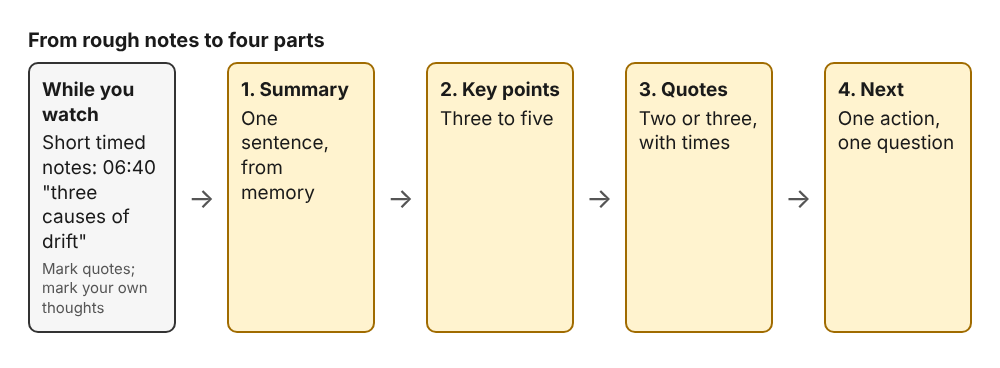
Rough notes first, then the four parts you rewrite them into.
1. One-sentence summary
Say what the talk argued, in one sentence, without looking at your notes. If you cannot, you have not followed the argument yet. Rewatch the section where you got lost.
2. Three to five key points
List the points that carry the argument. Keep each to one or two lines. If you have eleven, merge or cut. The limit is the useful part.
3. Quotes and moments, with times
Keep two or three exact quotes or striking examples, and put the time beside each. Describe everything else in your own words.
4. What you will do or ask
End with one action and one open question. "Try this at Monday's review" is an action. "Does this hold for small teams?" is a question. This part turns watching into something you use.
A sample set of notes from a 20-minute talk
Here is an example. The talk, its speaker and its quote are all made up, so you can see the shape of the notes without hunting for a real source.
Talk: "Better incident reviews" (20 minutes), watched 27 October. Goal: decide whether to change how our team runs reviews.
Summary. The speaker argues that a review works best when it rebuilds what people knew at each moment, rather than looking for who made the mistake.
Key points.
- Start with a timeline before any discussion of causes (03:10).
- Ask what each person knew then, not what they should have known.
- List one fix per cause, and give each fix an owner.
- Share the written review within a week, while people still remember.
Quotes and moments.
- 14:20: "Blame ends the story too early." Short, and useful for explaining the idea to others.
- 17:05: The example of the late alert. It shows point 2 better than the slide did.
Next. Action: build a timeline at the next review before anyone speaks about causes. Question: how do we do point 2 when the people involved have left the team?
That whole set fits on one screen. You can read it in a minute, which is the point.
How to keep timestamps and quotes without clutter
Timestamps are the first thing to clutter a page. Three habits keep them useful.
- Time only what you might revisit. A time beside every line is noise. A time beside a quote, a demo or a surprising claim is a bookmark.
- Keep the format the same. Use minutes and seconds like 14:20 every time, placed at the start or the end of the line, never both.
- Quote sparingly. If you copy more than a sentence, it is probably better in your own words. Keep long exact wording only when the phrasing is the point.
Keep what the speaker said apart from what you think. A simple rule works: anything in quotation marks is theirs, and anything after "My take:" is yours.
Turn your notes into something you can share
Good notes already read like a short post. You have a summary, a few points and a point of view. To share them, you need little more than a title and a sentence or two between the parts.
On Electrified you can choose between two forms in the editor:
- A note is a short post of up to 500 characters, with no title. It suits a quick take. The sample above could become one: "Watched a 20-minute talk on incident reviews. Main point: rebuild what people knew at each moment, not who erred. Takeaways: timeline first, one fix per cause, share within a week. Best line at 14:20: 'Blame ends the story too early.' Trying the timeline step at our next review."
- An article has a title of up to 140 characters and as many sections as it needs. Start each section with
##and a heading. Your four parts map straight onto four sections.
The editor reads simple formatting: **bold**, *italic*, [link](https://...), - for lists and > for quotes. Use the link format to point to the talk itself so readers can watch it. The body box has Write and Preview tabs, and the preview looks like the published page, so you can check your layout before anyone sees it.
Add up to five topics, separated by commas. Each topic links to a page of every post about it. Choose topics that name what the talk was about, not just "video". Save a draft first. Only you can see a draft until you press Publish, so you can leave it overnight and fix the summary in the morning.
If you watch talks on one subject regularly, a run of these posts becomes a record of what you have learned. That is the idea behind the knowledge building topic. Each article stands on its own, and together they show how your understanding developed.
Related posts on Electrified cover the same habit from other angles: how to summarize an article in your own words, how to write a weekly learning log you keep up and how to write a cheat sheet for a topic you are learning.
Frequently asked questions
How long should notes from a talk be?
Aim for about half a page for a 20-minute talk: a summary, three to five points, a couple of quotes and one next step. If your list of points is longer than that, cut the least important ones.
Should I write notes while watching or afterward?
Do both, with different jobs. Write rough, timed notes while you watch, then rewrite them in your own words soon after the video ends.
Do I need to quote the speaker exactly?
Only when the wording is the point. Otherwise paraphrase, and put quotation marks around anything you copy so you can tell their words from yours.
Can I post notes on Electrified before they are finished?
Yes. Save them as a draft, which only you can see until you publish it. You can also unpublish a post back to a draft later.
Is a note or an article better for video notes?
Use a note for one idea that fits in 500 characters. Use an article when you have a summary, several points and your own view to explain.
Get started
Pick one talk you watched this week and rewrite your notes into the four parts. Then make an account on Electrified. It asks for a name, handle, email and password, and gives you your own page at /@handle. Save the notes as a draft, read them in Preview, and publish when you are happy with them.
Comments
No comments yet.