Mind map for problem solving: lay out a problem on one page
A mind map for problem solving lays out one problem on one page: the question in the centre, the causes, limits, people and unknowns around it, and the options linked back to the causes they fix. You see the whole problem at once, so you can spot what is missing and choose the next action. This guide walks you through four steps and one full example, from a blank page to a decision.
If you want that page to keep working after today, Problem Graph turns it into a journal: you write the problem in one line, attach the solutions you try, and record whether each one worked, partly worked or failed.
What a mind map for problem solving is
A mind map is a diagram that arranges information as a hierarchy around one central idea, showing how the pieces relate to the whole. The term was made popular by Tony Buzan, starting with his 1974 BBC series Use Your Head, according to Wikipedia's article on mind maps. The same article notes that there is no strict right or wrong way to draw one.
That freedom is good for ideas and weak at deciding. A brainstorm map grows outward: you start with a topic and add everything that comes to mind. A problem solving map has a job. Every branch answers one of five questions:
- Why is this happening? (causes)
- What limits my options? (constraints)
- Who is affected or has a say? (stakeholders)
- What do I not know yet? (unknowns)
- What could I do about it? (options)
The difference is the links. In a brainstorm, ideas sit side by side. In a problem map, each option points back to the cause it addresses. An option that points at nothing is a guess. A cause with no option pointing at it is a gap.
Why one page helps you see the whole problem
Problems hide in lists. When causes sit on line 3 and options on line 14, you cannot see that two options attack the same cause while a third cause gets nothing. On one page, those patterns are in front of you.
One page also keeps you short. If a branch needs a paragraph, it is probably two branches. Short labels make the map easy to scan, and easy to show someone else.
Last, one page is honest about size. If the map spills off the page, your problem may really be three problems. Split it, map each one, and link them, as the guide on breaking a big problem into smaller problems shows.
Step 1: Write the problem as a question in the centre
The centre node sets the direction for everything else. Write it as a question, in one line.
- Weak: "Reports."
- Better: "Reports are late."
- Best: "Why does the weekly client report go out late every Friday?"
A good centre question names the thing, the symptom and when it happens. Keep solutions out of it. "How do I automate the report?" already assumes the answer. Next to the centre, write one fact you are sure of, so the map starts from something true rather than a guess.
Step 2: Branch out causes, constraints, stakeholders and unknowns
Draw four main branches and give each one a few short leaves.
Causes
List what makes the problem happen. Ask "why" once or twice per cause and stop when the next answer is something you can act on. For a deeper dig on one cause, a 5 whys example shows how far to go.
Constraints
Write the hard limits: deadlines, budget, rules, the time you actually have. They do not cause the problem, but they rule some options out.
Stakeholders
Name the people who feel the problem or can change it. One word per person or role is enough.
Unknowns
Write the questions you cannot answer yet. An unknown is often cheaper to settle than a cause is to fix, and its answer can change the whole map.
Step 3: Add options and link each one to a cause
Now add options as a fifth branch. For each option, draw a line to the cause or unknown it targets. If an option needs something to work, such as a tool, a person's time or a sign-off, note it next to the option as a requirement.
Three checks keep this step honest:
- Every option links to a cause or an unknown. If it does not, ask what it is for.
- Every option respects the constraints. Cross out any that break a hard limit.
- Options include cheap tests. "Ask the client" is an option. So is a small trial, as in how to test a solution before you commit to it.
Step 4: Spot the gaps and pick the next action
Step back and read the page. Look for:
- Causes with no option pointing at them.
- Unknowns that block several options at once.
- Options that depend on a stakeholder you have not talked to yet.
Then pick one next action. Not a plan: one action, small enough to do this week. After you try it, write down what happened, including when it fails. A failed attempt still tells you something about the problem, and the note stops you trying the same thing again next month.
A worked example: the late weekly report
Suppose you run a small team and the weekly client report keeps slipping. Here is the whole map.
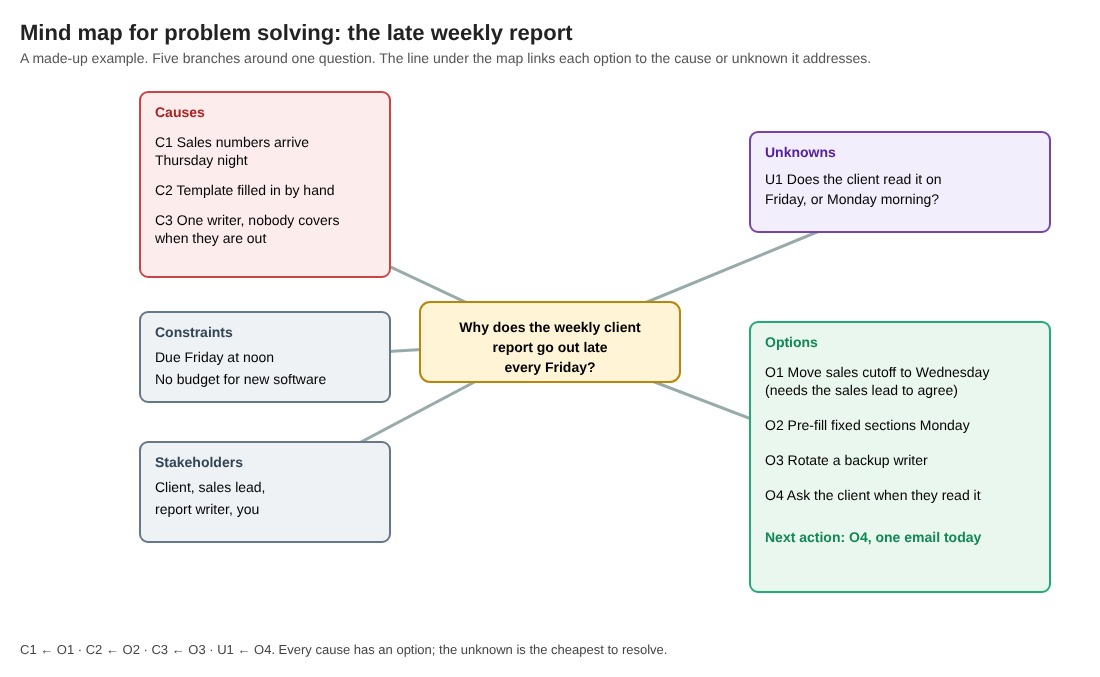
A made-up example: every cause has an option, and the cheapest next action settles the unknown.
- Centre: "Why does the weekly client report go out late every Friday?"
- Known fact: it has missed noon on most Fridays this quarter.
- Causes: sales numbers arrive Thursday night (C1); the template is filled in by hand (C2); one person writes it and nobody covers when they are out (C3).
- Constraints: due Friday at noon; no budget for new software.
- Stakeholders: the client, the sales lead, the report writer, you.
- Unknown: does the client read it on Friday, or on Monday morning? (U1)
- Options: move the sales cutoff to Wednesday, which needs the sales lead to agree (O1, for C1); pre-fill the fixed sections on Monday (O2, for C2); rotate a backup writer (O3, for C3); ask the client when they read it (O4, for U1).
Gap check: every cause has an option. The unknown is the cheapest to settle, and its answer could move the deadline itself. Next action: send the client one short email today.
The same map in Problem Graph
A paper map is hard to come back to. In the app, you type the centre question as one line, put it in the Work lane, and press Enter. It lands on the graph right away.
Each option becomes a solution idea. The app's map key names three kinds of node, problem, solution and requirement, so "the sales lead agrees" becomes a requirement on the Wednesday cutoff. You mark the client email as the one you are trying.
A week later you record the outcome. Say the client replies that they read it on Monday morning: you mark the email as worked, and the deadline on your map moves. Then you try pre-filling the fixed sections. If it saves some time but the report is still late once, you mark it partly. Nothing gets erased. The home page puts it this way: "The graph is honest. A solution that failed three times stays on the map as a failed solution, and that is exactly what the next person needs to know."
You may notice that late sales numbers also hold up a monthly forecast. Write that as its own problem and link the two; links can cross lanes, and patterns show up on the map that never show up in a list. If you prefer reading line by line, there is a List view beside the map.
Stuck for options? You can ask for suggestions: the AI proposes new solutions grounded in what worked for others on similar problems. Treat each one as a proposal to test, not an answer.
Frequently asked questions
Is a mind map good for problem solving?
It helps when you give it structure. Branches for causes, constraints, stakeholders, unknowns and options, with each option linked to a cause, show you gaps that a plain list hides.
What is the difference between a mind map and a fishbone diagram?
A fishbone diagram sorts the possible causes of one effect into categories. A problem solving mind map also holds the limits, the people, the unknowns and the options, so it runs from cause to decision; for causes alone, see this fishbone diagram example.
How many branches should a problem solving mind map have?
Start with the five main branches and keep each to about three to five leaves. If it will not fit on one page, split it into linked problems.
Can I build a problem solving mind map with a team?
Yes. In Problem Graph you mark the problem as a main node, share it into a private network you create, and give your team the invite code. Members see it and nobody else does, and anyone with the code can join, so share the code with care.
Get started
Take the problem that has been sitting in your head all week. Write it as one question. Branch out the causes, limits, people and unknowns. Link each option to what it fixes, then pick one small action.
Your problems are private by default, so nobody else sees them unless you share a main node. It runs in your web browser and works on your phone. To see what a map looks like first, an empty graph offers a "Load example set" button.
Try Problem Graph: it is free, and you can look around the public network without an account. Write one problem down in a line and attach the first thing you will try.
Every problem you carry, on one map. Solved together.
Visit problemgraph.vlvd.net↗


Comments
No comments yet.