New team member onboarding problems: one shared fixes list
New team member onboarding problems are easy to notice, mention in passing and forget until the next person hits the same wall. A simple fix is to keep them in one shared fixes list, where every problem has a line, an owner and a record of what was tried. This post shows how to set that list up and run it for a new hire's first 30 days.
Problem Graph is a journal that draws itself: you write each problem in one line, attach the solutions you try, mark each one worked, partly or failed, and share the problems you choose with a private network of people. That makes it a workable home for this kind of list.
Why new team member onboarding problems come back
The person who feels an onboarding problem is new, so they may not know who to tell. The people who could fix it may no longer remember what it was like to start without access or context. So the new hire works around the problem, someone helps in chat, and nothing is written down. The next hire starts from zero.
Three things usually go missing:
- A single place. Problems live in a chat thread, a manager's head and a half-finished checklist.
- An owner. Everyone agrees the setup guide is out of date, and nobody is the person who updates it.
- A record of what was tried. A fix that failed can be tried again two hires later.
One shared fixes list beats several separate ones
A shared fixes list is one list of everything that went wrong or felt unclear during onboarding, with the fix attached. It is not a feedback survey and not a checklist for the new hire. It is a working list for the people who can change things.
Patterns show up when problems sit side by side. If IT keeps a list, HR keeps a list and the hiring manager keeps notes, nobody sees that "no access to the repo" and "no access to the design files" may share one cause: access was requested too late. Problem Graph lets you link problems that belong together, even across lanes, and its home page says patterns show up on the map that never show up in a list. For onboarding, that means seeing a cluster instead of five separate complaints.
Common onboarding problems to log in the first 30 days
Start with ones like these and add your own as they happen:
- Laptop or accounts not ready on day one.
- Access to tools requested only after the new hire asks.
- No clear answer to "who do I ask about this?"
- Documentation that describes last year's setup.
- A first task that is too vague to start.
- Meetings with no context, or missing invitations.
- Jargon and acronyms nobody explains.
- Unclear expectations for the first week and the first month.
Log a problem when it appears, not at the end of the week. A line written the same day is likely to be more accurate than a summary written on Friday.
Set up the list: the fields that matter
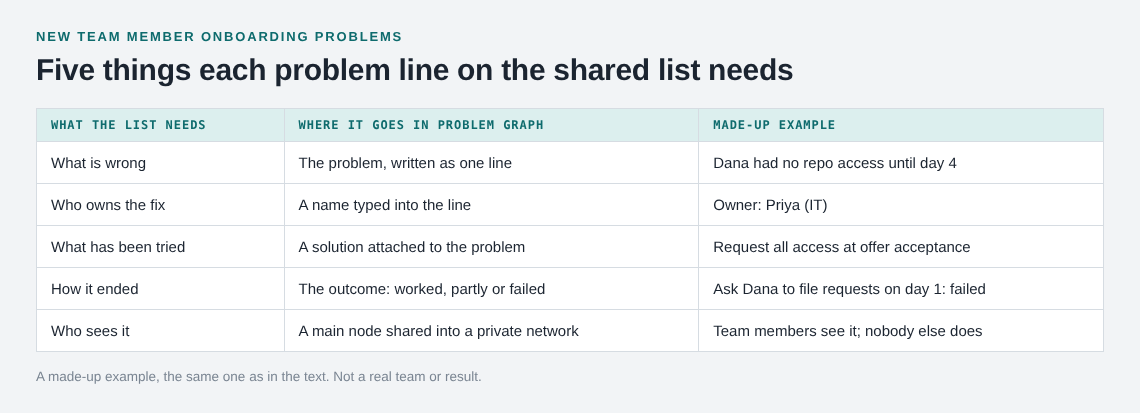
Keep the structure small. For each problem you want what is wrong, who owns the fix, what has been tried and how it ended. In Problem Graph that maps like this:
- What is wrong: the problem, in one line, in the work lane.
- Owner: the pages describe no owner field, so type the name into the line.
- What has been tried: each attempt is a solution; mark the ones you are trying.
- How it ended: worked, partly or failed.
If you have kept a log before, the habit is the same as in a clutter problems log: write down what you tried, so you stop repeating attempts that did not work. For a team of a few people, this shared problem log for a small business shows one person keeping the list for everyone.
Write each problem so someone can fix it
A problem line should be specific enough for a stranger to act on.
- Weak:
Onboarding is confusing - Better:
Dana had no repo access until day 4, owner: Priya (IT)
The second line says who, what, how long and who owns it, and it is still one line. If a line holds two problems, split it. "No repo access and no Slack channel invites" becomes two lines, linked together if you suspect they share a cause.
A made-up example
Say a new designer, Dana, starts on a Monday. By the following Friday you have logged three problems in the work lane:
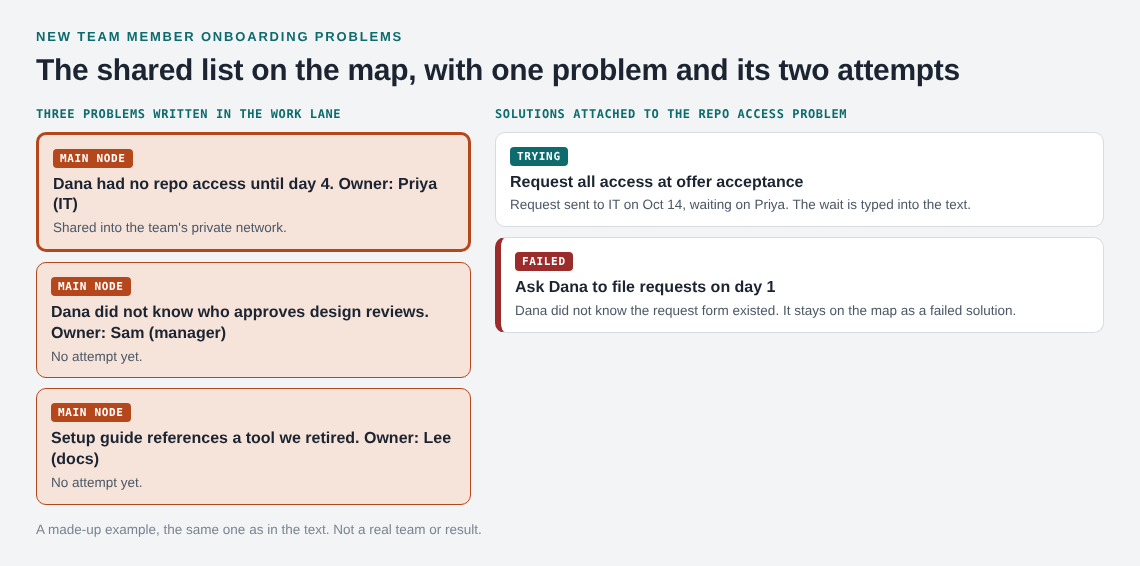
Dana had no repo access until day 4, owner: Priya (IT)Dana did not know who approves design reviews, owner: Sam (manager)Setup guide references a tool we retired, owner: Lee (docs)
Under the first you attach two solutions. "Request all access at offer acceptance" is the one you are trying. "Ask Dana to file requests on day 1" failed, because Dana did not know the request form existed. The failed attempt now stays on the map as a failed solution, so nobody suggests it again as if it were new. The other two problems have no attempt yet, which is itself useful: it tells the weekly review what to assign.
Track fixes that wait on others
Most onboarding fixes do not depend only on you. Access needs IT, a contract detail needs HR, a tool change needs a budget holder. This is where lists stall: the fix is "waiting on someone" and nobody checks. Write the dependency into the solution's text, for example Request sent to IT on Oct 14, waiting on Priya, and keep it marked as the one you are trying until there is an outcome. The waiting on someone log goes deeper on this pattern.
Link related problems so the owner sees the whole picture. If access, accounts and the laptop all trace back to one late request, link all three and fix the request once.
Share the list with the right people
A list nobody else can see is only your notes. Problem Graph is private by default, so only you see your problems until you share. To share:
- Create a private network for your team and give a few people the invite code. The app says anyone with the invite code can join, so pass it only to people you trust with it.
- Mark a problem as a main node and share it into the network. Members see it. Nobody outside the network does.
Only a main node can be shared. When it is, its solutions, their outcomes and the requirements they need go along. A problem you only link to it stays home, like the rest of your graph. So if the team should see "no repo access" and "unclear review approver", make each its own main node. The pages describe members seeing a shared node, so the simplest setup is one keeper who writes the list and everyone else reads it.
This also gives you a boundary. A new hire can keep a private worry, such as feeling behind on the codebase, in their own graph while the team list holds only what the team can fix.
Review the list weekly and close the loop
Set a fixed 15 minute slot each week in the first month and go through the list in this order:
- Problems with no attempt yet. Assign someone.
- Problems being tried. Ask what happened and record worked, partly or failed.
- Failed attempts. Decide on a different approach and add it as a new solution.
- Clusters on the map. Look for linked problems that point to one root cause.
Then tell the new hire which of their problems are fixed, which are not and why, so they know the list is being read.
Frequently asked questions
What should go on a new hire problems list?
Anything that blocked, confused or slowed the new person: missing access, vague tasks, outdated documents, unclear contacts. Write each as one specific line with an owner.
Who should own the shared fixes list?
Pick one person, often the hiring manager, to keep the list and run the weekly review. Each problem can have a different owner, typed into its line.
Can the new hire see the list?
Yes, if they join the private network and you share the problems into it. Anyone with the invite code can join, so keep the code among the people you intend.
Is Problem Graph free to use?
The home page says it is free, and you can look around without an account. To add a problem you create an account with a username and a password.
Does it send reminders when a fix is overdue?
The pages describe sharing, linking and borrowing solutions, and mention no reminders. Use your weekly review to check what is still waiting.
Get started
Start with the problems you already know from your last hire. Write each as one line in the work lane, add the first thing you will try, then create a private network and share the ones the team can fix.
Try Problem Graph: it is free, and you can look around without an account. Write one problem down in a line and attach the first thing you will try.
Every problem you carry, on one map. Solved together.
Visit problemgraph.vlvd.net↗


Comments
No comments yet.
Sign in or make an account to comment.