Q&A post for a topic you are learning: how to write one
A Q&A post for a topic you are learning is a short article built from the questions you had while studying something new, each one answered in plain words. To write one, collect the real questions you asked, answer each in one to three sentences, check every answer against a source, then order them from basic to advanced and list what you still don't know. The result helps the next beginner, and it shows you exactly where your own understanding stops.
Electrified gives you your own page where your notes and articles live, so a learner's Q&A has a home you can keep adding to: make an account on Electrified and draft your first one there.
What a Q&A post for a topic you are learning is
It is a list of questions with short answers, written by someone partway through learning a subject. It is not a full guide, and it does not pretend to cover everything. It covers the questions that came up for you, with the answers you found and the sources you checked them against.
It helps two people. The first is a reader one step behind you, who has the same confusion you had last week. Your post meets them there. The second is you. Writing an answer makes you find out whether you understand something or only recognise it.
Why a beginner's questions are worth publishing
Someone who learned a subject long ago may skip the step that tripped you up, because for them it stopped being a step. Your questions still have that step in them. "What does this word mean?" can be the most useful line in the whole post.
Be clear about where you stand. Say near the top that you are learning, and for how long. That one line sets the reader's expectations, and it makes the honest gaps later in the post read as honest rather than careless.
If you want the wider habit behind this, the guide to learning in public covers writing about a subject while you study it.
Step 1: Capture the questions you actually asked
Write questions down as they happen, not afterwards. Afterwards, you will tidy them up and lose the wording a real beginner would use.
- Keep a running list. One line per question, worded the way you would type it into a search box.
- Note where it came from. A chapter, a video, a confusing sentence in the docs. You need this when you check your answer.
- Keep the simple ones. A definition question is often the one a newcomer needs most.
- Drop duplicates later, not now. Two wordings of the same question can tell you which one is clearer.
On Electrified, a note is a short post of up to 500 characters with no title, and when you are signed in the home page has a quick box, "Post a note". Keep in mind that it posts the note straight away. If you want the list to stay private while you build it, start an article instead and save it as a draft, which only you can see.
Step 2: Answer each question, then check it against a source
Answer first, from memory. Then check. Doing it in that order shows you what you really know.
- Write the answer in one to three sentences. Lead with the direct answer. Add one sentence of why, if it helps.
- Open the source you noted in Step 1. Compare your answer with it line by line.
- Fix what was wrong, and note what surprised you. A surprise is a good sign the question belongs in the post.
- Link the source. Readers can go deeper, and you can recheck it later.
Then use the plain-words test. Could a friend outside the subject read your answer once and repeat it back? If not, cut the jargon, or define it in the same sentence.
Take extra care with anything about prices, versions or numbers, because those change. Write what the source said and when you read it, rather than stating it as permanent.
Step 3: Order the questions and mark what you still don't know
Your list is in the order you hit each question. Reorder it so each answer only uses ideas from the answers above it.
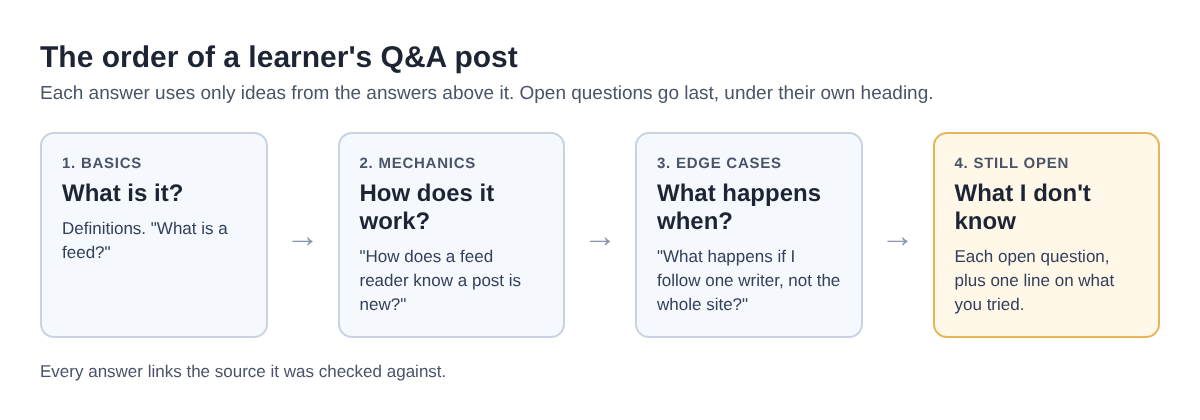
- Basics first: definitions and "what is" questions.
- Then mechanics: "how does" and "why does" questions.
- Then edge cases: "what happens when" questions.
- Last, open questions: the ones you could not answer yet.
That last group matters most. Put it under its own heading, such as "What I still don't know", and give each open question one line on what you tried. It is the most honest part of the post, and it hands you a ready list for your next round of study.
A Q&A post template with a worked example
On Electrified, choose Article in the editor. An article has a title of at most 140 characters and as many sections as it needs; you start a section with ## and a heading. Here is the shape to type into the body:
- Title: "Questions I had while learning [topic], answered".
- Opening paragraph: what you are learning, how long you have been at it, and one line saying this is a learner's Q&A.
## The basics, then two or three questions in bold, each with a short answer and a source link.## How it works, then two or three mechanics questions.## The tricky parts, then one or two edge cases.## What I still don't know, then a list of open questions, each with what you tried.## Sources, then the links you checked your answers against.
Worked example: a learner's Q&A on web feeds
Imagine Sam (made up for this example) is learning how web feeds work, so they can follow writers without checking each page by hand. Sam's Step 1 list reads:
- What is a feed?
- How does a feed reader tell a new post from one I have seen?
- Can I follow one writer instead of the whole site?
- Which feed reader should I use?
For Step 2, Sam opens a real feed, Electrified's site feed, and checks each answer against the file itself. Sam's first entry: What is a feed? A file a site keeps updated with its newest posts, so a feed reader can check it for you. Electrified's is an Atom feed: the file opens with a feed element in the Atom namespace.
The second: How does a reader tell a new post from an old one? In the file, each entry carries an id, which is the post's address, plus a published time and an updated time. That gives a reader what it needs to tell posts apart. Sam links the file as the source.
The third is an edge case. Can I follow one writer? Yes. Each writer has their own feed at /@handle/feed.xml, such as this writer's feed.
For Step 3, the reader question goes under "What I still don't know": Sam writes "I have tried two, and have not yet compared how they handle a writer's feed." Sam then links the guide on following a blog with an RSS or Atom feed as further reading.
Before publishing, Sam adds topics. The editor takes up to 5, separated by commas, and each one links to a page of every post about it, such as the knowledge building topic. Sam checks the layout in the Preview tab, which looks like the published page, presses "Save draft", and presses "Publish" when it reads well.
Frequently asked questions
How many questions should a learning Q&A post include?
There is no set number. Start with the questions you actually had. If the list grows so long that the sections stop fitting together, split it into two posts.
Is it okay to publish answers I am not fully sure about?
Yes, if you say so. Move them under "What I still don't know", or add a short line such as "I have only one source for this", and link that source.
How is a Q&A post different from notes from a talk or video?
Notes follow one speaker's order and ideas, while a Q&A post follows your own questions across many sources. If you are working from a single talk, the guide on writing notes from a talk or video fits better.
Should I update the post as I learn more?
Yes. On Electrified you edit the published post and press "Save changes", and it keeps its address, so links to it still work. Move answered questions out of "What I still don't know" and add new ones as they come up.
Get started
Pick the subject you are learning right now. Open your list of questions, or start one today. Answer three of them and check those answers against a source. That is enough for a first draft, and the open questions tell you what to study next.
Make an account on Electrified: write about your product, topic or idea on your own page, one article at a time, and let readers follow along.
Comments
No comments yet.