Secure AI model ops: a lifecycle security checklist
Most advice on AI security stops at the prompt, but a model in production is also a pipeline, a set of files, an API and a bill. This guide to secure AI model ops follows the OWASP Secure AI/ML Model Ops Cheat Sheet from training to rollout and turns each part into checks you can run on your own system.
If you want a second pair of eyes on the result, whitehatstoic builds web and mobile apps, tests web apps and AI systems for weak spots, and gives independent advice.
Secure AI model ops: what the OWASP sheet covers
The sheet is written for MLOps, DevOps and security teams. It covers traditional machine learning models and large language models, and it follows the model lifecycle from development to production. The threats it names are data poisoning, adversarial input, model theft and operational abuse.
Its advice comes in nine groups: training, secrets, storage, the inference API, deployment, runtime and hardware isolation, monitoring, adversarial robustness, and incident response. The sections below use that order. The sheet leaves prompt-specific defenses to its own prompt injection sheet, so this post does the same. If you want the prompt side, start with what to check before you ship an AI app.
The problems it lists, in plain words
The sheet lists twelve common issues. Read them as a menu of what to rule out:
- Data poisoning. Attackers put bad records into training data to change the model's behavior.
- Model inversion and extraction. Attacks that infer training data, or recreate a model's behavior or parameters.
- Membership inference. Working out whether one person's sample was used in training.
- Adversarial examples. Slightly changed inputs that mislead a model while looking normal to a person.
- Prompt injection. Input that overrides or hijacks what an LLM was told to do.
- Unsecured APIs. Public inference endpoints with no authentication, rate limiting or input validation.
- Hardcoded secrets. Keys and tokens in source code or notebooks.
- Unvalidated third-party models. Pre-trained models used without checking integrity or provenance.
- Open artifact stores. Model files, datasets or logs readable because storage is misconfigured.
- No monitoring or drift detection. Nothing notices when behavior or data shifts.
- Orphaned deployments. Test or old models left reachable in production.
- Weak runtime isolation. Shared infrastructure that allows data exposure between tenants, reused credentials or access to accelerator memory.
The sheet's examples make these concrete: a model file that runs malware when it is loaded, an open MLFlow instance that exposes every model and training log, leaked API keys found on GitHub, and old staging models left running on public cloud endpoints. Mark the three that would hurt your team most. They tell you where to start below.
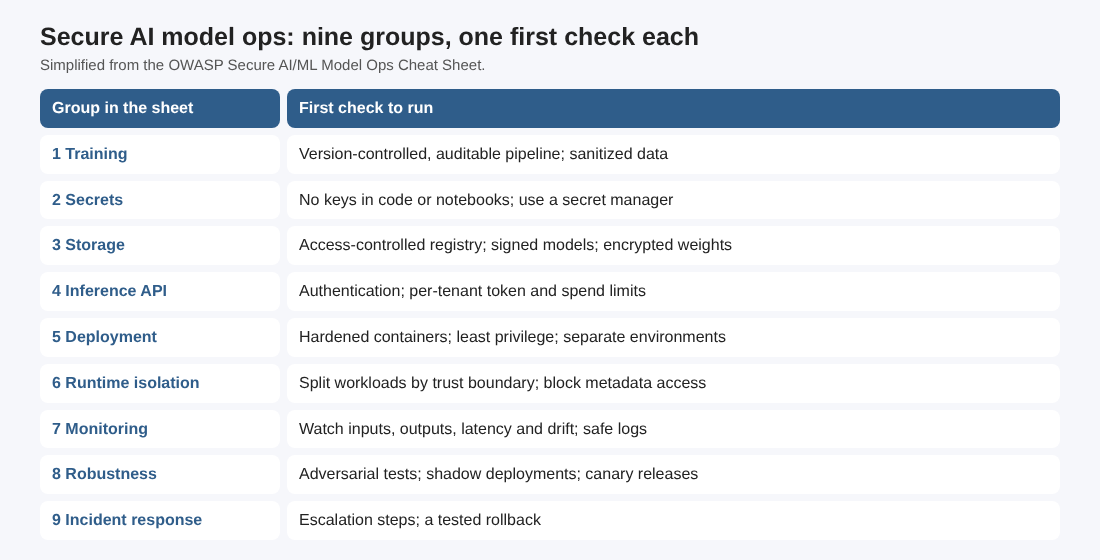
Train and store: pipelines, data, secrets and model files
This is the part of the lifecycle your own team controls, so it is the cheapest to fix. The sheet asks for:
- Auditable training pipelines. Keep them under version control so you can say which run made which model.
- Validated and sanitized training data. Use differential privacy or data anonymization when the data is sensitive.
- Reproducible environments. Containers or virtual environments, not a laptop that nobody can copy.
- No hardcoded secrets. Use a secret manager, environment variables or secrets injected by CI. Notebooks count as source code here. Our post on keeping API keys out of code and logs shows how to check.
- An access-controlled model registry. Sign model binaries and encrypt weights and datasets at rest.
- Restricted training logs. Intermediate outputs can reveal as much as the final model, so limit who reads them.
- Validated outside models. Check third-party and pre-trained models for integrity and safe behavior before they reach production. The post on vetting models before you use them goes deeper.
Inference API security and cost limits
The inference endpoint is where strangers meet your model. Besides the usual items (authentication, authorization, input validation, rate limiting and abuse detection such as bot detection or anomaly scoring), the sheet adds limits aimed at cost and runaway behavior:
- Structured prompt templates for LLMs, to keep instructions apart from user input.
- Per-tenant limits on tokens, requests, concurrency and spend, to reduce denial-of-wallet risk.
- Recursion, retry and chain-depth limits for agents and tool-using flows.
- Circuit breakers or kill switches for abnormal cost, latency or tool-call spikes.
- Near real time telemetry with an alert on sudden changes in tokens, requests or spend.
For a closer look at the first two, read how to cap usage and cost in your AI app.
Deployment and runtime isolation
For deployment the sheet is short: harden containers and limit capabilities (it names distroless images and AppArmor), run CI/CD pipelines with security scanning, give training and inference jobs the least privilege they need, and keep development, staging and production apart.
Its runtime and hardware isolation section is the longest, and it is the one teams most often skip. The checks, in the order you can act on them:
- Separate training, evaluation and production inference workloads by trust boundary.
- Do not share a GPU or accelerator between tenants who do not trust each other, unless the platform gives hardware-backed partitioning and memory isolation.
- Clear inputs, outputs, temporary files, caches and accelerator memory between jobs where the runtime supports it, and confirm that teardown removes checkpoints, prompt logs and cached embeddings.
- Run untrusted evaluation, fine-tuning and conversion jobs in a sandbox or an isolated worker with restricted network egress. For high-sensitivity models and data, the sheet points to microVMs, gVisor, Kata Containers, confidential compute or dedicated nodes.
- Block host paths, container sockets, cloud metadata services and unneeded device mounts from model-serving containers.
- Set CPU, memory, GPU, disk, process and network limits per workload, so one job cannot starve the others.
- Scope serving credentials to one model, endpoint and environment, not the whole platform.
- Watch for isolation failures, unexpected device access, traffic across namespaces and attempts to reach metadata endpoints.
Sandboxing an agent that runs code is a close cousin of this list; see how to contain the code agents run.
Monitoring, robustness and safe rollouts
After launch the work shifts to watching. The sheet asks you to monitor input distribution, output entropy and latency, detect drift by statistical analysis or shadow models, and keep request logs with traceability while avoiding sensitive data in them. Alert on unusual use such as scraping or injection attempts.
For robustness, include adversarial examples in your tests and consider robust training such as adversarial training or input denoising. Watch model confidence thresholds to catch inputs far from anything the model has seen. For releases, use two patterns from the sheet:
- Shadow deployment. The candidate model sees real production inputs, but its outputs never reach users.
- Canary release. A small share of traffic goes to the new model, with a fast way back if something looks wrong.
Last, governance: define escalation steps for model abuse or drift, build rollback into every model deployment, and map your threats to OWASP ASVS or the Proactive Controls for AI/ML.
A worked example: one week for a small model service
Take a made-up team that runs a support assistant on a hosted model plus a small classifier it trained itself. This is an example to practice on, not a client, and the order is ours; the sheet supplies the checks.
- Monday, find what is exposed. List every model endpoint, registry, experiment tracker and storage bucket. Anything reachable without sign-in is a finding. Anything old goes on the retire list.
- Tuesday, secrets. Search notebooks and repositories for keys. Move any you find into a secret manager and replace them.
- Wednesday, the API. Confirm authentication, then set per-tenant token, request and spend limits, plus a depth limit on any tool-calling chain. Add an alert for a jump in spend.
- Thursday, isolation. Check that the serving container cannot reach the cloud metadata service or the container socket, and that its credentials cover one model only.
- Friday, rollout. Write down how to roll back, then try it on staging. Plan the next model change as a canary.
Write each step as one line: the check, the result, the owner. A passed check is evidence, not proof, so keep the monitoring from the previous section running.
Frequently asked questions
Is this only for large language models?
No. The sheet covers traditional machine learning models as well as LLMs, and its issues include adversarial examples and membership inference that apply to both.
Where should I start if I have nothing in place?
Start with exposure and access: find open endpoints and stores, remove hardcoded secrets, and require authentication on the inference API. Then add limits on spend and a way to roll back.
What is denial of wallet?
It is abuse that runs up your usage bill instead of taking the service down. The sheet's answer is per-tenant limits on tokens, requests, concurrency and spend, plus alerts and a kill switch.
Why does runtime isolation matter if I use a hosted model?
It matters most where you run your own jobs: evaluation, fine-tuning, conversion and serving. If a vendor runs the model, ask how it separates tenants and clear data between jobs.
Get started
Run Monday's exposure list on one service this week and write down what you find. If you want an outside review of your AI app or its API, book a meeting with whitehatstoic and tell us about your product, your deadline and your biggest worry. Work is scoped after a short call, and you can pick the topic on the booking page for cybersecurity and AI safety testing.
Build it right. Test it thoroughly. Keep it safe.
Visit whitehatstoic.com↗


Comments
No comments yet.