Shared office kitchen problems: one list for the team
Shared office kitchen problems tend to come back when nobody owns them and nobody wrote down what already failed. The answer is one list for the team: each problem is one line, each fix you try has a recorded outcome, and everyone can see it in one place.
Problem Graph is built for this kind of list. You write a problem in one line, attach the solutions you try with an outcome of worked, partly or failed, and share the problem with a private network of people you choose.
Why shared office kitchen problems keep coming back
A kitchen is shared by everyone, which can mean it is owned by no one. A complaint goes into a chat, a few people react with a thumbs up, and the thread scrolls away.
Then someone sticks a note on the fridge. The problem returns, and a different person suggests the same note, because nothing says it was already tried.
Two things are missing. One is a single place where the problems live. The other is a record of what happened when you tried to fix them. Without both, the team repeats itself.
The most common office kitchen problems to list first
Start with the things people already grumble about. You do not need to find the root cause yet. You only need to name the problem.
- Dirty mugs and plates left in the sink.
- The dishwasher is full of clean dishes, so nobody can load it.
- The fridge fills up with old lunches and unlabelled containers.
- The coffee machine is empty, or nobody descales it.
- Strong smells from reheated food.
- The bin overflows, and nobody knows whose job it is.
- Shared supplies (sponges, soap, tea, milk) run out with no one responsible for restocking.
Each of these is a separate problem. Keep them separate. "The kitchen is a mess" is too big to act on, and you cannot record a useful outcome against it.
Why one list for the team beats shared office kitchen problems in chat
A chat thread is good for noticing a problem. It is poor at remembering one. A list does three things a thread cannot.
- It has one entry per problem. Nobody has to scroll to find out whether the fridge issue was already raised.
- It keeps the history. A fix that failed stays on the list as a failed fix. Problem Graph is built around this: its home page says a solution that failed three times stays on the map as a failed solution, and that is what the next person needs to know.
- It shows connections. You can link problems that belong together. Full sinks and a full dishwasher are probably one story, and linking them makes that visible on the map in a way a flat list does not.
If you have used a shared list for another team job, the idea is the same. The post on a shared fixes list for onboarding problems covers that pattern for a different kind of problem.
How to set up a shared kitchen problems list
Pick one person to run the list. This is not a boss role. It just means one person adds entries, records outcomes and keeps it tidy.
- Create an account. You can look around the public network without one, but you need a username and a password to add a problem.
- Write the first problem and put it in the work lane. Problem Graph has four lanes: personal, work, expert and scientific. A kitchen problem at the office fits work.
- Mark it as a main node. Only a main node can be shared. When you share it, its solutions, their outcomes and the requirements they need go along with it.
- Create a network and share the invite code. Give the code to the people on your team. Members see the shared main node, and nobody else does. Note that anyone with the invite code can join, so send it only to people you want in.
- Share the main node into that network. Now the team can see the same problem and the same record.
One detail matters here. Problems you only link to a main node stay home. If you link a personal note such as "I skip lunch because the kitchen is gross" to a kitchen problem, that note is not shared. Your private graph stays private.
Write each problem so someone can act on it
One line is enough, but make it a line you could test. Compare these.
- Weak: "Kitchen is disgusting."
- Better: "Dirty mugs pile up in the sink by 3pm."
- Weak: "Fridge problem."
- Better: "Old lunches stay in the fridge for weeks."
The better versions say what happens and roughly when. They also point toward a fix you can try. A mug rule is a different fix from a fridge-clearing rule, and the list should show that.
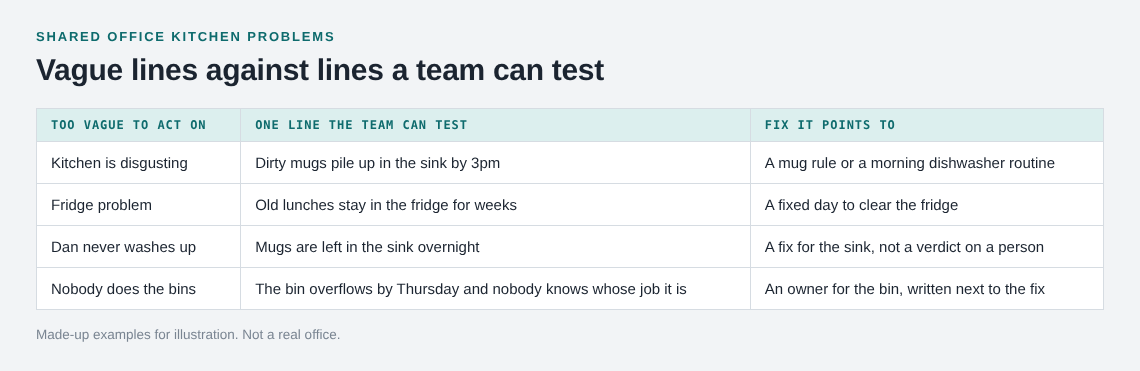
Avoid putting a name in the problem line. "Dan never washes up" starts an argument. "Mugs are left in the sink overnight" starts a fix.
Try one fix at a time and record the result
This is where most teams slip. They try three changes at once and cannot tell which one helped.
Attach a solution to the problem as an idea. When the team agrees to try it, mark it as one you are trying. Give it a set time, such as two weeks. At the end, record the outcome: worked, partly, or failed.
Some solutions depend on something else being true. Problem Graph has a requirement node for that. If your fix is a morning dishwasher rota, the requirement might be that someone is in the office early enough to do it. Writing the requirement down explains why a fix failed, and it tells the next person what to check first.
This habit is the same one used in the clutter problems log for keeping a room tidy: write down what you tried, then write down what happened. And if the list grows, the idea in personal kanban for problems helps. Limit how many kitchen fixes are in progress at once, so you can tell what is working.
Example: a kitchen problems list after one month
This is a made-up illustration, not a real team and not a real result. It shows what the list could look like.
The main node is "Dirty mugs pile up in the sink by 3pm". Three solutions are attached.
- Note on the fridge asking people to wash up. Outcome: failed. It was ignored after a few days.
- Everyone puts their mug in the dishwasher, not the sink. Outcome: partly. It worked until the dishwasher filled up with clean dishes.
- One person empties the dishwasher each morning. Outcome: worked. The requirement attached to it is that someone arrives early enough to do it.
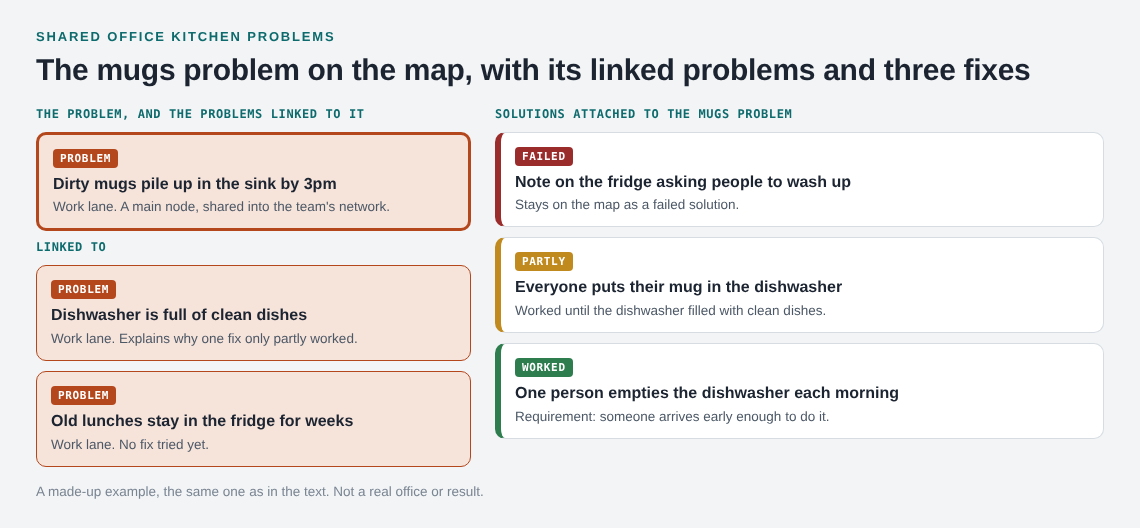
A second problem, "Dishwasher is full of clean dishes", is linked to the first. On the map, the two sit side by side, and the link explains why the second solution only worked partly. A third problem, "Old lunches stay in the fridge for weeks", has no attempts yet. It waits.
After one month, the team has one solution that worked, one that partly worked and one that failed. Next time someone proposes a fridge note, anyone can see it was already tried.
You can also ask the app for suggestions. The app says its AI proposes new solutions grounded in what worked for others on problems like yours. Treat those as ideas to try, not answers. Whether one works for your kitchen is something only your own record will tell you.
Frequently asked questions
How do I share a kitchen problem with my team in Problem Graph?
Mark the problem as a main node, create a network, and give the invite code to your team. Then share the main node into the network. Members see it, and nobody else does.
Will my linked personal notes be shared too?
No. Only a main node is shared, along with its solutions, their outcomes and the requirements they need. A problem you only link to it stays in your own graph.
Can anyone join my team network?
Anyone who has the invite code can join, so share it only with people you want to include. Problems you keep private stay visible only to you.
Do I need an account to try it?
You can browse the public network without one. To add a problem, recommend a solution or borrow one, you create an account with a username and a password.
Is a list better than just fixing the kitchen myself?
Fixing it yourself works once. A list records what the team tried and what happened, so the same failed idea is not repeated.
Get started
Pick the one kitchen problem that annoys your team most. Write it in one line, mark it as a main node, and attach the first fix you will try. Set a date to record the outcome.
Try Problem Graph: it is free, and you can look around the public network without an account. Write one problem down in a line and attach the first thing you will try.
Every problem you carry, on one map. Solved together.
Visit problemgraph.vlvd.net↗


Comments
No comments yet.
Sign in or make an account to comment.