Sibling Caregiving Problems: One Shared List for the Family
Sibling caregiving problems rarely come from one big disagreement. They come from small things that nobody wrote down: who called the pharmacy, which ride failed, what you already tried last month. Sibling caregiving problems: one shared list for the family is the fix. You keep one list of the open problems, who owns each one, what was tried and what happened, and every sibling looks at the same list.
Problem Graph is a journal drawn as a graph. You write each problem in one line, attach the solutions you try with their outcome, and share the important problems with a private network of the people you choose. This article shows how to use that for a parent's care.
Why sibling caregiving problems keep repeating
The same problem comes back because the answer was never stored anywhere. One sibling finds that a phone alarm does not remind Mum to take her pills. Three weeks later another sibling suggests a phone alarm. Nobody is careless. The first sibling just never had a place to put "tried it, failed."
Care work also splits unevenly. The sibling who lives close sees everything. The sibling who lives far away sees only what gets reported. Both end up frustrated, because one feels unseen and the other feels out of the loop.
What goes wrong when updates live in texts and calls
Texts and calls are fine for a quick "running late." They are poor at holding a state. Three things break down.
- The latest facts are buried. The refill date is somewhere in a thread from two weeks ago.
- Failed attempts vanish. A solution that did not work is the most useful thing to remember, and it is the first thing lost.
- Each sibling holds a different version. Your brother thinks the home help is sorted. Your sister thinks it is still open. You find out at the worst moment.
The result is a family argument that is really a memory problem.
Sibling caregiving problems: what one shared list for the family actually is
It is not a to-do list. A to-do list tells you what to do next. A shared problem list tells you what is going wrong, what has been tried, and what came of it.
Each entry has three parts:
- A problem, in one line.
- The solutions you tried or are trying.
- The outcome of each one: worked, partly, or failed.
That is the same habit as in a shared family list of what worked. The subject here is care for a parent, but the logic is the same. You stop repeating attempts and you can see what actually helped.
Problem Graph adds a map on top. You can link problems that belong together, so "Mum skips her evening pills" and "Mum is alone after 6 pm" sit near each other and the pattern is visible. Patterns show up on the map that never show up in a list.
What to put on the list: problems, owners, and next steps
Keep each problem small enough to act on. "Mum's care" is a topic, not a problem. These are problems:
- Mum misses her evening pills.
- Nobody can drive her to physio on Thursdays.
- The bathroom has no grab rail.
- We have not agreed who pays for home help.
For each one, record what you are trying. Mark the ones in progress and note the outcome when you know it. In Problem Graph, solutions can also carry requirements, the things a solution needs before it can work. A pill organiser might need "someone fills it every Sunday."
Owners are worth writing into the problem line itself, for example "Thursday physio rides (Ben)." Problem Graph is a one-line journal, so put the name in the text. It is plain, and everyone can read it. For more on naming one person per problem, see problem owner: who fixes what, and by when.
If you are unsure which problem to start with, use the rule in how to choose which problem to solve first: choose one that repeats and costs you time every week.
How to set up the list in five steps
- Write the problems down yourself first. Open the app, create an account with a username and a password, and add five or six problems. One line each. Pick the lane that fits, usually personal.
- Add what has been tried. Enter past attempts as solutions and mark each as worked, partly, or failed. This is the part siblings will value most, because it saves them from retrying the failures.
- Choose a main node. Mark one problem as the main node, for example "Mum is safe and comfortable at home." Only a main node can be shared. When you share it, its solutions, their outcomes and the requirements they need go along with it.
- Create a private network. Make a network, then share the main node into it. Give the invite code to your siblings only. The app says anyone with the invite code can join, so do not post the code in a group chat that includes anyone else.
- Agree on one habit. One person updates outcomes after each event, such as an appointment or a missed day. Everyone else looks before they ask.
Write the steps for your own family in plain words too. Short, ordered instructions work best. If one sibling is about to step back from the work, handover notes show how to pass on open problems and what was tried.
Keep some things at home
Linking has a useful side effect. A problem you only link to a shared main node stays home, like the rest of your graph. So you can link "I am exhausted and need a weekend off" to the shared problem, see the connection on your own map, and keep that entry to yourself. Your siblings see the care problems. They do not see everything in your head.
How to run a family check-in without a fight
Problem Graph is for recording and sharing. It does not have chat, comments or notifications, so the conversation still happens by call or in person. The list gives that conversation a shape.
Try a fixed, short check-in, say twenty minutes every other Sunday:
- Start with what worked. Read the solutions marked worked since last time. It sets a better tone than opening with complaints.
- Go through the open problems one at a time. Ask what was tried and what happened. The outcomes are already on the list.
- Treat failed solutions as information. Nobody is blamed for a failed attempt. It stays on the map as failed, which is exactly what the next person needs to know.
- End with one next step per problem. Say who does it and by when, then add it to the entry.
Disagreements shift from "you never help" to "this has failed twice, what else could we try?" That is an easier question to answer.
Example: a shared list for a parent after a hospital stay
This is an invented example to show the shape, not a real family. Three siblings, Ana, Ben and Carla, are looking after their father after a hospital stay. Ana lives nearby. Ben lives two hours away. Carla lives abroad.
Ana creates the main node: Dad is safe and managing at home. She adds these linked problems:
- Dad misses evening pills.
- Thursday physio rides (Ben).
- Dad is alone most evenings.
- Home help cost is not agreed (Carla to draft options).
Under the pill problem she records three attempts:
- Phone alarm: failed. He silences it and forgets.
- Weekly pill organiser: partly. It works when someone fills it, but it ran empty once.
- Carla calls at 8 pm: worked, for the days she called.
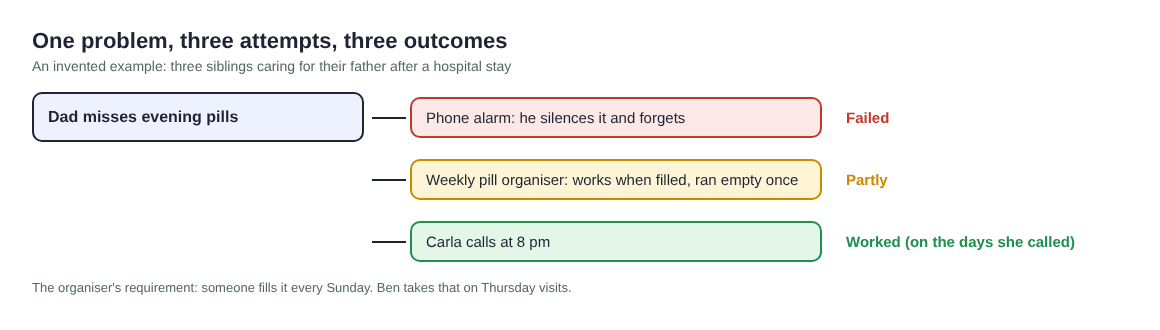
One problem, three attempts, three outcomes (an invented example)
Now the organiser has a requirement: "someone fills it every Sunday." Ben takes that, since he visits on Thursdays anyway and can fill it then. The link between "alone in the evenings" and "misses pills" also shows on the map. One fix, the 8 pm call, helps both problems.
For anything about the medication itself, such as doses or what to do after a missed one, the family asks his doctor or pharmacist. The list records what the family tried. It is not medical advice. If caring is wearing you down, the NHS has a page on support and benefits for carers.
Ana presses a button to ask for suggestions on the evening problem. The AI proposes ideas based on what worked for others on similar problems. Treat them as proposals to discuss, not as answers that have been checked.
Frequently asked questions
Who can see the shared list?
Private is the default, so only you see a problem until you share it. Once you share a main node into a private network, its members see it and nobody else does. Anyone with the invite code can join, so give it only to your siblings.
Does everything I write get shared?
No. Only a main node can be shared, and its solutions, outcomes and requirements go with it. A problem you only link to it stays home.
Do my siblings need to install anything?
No. Problem Graph runs in the web browser and works on a phone. To add problems, they create an account with a username and a password.
Can it send reminders or host the family discussion?
No. It does not do chat, comments or notifications. Use it as the record, and keep talking by call or in person.
Should I put our family problems in the public network?
Usually not. Public means a main node is out for everyone in the app. For a parent's care, use a private network.
Get started with a shared problem list in Problem Graph
Try Problem Graph: it is free, and you can look around the public network without an account. Write one caregiving problem down in a line, attach the first thing you will try, and mark it worked, partly or failed when you know. Then share the main node with your siblings in a private network.
Every problem you carry, on one map. Solved together.
Visit problemgraph.vlvd.net↗


Comments
No comments yet.
Sign in or make an account to comment.