What Is Function Calling? How AI Models Use Your Tools
What is function calling? It is the way a large language model asks your software to do something it cannot do on its own: look up an order, check a calendar, run a calculation. You describe a few functions to the model. When a user's request needs one, the model replies with a structured call, such as a function name and its inputs, instead of plain text. Your code runs the function and sends the result back, and the model uses it to answer.
The Agents and Automation course on Age of AI Entrepreneur covers tools, loops and why agents fail in a lesson of about nine minutes with its sources; sign in with your email and an emailed code to open it. This post explains function calling from the ground up and walks through one example you can copy.
What is function calling, in plain words
A model on its own only produces text. It cannot see your database, and it is weak at some jobs a few lines of code do perfectly. The Toolformer paper from 2023 put it plainly: language models can solve new tasks from a few examples, yet struggle with basic things like arithmetic or looking up a fact, where much simpler tools excel.
Function calling joins the two. Anthropic's documentation calls it tool use and notes that the two names mean the same thing. The model decides when to call a tool based on the user's request and the tool's description, and it returns a structured call. When the tool is yours, your application runs it.
Three things to remember:
- The model never runs your function. It only asks. Your code decides whether to run it.
- The description does the steering. The model picks a tool by reading its name and description, so vague descriptions lead to wrong calls.
- The inputs follow a schema you write. You say which fields a function takes and which are required, so the call arrives in a shape your code can check.
How one round trip works
Every function call follows the same four steps.
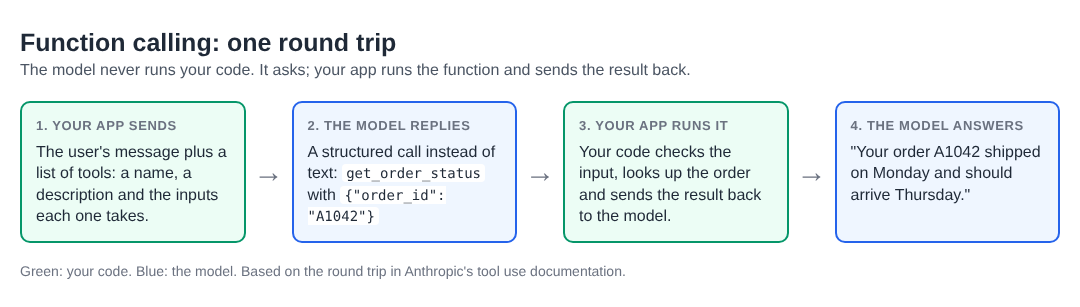
One round trip: the model asks, your code acts.
- Your app sends the request with a list of tools. Each tool has a name, a description and an input schema.
- The model replies with a call. In Anthropic's API the reply stops with
stop_reason: "tool_use"and carries one or moretool_useblocks naming the tool and its inputs. - Your app runs the function. It sends the output back in a
tool_resultblock. - The model writes the answer. It now has real data instead of a guess.
Some providers also run certain tools on their own side, such as web search. Those are called server tools, and you see the result without running anything. The tools that touch your own data are client tools, and they always run in your app.
Function calling, workflows and agents
Function calling is the building block for both workflows and agents. In a workflow, your code decides the steps and the model fills in one of them, perhaps calling one tool. In an agent, the model calls a tool, reads the result, and decides the next call itself, in a loop, until the job is done.
That loop is where most agent problems start: a tool that returns an error the model does not understand, a call repeated forever, a tool that does more than it should. We cover that in why AI agents fail, and the choice between the two shapes in AI workflow vs AI agent.
Worked example: a support bot that looks up real orders
Say you run a small online shop and want a chat assistant that answers "where is my order?" without making up a date. Here is the plan.
1. Define one tool. Name it get_order_status. Description: "Look up the shipping status of one order by its order ID. Use this whenever the customer asks where an order is." Input schema: one required string field, order_id.
2. Send the customer's message with the tool. The customer writes: "Hi, where is order A1042?" The model replies with a call to get_order_status and the input {"order_id": "A1042"}.
3. Check the input, then run it. Before you touch your database, confirm the ID has the right format and belongs to the signed-in customer. The model chose the ID from the chat, so treat it like any other user input. Then look it up: shipped Monday, arriving Thursday.
4. Send the result back. Return the status as a tool_result. The model replies: "Your order A1042 shipped on Monday and should arrive Thursday."
5. Test the edges. Ask about an order ID that does not exist, about someone else's order, and about two orders at once. The second case is where the ownership check earns its place; the third shows whether the model makes two calls or one.
6. Write down what the tool must never do. This tool only reads. If you later add cancel_order, it changes something real, so ask the customer to confirm before your code runs it, and log every call with its inputs and result. A read-only tool that answers wrong costs a reply; a tool that writes and answers wrong costs an order.
One tool, one check, one result. Most first agent projects should look this small, and how to build an AI agent takes the next step from here.
Function calling vs MCP
Function calling is how one app tells one model about its tools. The Model Context Protocol (MCP) is an open-source standard for connecting AI applications to outside systems such as data sources and tools, so a tool built once can plug into many apps. The model still asks for a tool and gets a result back; MCP changes how the tools are found and connected. See MCP vs API for when each fits.
Frequently asked questions
Is function calling the same as tool use?
Yes. Anthropic's documentation says tool use is also called function calling. Both mean the model returns a structured request for your code to run.
Does the model run my code?
No. For tools you define, the model only returns the call. Your application runs the function and decides what to send back.
Do I need an agent to use function calling?
No. A single call inside a fixed workflow is often the better first step. An agent is what you get when the model chooses calls in a loop.
How many tools should I give a model?
Start with the fewest that do the job. Each extra tool is one more choice the model can get wrong, so add tools only when your tests show you need them.
What makes a good tool description?
Say what the tool does, when to use it and when not to, in one or two plain sentences. Name each input clearly and say which ones are required.
Get started
Open Age of AI Entrepreneur, sign in with your email and an emailed code, and take the Agents and Automation course: workflows versus agents, tools, loops and why agents fail, and a project agent that does a real job. Each lesson takes about nine minutes and lists its sources.
Building a business in the age of AI, from a first project to a company.
Visit aientrepreneur.vlvd.net↗
Comments
No comments yet.