Workload identity federation: replace long-lived cloud keys
Workload identity federation lets your build pipeline or service reach the cloud without a stored key. Instead of copying a long-lived cloud credential into your CI secrets, you tell the cloud provider to trust tokens from your CI, and each job swaps its own short-lived token for short-lived cloud access. This guide shows how the exchange works, which conditions to set first, and how to move one deploy job off a stored key in a morning.
Moving deploys off stored keys and want a second pair of eyes? Book a meeting with whitehatstoic: it tests web apps and APIs for weak spots and gives independent codebase reviews.
Workload identity federation: what it replaces
GitHub's OpenID Connect docs describe the usual setup. A workflow that deploys to a cloud provider needs credentials, so you create them in the cloud and then duplicate them in GitHub as a secret. GitHub calls these long-lived secrets: the copy stays valid until someone changes it.
Google Cloud's overview of Workload Identity Federation makes the same point about its own service account keys: they are powerful credentials and can present a security risk if they are not managed correctly. Federation lets workloads outside Google Cloud use federated identities instead. It works with workloads on AWS or Azure, on-premises Active Directory, X.509 client certificates, deployment services such as GitHub and GitLab, and any identity provider that supports OIDC or SAML 2.0.
GitHub lists three gains: no cloud secrets copied into GitHub, finer control through the cloud provider's own access tools, and a token that is valid for a single job and then expires by itself. Our secrets management post covers the keys you cannot remove this way.
How the token exchange works
GitHub's docs give the flow in four steps, and Google's side follows the OAuth 2.0 token exchange specification:
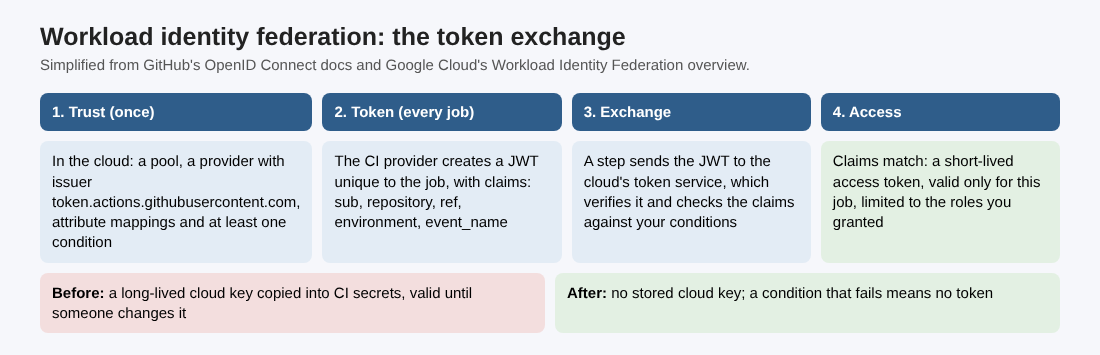
Simplified from GitHub's OpenID Connect docs and Google Cloud's Workload Identity Federation overview.
- Trust. You set up a trust relationship in the cloud provider that lets specific workflows ask for access on behalf of a defined cloud role.
- Token. Each time a job runs, GitHub's OIDC provider creates a JSON web token unique to that job, with claims about the workflow: the repository, the branch or environment, the event and more.
- Exchange. A step in the job sends that token to the cloud. On Google Cloud, the Security Token Service verifies it and returns a federated token.
- Access. If the claims match your conditions, the cloud returns a short-lived access token that works only for the length of the job.
The token is a JWT, so the same care applies as anywhere else you accept one. See our JWT security post.
Set your conditions before anything else
The trust is only as narrow as its conditions. GitHub's guide for Google Cloud says you must plan your security strategy first, so that access tokens are only handed out in a predictable way, and that you must define at least one condition so untrusted repositories cannot request access tokens for your cloud resources.
On Google Cloud, a condition is a CEL expression checked against the incoming token. If it evaluates to true the credential is accepted; otherwise it is rejected. Google gives two reasons to always write one:
- If your identity provider is open to the general public, as a hosted CI service is, a condition limits access to the identities you choose.
- If you use one identity provider with several clouds, a condition stops credentials meant for another platform being used with yours, which helps avoid the confused deputy problem.
For OIDC providers you must also write the attribute mappings yourself, from the claims your provider documents. GitHub adds one detail for its tokens: Dependabot update jobs carry an event_name claim of dynamic, so if your trust is meant only for your workflows and your cloud can check event_name, allow only the events your workflows use.
Pin the subject: immutable subject claims
The sub claim is what GitHub's reference calls essential for handing out tokens predictably. The old default looked like repo:octo-org/octo-repo:ref:refs/heads/main, built from names only. GitHub explains the problem: if a namespace was recycled, a different owner could create the same subject value.
Repositories created after 15 July 2026 now use an immutable default that adds the owner ID and repository ID, such as repo:octo-org@123456/octo-repo@456789:ref:refs/heads/main. Repositories created before that date keep the old format unless you opt in, and renames or transfers after that date also move to the new one. GitHub Enterprise Server does not have it.
Check which format your repository sends before you write the condition. A condition for the old format will stop matching after a rename or a transfer.
Grant the smallest access
Once a token is accepted, what it can reach is up to your grants. Google's overview gives these points:
- One pool per environment. Google recommends a new workload identity pool for each outside environment that needs access, such as development, staging and production.
- Direct access first. Google recommends granting the federated identity access directly on the resource. Some APIs have limits, and impersonating a service account is the alternative; that account needs the Workload Identity User role.
- Not the whole pool. You can grant access to every identity in a pool, but Google warns this can incur risk and says to limit access with attributes and conditions.
- Exact names. Use fully qualified resource names and your project number, not the project ID, when granting roles to outside identities.
The workflow side: permissions and environments
On the GitHub side, the job needs permissions: id-token: write so GitHub's OIDC provider can create the token. GitHub notes that this does not let the workflow change or write to any resource; it only lets it request the token.
If your condition names an environment, such as environment:prod, GitHub recommends protection rules on that environment, for example deployment rules that limit which branches and tags can deploy to it. Our CI/CD security post covers the rest of the pipeline.
A one-morning migration
Here is how you could move one deploy job from a stored Google Cloud key to federation. The order is ours; the steps come from the GitHub and Google docs above.
- Inventory. List every secret in the repository that holds a cloud credential, and which job uses it.
- Pool and provider. Create a pool for production only. Add GitHub as an OIDC provider with the issuer
https://token.actions.githubusercontent.com, and mapgoogle.subjecttoassertion.sub. - Condition. Write a condition that names your repository in the format it really sends and your production environment.
- Grant. Give that identity the one role it needs on the one resource it deploys to.
- Workflow. Add
id-token: writeto that job only, switch the login step to the token exchange, and add a branch rule to the environment. - Prove and remove. Run the deploy, then try it from a fork or another branch and confirm it is refused. Only then delete the old key in the cloud and the secret in GitHub.
Write each result as one line: what you changed, how you tested it, what is left.
Frequently asked questions
Is workload identity federation more secure than a service account key?
It removes the stored key, and each token lasts only for one job. It is only as narrow as your conditions and grants: GitHub says to define at least one condition, and Google warns against granting a whole pool.
Does id-token: write give my workflow write access?
No. GitHub says it only lets the job request the OIDC token; what that token can do depends on the cloud grants you set.
Do I need to change my conditions for the new subject format?
Possibly. Repositories created after 15 July 2026, and renamed or transferred ones, send a subject with owner and repository IDs, so check what yours sends.
Get started
Pick one deploy job and move it off its stored key this week. whitehatstoic tests web apps and APIs for weak spots, with a written report and a retest after fixes, and gives independent codebase reviews. Book a meeting with whitehatstoic and tell us about your product, your deadline and your biggest worry; work is scoped after a short call.
Build it right. Test it thoroughly. Keep it safe.
Visit whitehatstoic.com↗


Comments
No comments yet.