2048 swipe controls: slide the front face with a finger
A swipe in 2048 on a cube is one slide of the front face: every tile on it moves as far as it can in the direction you swiped, and two equal tiles that meet merge into their sum. That is the whole job of 2048 swipe controls, and everything else on the cube (a twist, a turn) is a different gesture that starts somewhere else.
Evolved 2048 puts the 2048 puzzle on a cube with six faces of nine squares, and it is free to play in your browser on a computer or a phone, so you can try each swipe below as you read.
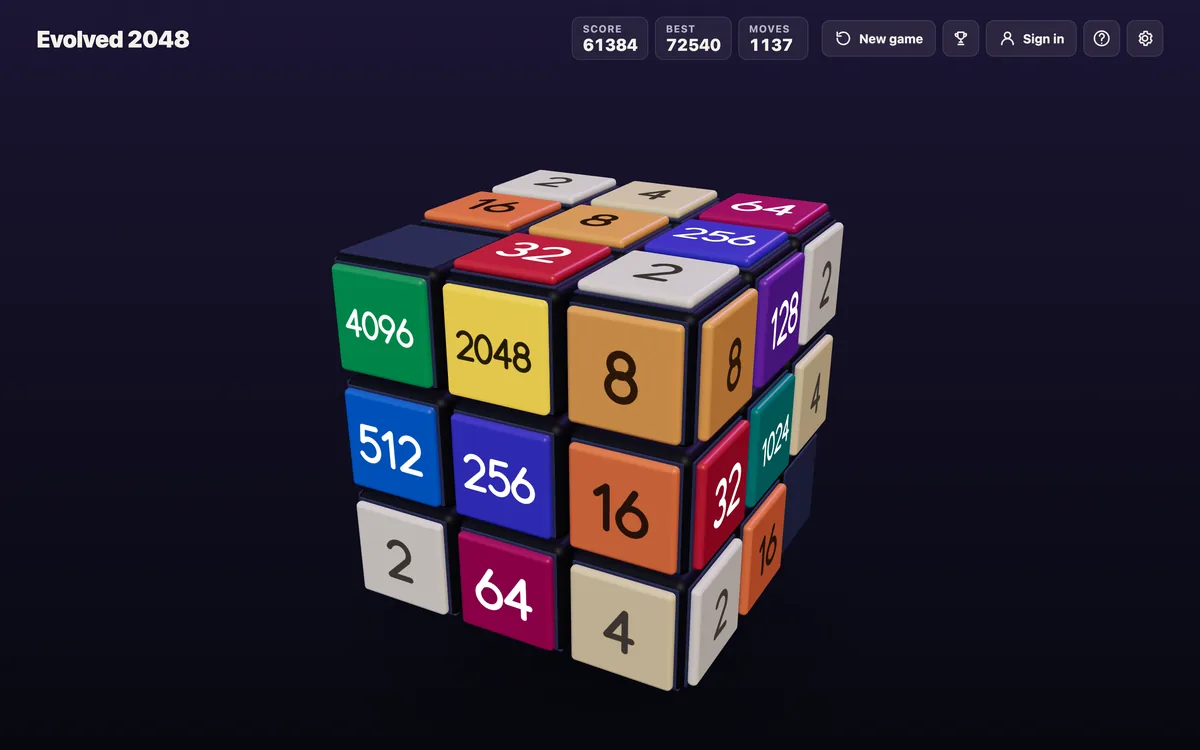
What a swipe does on the front face
The game's first tip says it in one line: "Swipe the front face to slide the tiles. Equal numbers merge." The picture below is that tip bar, marked 1 of 3, taken from the live game.
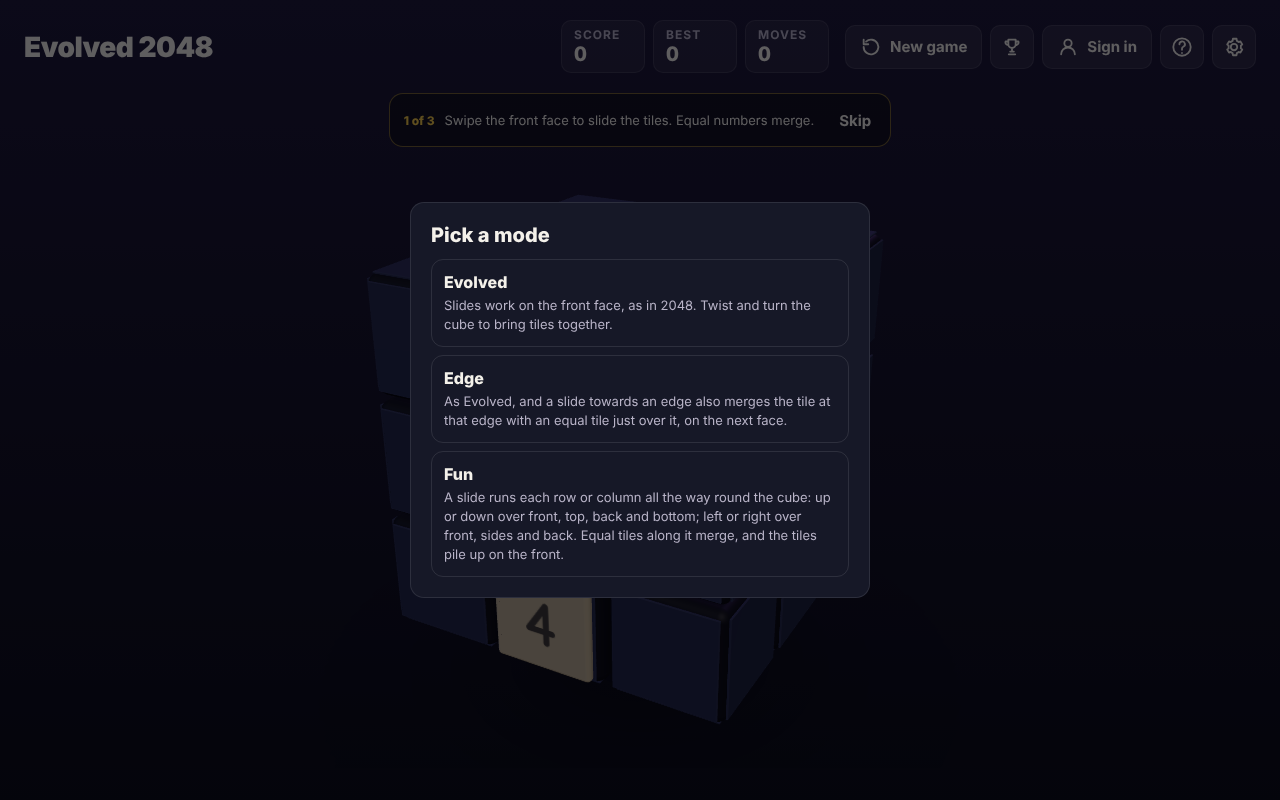
The first game tip, with the Pick a mode box open on a first visit.
A swipe is a slide, and a slide has four directions: left, right, up and down. The front face is the 3 by 3 face that points at you. Tiles on the other five faces do not move when you slide.
Each slide that moves something counts as one move and adds a new tile, a 2 or a 4. The game puts it on the front face when that face has room. Your score goes up by the value of every tile your merges make, so merging two 8s adds 16.
How a swipe merges tiles, with a worked example
The direction you pick decides which pair merges first. The pair nearest the wall you slide towards goes first, and a tile made in a merge does not merge again in the same slide. Here is one row of the front face, tested on a set-up board in the game.
- Swipe left on
2 2 2and you get4 2. - Swipe right on
2 2 2and you get_ 2 4. - Swipe left on
2 2 4and you get4 4. The two 4s sit side by side but do not join until your next slide. - Swipe left on
2 _ 2and you get4. A gap does not stop a merge.
So the same three 2s end up in different places depending on your swipe. Before each swipe, ask which tile you want to keep next to its match, and swipe the way that keeps it there. With 2 2 4, a second swipe left then joins the two 4s into an 8.
2048 swipe controls: swipe, twist and turn are different gestures
On a flat board a swipe is the entire game. On a cube it is one of three gestures, and each one starts on a different part of the screen.
- Slide: swipe the front face. This is what this post is about.
- Twist: drag a row on the right face sideways, or a column on the top face. That layer turns a quarter and carries its tiles to the next face. A twist counts as a move and adds a new tile, like a slide.
- Turn: drag the space around the cube. The whole cube turns and a different face comes to the front. The game says turning is free: it counts no move and adds no tile.
The game's own label for the cube sums it up: swipe the front face to slide, drag the top or right face to twist, drag around the cube to turn it. If you meant to slide and the cube twisted or turned, your finger started in the wrong place. Start the next swipe on the front face. To learn the other two gestures, read Turn the whole cube in 2048: Shift and arrow keys.
When a swipe moves nothing
If no tile can move the way you swiped, the game shows "Nothing moves that way. Try another way, or twist a row." Nothing was slid, so no new tile is added. It is a hint that the front face is stuck in that direction and that another direction, or a twist, may bring tiles together.
The same hint appears when the front face is full of tiles with no equal pair side by side on it. That is the moment a twist helps most, because a twist carries a tile in from another face. The game's own advice on its end screen is to keep room on one face so a twist can still bring tiles round to their match.
Swipe or keys: both slide the same way
The game's How to play box gives the same slide two ways: "Swipe the front face, or press the arrow keys or W A S D." On a keyboard, each of the four arrow keys and each of W, A, S and D slides the front face and adds 1 to Moves. Holding Shift with an arrow key turns the whole cube instead, with Moves unchanged. The full list of keys is in 2048 keyboard controls, and the phone side is in Evolved 2048 on a phone.
Pick whichever suits the screen in front of you. The swipe and the key do the same thing to the board, so a plan that works with one works with the other.
Slides in the three modes
A first visit opens a Pick a mode box with three choices, and your swipe means a little something different in each.
- Evolved: slides work on the front face, as in 2048. You twist and turn the cube to bring tiles together.
- Edge: as Evolved, and a slide towards an edge also merges the tile at that edge with an equal tile just over it, on the next face.
- Fun: a slide runs each row or column all the way round the cube, and equal tiles along it merge.
Each mode keeps its own best score. If you have not decided which to play, Evolved, Edge or Fun: which 2048 mode should you pick? sets them side by side.
A swipe cannot be taken back
There is no undo. On a set-up board, one slide gave Score 4 and Moves 1, and Control+Z, Command+Z, Backspace and a handful of other keys changed nothing. So read the board before each swipe. Ask where the new 2 or 4 will probably land, which merges your direction makes right now, and whether the tile you want to protect is next to its match when the slide ends.
A twist can be twisted back with Shift and its key, but that counts as a second move and adds a second new tile, so it is a fix with a cost.
Four habits make swipes cleaner:
- Start on the front face. A drag that starts on the right face or the top face is a twist.
- Swipe straight. A clear left, right, up or down is the gesture the game names; avoid diagonals.
- Read, then swipe. Check the new tile before the next slide, since the tip bar and the board both wait for you.
- Use the tips. The tip bar moves from 1 of 3 to 2 of 3 only after a slide that moves tiles. Skip ends all three if you already know the controls.
Frequently asked questions
How do I swipe in 2048 on a cube?
Put your finger on the front face and swipe left, right, up or down. Tiles on that face slide that way and equal tiles merge into their sum.
Can I use the keyboard instead of swiping?
Yes. The arrow keys or W A S D slide the front face the same way a swipe does, and each one counts as a move.
Why did my swipe twist or turn the cube?
A drag that starts on the right face or the top face is a twist, and a drag around the cube is a turn. Start your swipe on the front face to slide.
What does "Nothing moves that way" mean?
No tile on the front face can move in the direction you swiped, so nothing slid and no tile was added. Try another direction or twist a row.
Is there an undo for a wrong swipe?
No undo was found. Read the board before each swipe.
Get started
The quickest way to learn swipe controls is to play a few slides and watch what each direction does. A first game shows three short tips in turn, and you can skip them.
Play Evolved 2048: it is free and plays in your browser on a computer or a phone.
Comments
No comments yet.
Sign in or make an account to comment.