Bike repair log: what you fixed and how
Your bike tells you what is wrong, but only once. The click in the bottom bracket, the rear flat that keeps coming back, the brake that squeals in the rain: you fix it, ride off, and three months later you cannot remember which part you replaced or why. This guide shows you how to keep a bike repair log of what you fixed and how, in a short form you will read again: a template, example entries, and a way to spot repeat problems.
If you would rather keep that log as a map than a list, Problem Graph lets you write each bike problem in one line, attach every fix you try with its outcome (worked, partly or failed), and link problems that turn out to share a cause.
Why a bike repair log beats memory and receipts
Receipts tell you what you bought. They do not tell you what was wrong, what you tried first, or whether it worked. Memory is patchy too: the fix that worked can crowd out the two that did not, and then you try the same wrong things again.
A log fixes three specific problems:
- Repeat failures. Three flats on the rear wheel in a month is a pattern. Three separate memories of "I got a flat" is not.
- Wear timing. If you wrote down the odometer reading when you fitted a chain, pads or tires, you know how far they have done when you check them again.
- Honest outcomes. A fix that only partly worked is useful information. It tells you that you treated a symptom, not the cause.
The same idea works for logging what you tried for noise problems at home or for keeping a room tidy. Write the problem, write the attempt, write what happened.
What to record in your bike repair log
Keep every entry short. You want four things, plus two numbers.
- Symptom. What you noticed, in your own words. "Rear shifting skips under load in the middle cogs." Be specific about when it happens: climbing, braking, wet roads, cold mornings.
- Cause. What you think was wrong. If you are not sure, write "suspected" in front of it. You can correct it later.
- Parts. Anything you replaced, with brand and size if you know it: tube size, chain speed, pad compound.
- Steps. What you actually did, in two or three lines. "Turned barrel adjuster a half turn anticlockwise, test rode, another quarter turn."
- Date and distance. The date, and the odometer or app reading if you track distance.
- Outcome. Worked, partly, or failed. Keep this field even when the answer is failed.
A simple bike repair log template you can copy
Copy this into a notebook or a phone note and fill it in after each fix. One entry per attempt: three tries for one squeak is three entries.
- Date:
- Distance on bike (km or miles):
- Bike and part (front or rear, left or right):
- Symptom:
- Suspected cause:
- What I did:
- Parts and tools used:
- Outcome (worked, partly, failed):
- Check again at (date or distance):
The last line turns a diary into a maintenance plan: when you will look at the new pads, or test a fix that only partly worked.
Example entries: flats, slipping gears and squeaky brakes
Repeat rear flats
Entry 1. Symptom: rear tire flat after a commute. Suspected cause: puncture. What I did: replaced tube. Outcome: worked, for nine days.
Entry 2. Same symptom, same wheel. What I did: patched the new tube, ran fingers around the inside of the tire. Found nothing. Outcome: failed, flat again two days later.
Entry 3. Checked the hole position on the tube against the tire and rim. Hole was on the inner side, facing the rim. Suspected cause: rim tape shifted and exposing a spoke hole. What I did: replaced rim tape. Outcome: worked.
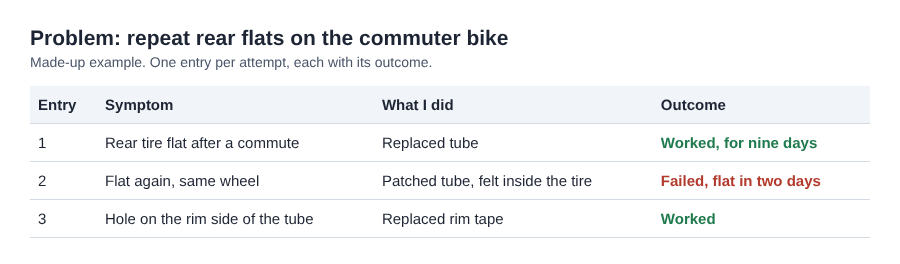
The made-up repeat flats example as three log entries, one per attempt.
Without entries 1 and 2, you would just remember "I had flats and changed the rim tape." With them, you have a note for next time: in this case, a hole on the rim side pointed to the rim, not the tire.
Slipping gears
Symptom: chain skips on the rear cassette when climbing in the middle gears. First attempt: indexed the derailleur with the barrel adjuster. Outcome: partly. Skipping dropped but did not stop. Second attempt: measured the chain with a chain checker. It was past the replacement mark. Replaced chain. Outcome: failed, skipping got worse. Suspected cause: a worn cassette. Third attempt: new cassette. Outcome: worked.
That failed second step is the most useful line in the entry. Next time a chain is past the mark, you know to check the cassette too, and to ask a shop if you are unsure.
Squeaky brakes
Symptom: front disc brake squeals in wet weather. First attempt: cleaned the rotor with isopropyl alcohol. Outcome: worked for a week. Second attempt: replaced pads that had picked up contamination. Outcome: worked. Suspected cause: chain lube sprayed near the front wheel. Note for next time: lube the chain away from the brakes.
Spotting repeat problems and wear patterns over time
After a few months, read your log in one sitting. Look for three things.
- The same part showing up again and again. If the rear wheel appears in five entries, the wheel itself may be the problem: a wobble, loose spokes, or a worn hub.
- "Partly" outcomes in a row. Two partial fixes on one symptom can mean you are treating a symptom; in the gear example, it was a worn part.
- Distances between replacements. If you note the odometer each time you fit a chain or pads, you can see how long they last on your riding and your roads.
Problems also connect in ways a flat list hides. In the gear example, the skipping chain and the worn cassette turned out to be one job. When two problems seem to share a root, write that link down.
When a repair log tells you to visit a bike shop
Your log is also your evidence for when to stop fixing things yourself. Signs it is time:
- You have three or more failed attempts on one symptom and no new ideas.
- The fix needs a tool you do not own and would use once, like a bottom bracket or headset press.
- The problem touches safety: cracked frame or fork, brakes that will not bite, a wheel that wobbles after truing.
Bring the log with you. A mechanic who can read "replaced chain at this distance, skipping worse, then new cassette, now clicking" has much more to go on than "it makes a noise." If you are torn between buying tools and paying for the job, a quick force field analysis for a personal decision can help you weigh cost, time and confidence.
Turning your log into a problem graph of causes and fixes
A notebook works. Where it falls short is linking. Problem Graph is a journal that draws itself as a map of problems, solutions and requirements.
Here is how the flat tire example looks there:
- Type the problem in one line, "Repeat rear flats on commuter bike", put it in the Personal lane, and press Enter. It lands on the graph straight away.
- Add solutions: "Replace tube", "Patch tube and feel inside the tire", "Replace rim tape." Mark the one you are trying.
- Record each outcome as worked, partly or failed. The failed patch stays on the map as a failed solution. That is the point. It tells you, or anyone you share with, what not to repeat.
- Add a requirement to the solution that needs it, such as the right rim tape width for "Replace rim tape".
- Link problems that belong together, such as "Chain skipping" and "Worn cassette". As the graph grows, patterns show up on the map that never show up in a list.
Your problems are private by default. Only you see them, and they follow you to any phone or computer you log in on. If you maintain the bikes for your family or a riding group, mark one problem as a main node and share it into a private network. People join with an invite code you give them. When you share a main node, its solutions, their outcomes and the requirements they need go along. Problems you only linked to it stay private.
You can also put a main node out for everyone, where others can link their own problems to it and borrow the solutions that worked. And you can ask for suggestions: the AI proposes new solutions grounded in what worked for others on problems like yours. Treat those as ideas to test, then log the outcome like any other fix.
To see the shape first, open the app and use "Load example set" on an empty graph.
Frequently asked questions
How often should I update my bike repair log?
Update it right after each fix, while the details are fresh. Then read it through every month or two to look for repeat problems.
Should I log routine maintenance or only repairs?
Log both. Routine jobs like chain lube, pad swaps and tire changes give you the distances you need to predict wear, and they often explain a repair that comes later.
Is a paper log or an app better for bike repairs?
Paper is fast and works in the garage. An app is better when you want to link related problems, record outcomes in one place, or share a fix with the people whose bikes you look after.
What mileage should I note for chain and tire wear?
This guide gives no fixed number. Note the odometer reading every time you fit a new chain, cassette, tire or set of pads, check the chain with a chain checker, and use your own logged distances to set your next check.
Get started
Pick the problem that annoys you most right now, the one you have already fixed twice. Write it in one line and add what you tried, including what failed. That single entry is the start of a log you will trust next time.
Try Problem Graph: it is free, and you can look around the public network without an account. Write one problem down in a line and attach the first thing you will try.
Every problem you carry, on one map. Solved together.
Visit problemgraph.vlvd.net↗


Comments
No comments yet.