Bot management: stop scraping and fake accounts
Bot management is how you keep automated traffic from abusing your app: scraping your content, filling sign-up with fake accounts, replaying leaked passwords or hoarding stock. This guide follows the OWASP Bot Management and Anti-Automation Cheat Sheet and is written for a founder or engineer who has seen odd traffic and wants a plan, not a product pitch.
If you want a second pair of eyes on how your sign-up and sign-in hold up to automated abuse, whitehatstoic tests web apps and AI systems for weak spots.
What bot management is for
The OWASP sheet opens with a stream of automated traffic that is not a flood that takes a site down, but is still abusive: credential stuffing, content scraping, scalping, fake account creation, card testing, fake reviews, click fraud and skewed analytics. The OWASP Automated Threats to Web Applications project catalogs these patterns as OAT-001 to OAT-021.
The sheet also sets the goal, and it is not "block every bot". Search crawlers, monitoring agents and accessibility tools are legitimate. The aim is to raise the cost of abusive automation while leaving real users and good bots alone. That goal shapes every choice below.
Match each threat to an endpoint first
A login form, a search page, a checkout and a public API face different bots, so the sheet says to name the threats before buying tools. Its table pairs each endpoint with a first control:
- Login: credential stuffing. Start with a rate limit, a breached-password check and multi-factor authentication.
- Sign-up: fake accounts. Start with email or phone verification and velocity limits.
- Search or catalog: scraping. Start with a limit per identity and a behavioral signal.
- Checkout or cart: scalping and card testing. Start with a queue, purchase limits and 3D Secure.
- Public API: scraping and scanning. Start with API keys, per-key quotas and signed requests.
- Comments and reviews: spam. Start with reputation and delayed publishing.
The post on credential stuffing goes deeper on the login row.
Layer the defense
One control is brittle, so the sheet combines three layers:
- Edge: a CDN, WAF or anti-bot service. IP reputation, network filtering and basic rate limits.
- Application: session-aware rate limits, identity-bound quotas, behavioral signals, honeypots and challenges.
- Backend and business: anomaly detection on transactions, account-velocity rules, fraud scoring and review queues.
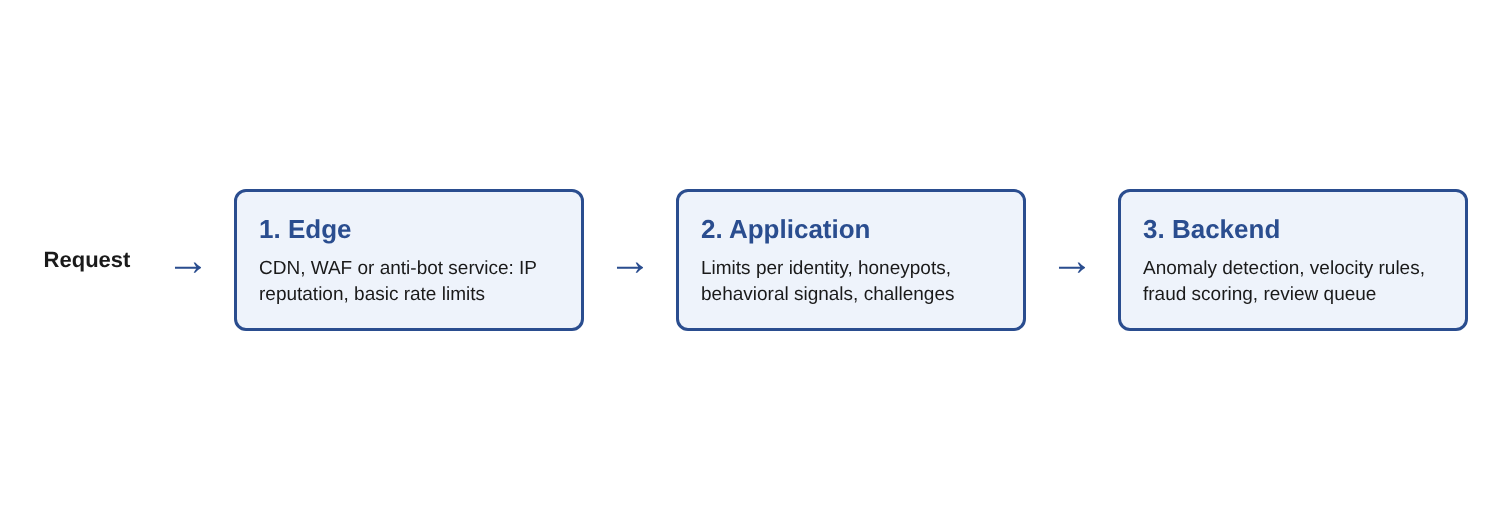
The reason is simple. A request can look human at one layer, with a good IP and a valid challenge, and still fail at another, such as ten checkouts in thirty seconds with different cards.
Rate limit on more than the IP address
The sheet calls rate limiting the foundational control and says to apply it on several keys: per IP, per session, per signed-in identity, per endpoint, and per network or region when unexpected traffic shows up. The signed-in identity is the most reliable because it applies after login. An IP limit is only a floor, since proxy networks defeat it.
Use a token-bucket or sliding-window method. Avoid fixed-window counters, which allow bursts at the boundary between windows.
For a login endpoint, the sheet asks for two independent buckets that must both be under their limit: one per username, which protects a single account from a spread-out attack, and one per IP, which stops a sweep that tries one password on many accounts. The common mistake is one bucket keyed on IP plus username. That gives every pair its own allowance, so one IP can try the limit against an unlimited number of usernames.
When a limit fires, return a plain 429 Too Many Requests. Skip a precise retry time and any detail about which bucket fired or how many tries are left, because that helps only the attacker tuning their tools. The checklist in the post on login rate limiting covers the details.
Use fingerprints sparingly, challenges last, and cheap traps
Fingerprinting spots bots that change IP address but reuse the same client setup. The sheet says to use passive network signals first and client-side fingerprinting only when necessary. It also sets privacy rules: say so in your privacy notice, hash or truncate what you store, keep it for hours or days rather than months, and do not fingerprint signed-in, low-risk traffic.
On CAPTCHA, the sheet is blunt. Visible puzzles are hard for people with disabilities to use, solvable by machine learning and outsourced to human solver farms. Treat them as a last-resort step-up. Its alternatives include attestation tokens, managed challenges, invisible risk scores, proof of work and passkeys for high-value flows. It adds two cautions: a proof-of-work puzzle does not show the client is human, and a challenge token must be checked on the server, not only in the browser. Keep your rate limits in place after a challenge is passed.
Add cheap traps. The sheet calls honeypots and slow answers cheap and invisible to real users:
- Hidden form field. A field real users never see or fill. If it comes back filled, silently drop the request or send it to a tarpit.
- Bait path. List a path in robots.txt that no real page needs. Well-behaved crawlers skip it, so any hit marks an abusive one.
- Tarpit. For a detected bot, slow the answers instead of returning an error, so its speed drops without telling it that it was caught.
- Canary content. Plant unique records in listings. If they turn up elsewhere, you have proof of scraping and a clue to the scraper.
The sheet's example hides the field from screen readers and takes it out of the tab order, so check that your own form does the same.
Answer in steps, and log what you see
A hard block teaches the attacker what worked, so the sheet describes a graduated response by confidence:
- Suspicious: log it, serve it normally and flag the session.
- Likely: step up with a challenge or multi-factor authentication.
- High: slow the answers.
- Very high: soft-block one action, such as checkout, and still allow browsing.
- Confirmed abuse: hold the account for manual review. Do not delete it, so you can investigate.
For sign-up, the sheet also asks you to verify email before the account is usable, check for disposable domains, and set a per-IP, per-network and per-device limit on sign-ups. The post on email verification security covers the verification part.
Log enough to investigate. Bot incidents are often found after the fact. For each request to a sensitive endpoint, the sheet asks you to record the time, request ID, route, status, IP, network and country, the fingerprints you hold, the user agent, who was signed in and what the decision and signals were. Mask credentials and personal data in the logs. Then watch requests per second by endpoint, error rates, failures by route and the login success rate: a sudden shift is a bot signal. For event names that are easy to search, see naming security events.
A worked example: a small shop under bot pressure
Take a small shop with sign-up, login, search and checkout. Here is one afternoon, in order.
- Write the map. List the four endpoints and the threat for each: fake accounts, stuffing, scraping and card testing.
- Fix the login limit. Split it into a per-username bucket and a per-IP bucket, and return a plain 429.
- Gate the sign-up. Require email verification before the account works and add a sign-up velocity limit.
- Add a honeypot. Put a hidden field on the sign-up form and route filled ones to a quiet drop.
- Limit search by identity. Give signed-in users a quota, and watch for one identity reading every page.
- Limit purchases. Cap purchases per account and put a hold time on carts.
- Log and chart. Record the decision with each sensitive request and chart requests per second and login success.
Seven steps, none of which needs a new vendor. Each is a line in the sheet, and you can add an anti-bot service at the edge later.
Frequently asked questions
Should I block all bots?
No. OWASP says search crawlers, monitoring agents and accessibility tools are legitimate. The aim is to raise the cost of abusive automation while leaving real users and good bots unaffected.
Is a CAPTCHA enough?
No. The sheet calls visible CAPTCHAs hard on accessibility, solvable by machines and outsourced to solver farms, so it treats them as a last-resort step-up and suggests alternatives. Keep rate limits after a challenge is passed.
Why not rate limit by IP address alone?
Proxy networks defeat it, so it is only a floor. Add limits per session, per signed-in identity, per endpoint and, for login, separate buckets for the username and the IP.
What is a honeypot field?
A form field hidden from real users. Bots tend to fill it in, so a filled field marks the request as automated and you can drop it or slow it down.
Should I always block a suspected bot?
Not at once. The sheet describes a graduated response, from logging to challenges to slower answers to soft blocks, because hard blocks teach attackers what worked.
Get started
Automated abuse usually targets sign-up, login and checkout, the pages that hold accounts and money. whitehatstoic runs security tests on web apps and AI systems, with a written report and fixes, covering web app and API review and a retest after fixes. Its home page also lists auditing sign-in and payments among the things it can do. No test finds every weakness, but a focused look at those pages is a sound place to start.
Building something that has to be safe? Book a meeting with whitehatstoic: tell us the product, the deadline and your biggest worry, and we reply with a plan.
Comments
No comments yet.
Sign in or make an account to comment.