Email verification security: validate addresses without leaks
A sign-up form asks for an email address, and a month later the same address decides who can reset a password, change an account and get in. This guide covers email verification security: how to check, store and confirm addresses so they stay a safe identifier. It follows the OWASP Email Validation and Verification Cheat Sheet and is written for the person who builds or reviews a sign-in flow.
Building something that has to be safe? Book a meeting with whitehatstoic: it builds web and mobile apps, tests web apps and AI systems for weak spots, and gives independent advice.
Why email verification security matters
The OWASP sheet starts from one fact: email addresses are widely used as the main identifier in sign-in and account recovery. Handled badly, validation, normalization and verification can lead to account takeover, user enumeration and identity confusion.
It lists what an attacker tries: registering equivalent or look-alike addresses, exploiting inconsistent normalization, abusing password reset, finding out which accounts exist, and taking over accounts through email change. The rest of this post takes those in order. For the wider sign-in picture, see the post on authentication design.
Pick one way to compare addresses
Two strings can name the same mailbox. If registration treats them as one account and login treats them as two, someone can end up in the wrong account. The sheet asks you to define a normalization strategy before you store or compare anything:
- Lowercase the domain. The domain part is always case-insensitive.
- Be careful with provider tricks. Do not apply provider-specific rules, such as removing dots in Gmail addresses, unless you fully control them.
- Store two values. Keep the original input for display and for sending mail, and a canonical form for comparison.
- Write the policy down. Apply it the same way in registration, login, password reset, account recovery and account linking.
The local part, the text before the @, needs thought. It is technically case-sensitive under SMTP, but many providers do not enforce that. The sheet says to preserve what the user typed, set an explicit policy, and fold the local part only when your system fully owns that behavior and doing so cannot cause account collisions or put someone in the wrong account.
Validate the format with a library and watch for look-alikes
A strict regular expression looks safe and does damage in two ways: it rejects valid addresses and it behaves differently from place to place. The sheet's advice is short. Use a well-tested library, accept a broad range of valid formats, and reject only input that is clearly malformed.
Format checks only tell you the text looks like an address. They do not tell you the person owns it. That is the job of verification, covered below.
Unicode lets an attacker register an address that looks the same as yours on screen but is a different string. The sheet names homoglyph attacks, such as a Latin letter swapped for a Cyrillic one. Its advice:
- Normalize Unicode input.
- Convert internationalized domains to punycode for comparison.
- Be especially careful with internationalized local parts, because normalization and comparison can differ between systems.
Verify ownership, then treat reset and change as identity changes
Typing an address proves nothing. The sheet says ownership must be verified before the account is usable. Send a token that is cryptographically secure and random, single-use and time-limited, and do not activate the account until the user has used it.
Three questions catch most mistakes. Can the same link be used twice? Does it still work next week? Does the account already work before the link is clicked? Each yes is a finding. The same token rules apply to reset links, which the post on testing your password reset flow goes through.
The sheet calls password reset a high-risk operation. Use single-use, time-limited tokens, do not say whether the address exists, invalidate a token once it is used or has expired, and rate limit reset requests.
It goes further for changing the address: changing an email address is equivalent to changing identity. The flow it sets out is:
- Require the user to sign in again (re-authentication).
- Notify the existing address that a change was requested.
- Require confirmation from the new address.
- For high-risk systems, consider requiring confirmation from both addresses.
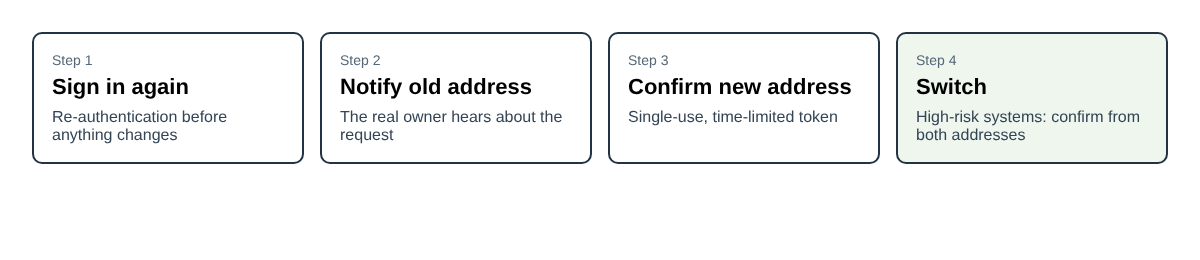
The old-address notice matters most. If an attacker has a stolen session, the real owner learns about the change while there is still time to act.
Close the side doors: enumeration, disposable addresses and weak factors
If a form says "no account with that address" for one email and "check your inbox" for another, anyone can test a list of addresses against your site. The sheet says attackers should not be able to tell whether an email is registered. It asks for three things:
- Consistent responses for login and reset flows.
- No timing difference between the valid and invalid cases.
- Rate limiting and monitoring.
Sign-up is the hard part, since saying "this address is taken" is a leak too. A common way to keep one response is to show the same "check your email" page and send the real information to the mailbox. The sheet does not prescribe this, so test what your own flow does. The checklist in the post on login rate limiting covers the limits.
Disposable email services let people skip your controls. The sheet suggests a list of known disposable domains if it suits you, favors risk-based controls over strict blocking, and says to monitor for odd patterns in account creation.
It also reminds you that email is a weak authentication factor. Require multi-factor authentication for sensitive operations and do not rely on email alone. The post on choosing and rolling out MFA is the place to start.
Log email events without logging the secrets
Logs help you spot abuse, and they can leak. The sheet asks you to log verification attempts and failures, watch reset activity and detect unusual patterns such as many requests in a short time. It also sets limits:
- Do not log full addresses where you can avoid it. Mask or pseudonymize them, for example j***@example.com.
- Never log tokens or full verification or reset links.
- Treat addresses in logs as personal data and restrict who can read them.
The post on naming security events helps you pick event names that are easy to search.
A worked example: reviewing a small app's sign-up and email change
Take a small booking app that signs people up with an email and lets them change it in settings. Here is a plan for one afternoon, in the order a reviewer would work.
- Write the policy. Decide how addresses are compared and put it in one function used by sign-up, login, reset and linking. Store the original and the canonical form.
- Try near-duplicates. Register with a different domain case, then a look-alike character. Both should be treated as your policy says, not by accident.
- Replace the regex. Swap a hand-made pattern for a maintained library and check it still accepts unusual but valid addresses.
- Test the token. Use a verification link twice, then after it expires. Both should fail. Confirm the account does not work before the click.
- Compare responses. Ask for a reset for a real address and a made-up one. The page, the message and the timing should look the same.
- Walk the change flow. Change the address in settings and check you were asked to sign in again, the old address got a notice and the new one had to confirm.
- Read the logs. Search for a full address or a token. Neither should be there.
Seven checks, no special tools. Each one maps to a line in the sheet.
Frequently asked questions
Is a regex enough to validate an email address?
No. OWASP says strict regex validation often rejects valid addresses or adds inconsistencies. Use a well-tested library, accept a broad range of valid formats and reject only clearly malformed input.
Does the email address have to be case-insensitive?
The domain always is. The local part is technically case-sensitive under SMTP, though many providers do not enforce it. Keep the original input and fold the local part only if your system fully owns that behavior.
What should a verification token look like?
Cryptographically secure and random, single-use and time-limited. The account should not be active until the token has been used.
Why does changing an email need extra steps?
Because the sheet treats it as changing identity. It asks for re-authentication, a notice to the old address and confirmation from the new one, and suggests both addresses for high-risk systems.
Should I block disposable email addresses?
The sheet says a list of known disposable domains can help if it fits, but it prefers risk-based controls over strict blocking, plus monitoring for suspicious sign-up patterns.
Get started
Email flows touch sign-up, sign-in, recovery and settings, so a gap in one can undo the others. whitehatstoic runs security tests on web apps and AI systems, with a written report and fixes, covering web app and API review and a retest after fixes. Its home page also lists auditing sign-in and payments among the things it can do. No test finds every weakness, but a focused look at your sign-in and recovery pages is a sound place to start.
Building something that has to be safe? Book a meeting with whitehatstoic: tell us the product, the deadline and your biggest worry, and we reply with a plan and a price.
Comments
No comments yet.
Sign in or make an account to comment.