GitHub Actions security: harden workflows and tokens
GitHub Actions security is about one thing: stopping code you did not review from running with your secrets and a token that can write to your repository. A workflow file is short, but it often holds cloud keys, registry tokens and the power to publish a release, which is why the OWASP GitHub Actions Security Cheat Sheet says to treat the pipeline as critical production code, possibly more critical than the code it builds.
If you would rather have someone outside the team look at your workflows, whitehatstoic tests web apps and their delivery setup for weak spots, with a written report and a retest after fixes.
GitHub Actions security: what an attacker wants
The OWASP sheet names four outcomes of attacker-controlled code running in a workflow:
- Stolen secrets. Long-lived cloud credentials or package registry tokens printed to logs, sent to an outside address or hidden in an artifact.
- A misused
GITHUB_TOKEN. GitHub gives each run a short-lived token scoped to the repository. With write permissions, an attacker who gets it can change code, create or alter releases and touch other GitHub resources. - Cache poisoning. A cache written by an untrusted run is restored later by a release workflow, so the attacker's files run where the production secrets are.
- Denial of wallet. Pipelines that call paid services, such as a language model for code review, can be triggered again and again until the bill grows.
The sheet also says to assume a breach will happen: write down who responds, how they talk to each other and when they escalate, before you need it. Most of what follows is about keeping untrusted input away from privilege. The wider pipeline, from build isolation to signing what you ship, is in our post on CI/CD security.
Harden the repository settings first
Settings apply to every workflow at once, so start there.
- Require approval for all external contributors. The sheet warns that the weaker setting, approval for first-time contributors only, lets someone send a harmless typo fix to earn trust and then send changes that run in CI without review.
- Make the default token read only. Restrict the default
GITHUB_TOKENpermissions to reading contents and packages, and grant more in the workflow file only where a job needs it. - Protect branches. Require pull request reviews, status checks, signed commits and CODEOWNERS approval before anything reaches a protected branch. The OpenSSF Scorecard can audit these settings.
- Scan the workflows themselves. Turn on CodeQL for the GitHub Actions language, add Zizmor as a second scanner, run both on every pull request as required checks, and block merges on high or critical findings. Run a full scan on a schedule too, such as daily.
Avoid dangerous triggers and untrusted input
Most real attacks on workflows start with a trigger that gives a stranger's input access to secrets. The table shows the four the sheet discusses.
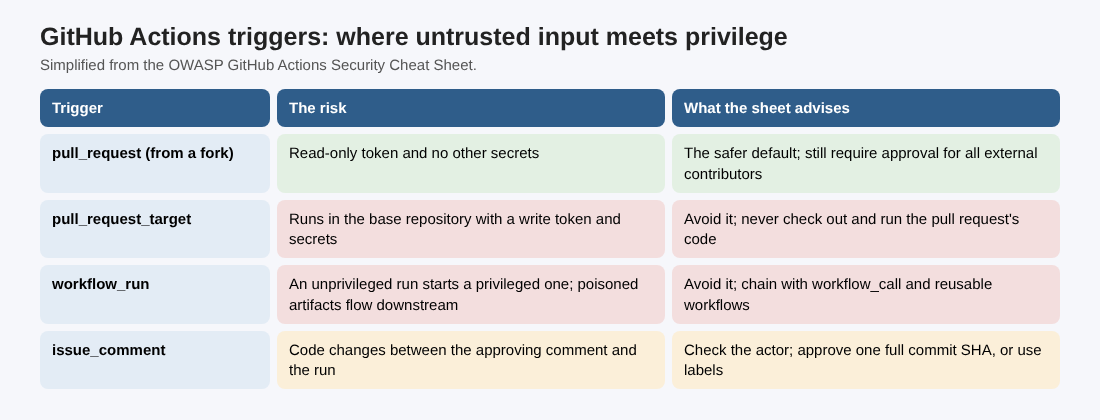
Simplified from the OWASP GitHub Actions Security Cheat Sheet.
pull_request_targetruns in the context of your repository, with a write token and secrets. Try to avoid it, and never check out and run the pull request's code under it.workflow_runlets an unprivileged workflow start a privileged one, and the attacker can shape the first workflow through a pull request. If you need a chain, useworkflow_callwith reusable workflows instead.issue_commentopens a gap between the comment that approves a run and the run itself, in which the attacker can push new code. Check that the person commenting is a trusted member, and have the comment name a full commit SHA, so only that commit is checked out. A label on apull_requestworkflow works too, as long as you check outgithub.event.pull_request.head.shaand do not treat the label as approval for later commits.
The same rule applies to text. A pull request title is input an attacker writes. Never place a context value straight inside a run: block; pass it through an environment variable first, every time, even when the value looks harmless. For example, set PR_TITLE: ${{ github.event.pull_request.title }} under env: and write echo "$PR_TITLE" in the script, so the shell reads the title as data instead of code.
Pin actions and keep them current
Every third-party action runs with your workflow's permissions. The sheet's advice:
- Use fewer of them. Where a call to the GitHub API does the job, prefer it.
- Before adopting one, check who wrote it, that it is maintained by more than one active person, and that it asks for no permissions it does not need.
- Pin every action and reusable workflow to a full commit hash, not a tag. Then check the commit really belongs to that repository: GitHub runs a matching commit even if it came from a fork. Zizmor's impostor-commit rule automates the check.
- Keep pins current with Dependabot or Renovate, with a delay of a few days before a new release is adopted (Dependabot's
cooldown, Renovate'sminimumReleaseAge), so a malicious release has time to be noticed.
Teams with many repositories do better with one curated set of reviewed workflows and actions that every repository reuses. The same thinking applies to your packages; see npm package security.
Shrink the token and the secrets
- Start from nothing. Set
permissions: {}at the workflow level, then grant each job only what it needs. - Remove static credentials. Move to short-lived OpenID Connect tokens, which many registries and cloud providers accept; our post on workload identity federation shows the cloud side.
- Where a static secret must stay, never write it in the workflow file, pass it to the step that needs it rather than the whole job, prefer environment-level secrets, and rotate it.
- Do not use
secrets: inheritwhen calling a reusable workflow; pass only the secrets it needs, and check which environment it selects, since that environment's secrets apply there as well. - Mask and scan. Mask any sensitive value that is not a GitHub secret with
::add-mask::, and run secret scanning both before commit and on pull requests, failing the check on a hit. - Do not keep checkout credentials. Use
actions/checkoutwithpersist-credentials: falseunless a later step really needs git access. - Gate production. Deployments and publications go through GitHub environments with required approval by named people.
For where secrets should live outside CI, see secrets management.
Runners, caches and AI assistants
Self-hosted runners often reach internal networks and keep credentials, and they run whatever code a workflow gives them. The sheet says never to use them with public repositories. If you must, approve every external contributor's run by hand, use ephemeral runners destroyed after each job, store nothing sensitive on them and limit their network access. Use runner groups and labels to keep high-privilege runners, such as image builders, away from low-privilege jobs such as linting.
Outbound traffic from GitHub-hosted runners can be watched and restricted with a tool such as Harden-Runner, which makes sending a secret out harder.
Caches are how a poisoned file reaches a release. Turn off every form of caching in release and publishing workflows.
AI assistants that review pull requests or sort issues read text an attacker writes, which invites prompt injection. If such a workflow holds secrets or a write token and any GitHub account can trigger it, the assistant can be talked into leaking or acting. Give it only the tools and actions its task needs.
Worked example: a one-hour review of one repository
Pick the repository that publishes your app or package and work through it in this order.
- Settings (10 minutes). Check that approval is required for all external contributors, the default token is read only, and the main branch requires reviews and status checks.
- Triggers (10 minutes). Search
.github/workflowsforpull_request_target,workflow_runandissue_comment. For each hit, write down whether it checks out pull request code and which secrets it can read. - Input (10 minutes). Search every
run:block for${{ github.event. Each hit becomes an environment variable. - Actions (10 minutes). List every
uses:line. Anything pinned to a tag or branch gets a full commit hash, and the update tool gets a cooldown. - Token and secrets (10 minutes). Add
permissions: {}at the top of each workflow and grant per job. Replacesecrets: inherit. Addpersist-credentials: falseto checkouts. - Release path (10 minutes). Confirm the release workflow uses no cache, deploys through an environment that needs approval, and runs on a runner group of its own.
Finish by turning on CodeQL for Actions and Zizmor as required checks, so the next change to a workflow is reviewed by a scanner as well as a person.
Frequently asked questions
Is pull_request_target always unsafe?
Not always. Labeling workflows that never check out pull request code are a common use, but the OWASP sheet still says to avoid the trigger where you can, and never to check out and run untrusted code under it.
Why pin actions to a commit hash instead of a version tag?
A tag can be moved to different code, while a full commit hash cannot. Check that the hash belongs to the action's own repository, since GitHub also runs a matching commit from a fork.
What permissions should GITHUB_TOKEN have?
None by default. Set permissions: {} at the workflow level and grant each job only the permissions it uses.
Can I use self-hosted runners with a public repository?
The sheet's advice is not to. If you must, approve every external run by hand, use ephemeral runners and keep sensitive data and networks out of their reach.
Get started
Run the one-hour review on the repository that ships your product this week. whitehatstoic tests web apps and APIs for weak spots, with a written report and a retest after fixes, and gives independent codebase reviews. Book a meeting with whitehatstoic and tell us about your product, your deadline and your biggest worry; work is scoped after a short call.
Build it right. Test it thoroughly. Keep it safe.
Visit whitehatstoic.com↗


Comments
No comments yet.