Gym plateau log: what you changed and what happened
A gym plateau log is a written record of each change you make when your lifts stop going up, and what happened after you made it. When a lift stalls, it is easy to change several things at once and then not know which one mattered. A short written log, one change and one outcome at a time, gives you that answer.
If you want a place to keep it, Problem Graph lets you write the plateau down in one line, attach each fix you try, and mark it as worked, partly or failed.
What a gym plateau log is
The log has one problem and a list of attempts. The problem is the plateau, stated plainly: "Bench press stuck at 80 kg for six weeks." Each attempt is one change you made. Next to each change you record the outcome.
It is not a workout tracker. You are not logging every set. You are logging decisions, and what those decisions did. That is a smaller record, and a more useful one when you are stuck.
The same pattern works for other stalls and habits. The post on a screen time problems log uses the same idea for a different problem.
Why guessing at plateau fixes keeps you stuck
When a lift stalls, the tempting response is to do more: more sets, more food, a new program, all in the same week. Then the bar moves or it does not, and you have no way to say why.
Three things go wrong with that approach.
- You cannot attribute the result. If you change five things and progress returns, you do not know which one mattered. If progress does not return, you do not know which ones to drop.
- You can repeat a failed fix. Months later you may try the same tweak again because nothing on paper says it did nothing the first time.
- A good week can fool you. A fix that happened to land in a strong week looks like it worked. A written outcome, with a note about anything else that changed, keeps you honest.
A written log removes the guessing. It also gives a failed attempt a job: it tells you what to cross off.
What to put in your gym plateau log
Keep it short. You will only maintain a log that takes a minute to update. Record these things for each attempt.
- The problem, in one line. Name the lift and how long it has been stuck.
- The single change. One sentence. "Added a second weekly bench session" is a change. "Trained harder" is not.
- How long you will give it. Put the length of the trial in the text of the change, such as "2 weeks".
- The outcome. Worked, partly or failed. Add a few words on why you chose that.
- Anything else that moved. A bad week of sleep or a holiday can change the result. Note it so you do not over-trust the outcome.
In Problem Graph the structure matches this. The problem is a node. Each fix is a solution attached to it. You mark the ones you are trying, then record worked, partly or failed when you know. Put the plateau in the personal lane, since it is yours. The post on one change at a time goes deeper on why each trial should hold a single change.
Gym plateau log example: six weeks of single changes
This is an invented example to show the shape of a log, not real results from anyone.
The problem: Bench press stuck at 80 kg for six weeks. Your top set is 5 reps at 80 kg, and your own rule is to add weight once you reach 6 reps.
You test one change at a time, each for a fixed two-week window.
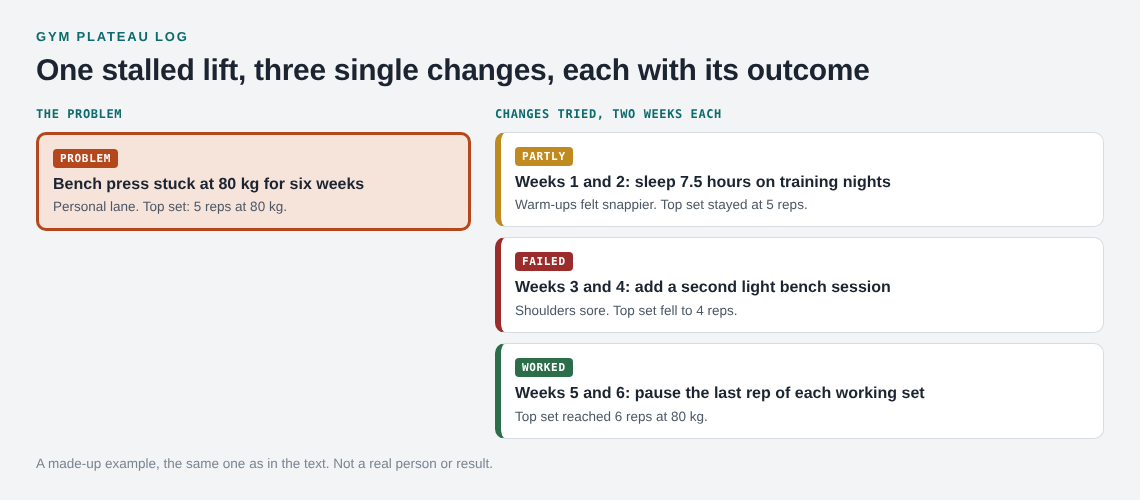
- Weeks 1 and 2: sleep 7.5 hours on training nights. Outcome: partly. Warm-up sets felt snappier, but the top set stayed at 5 reps at 80 kg. No other changes.
- Weeks 3 and 4: add a second light bench session. Outcome: failed. Shoulders felt sore and the top set fell to 4 reps. Dropped it.
- Weeks 5 and 6: pause the last rep of each working set for one second. Outcome: worked. The top set reached 6 reps at 80 kg, so the next session moves to 82.5 kg. You kept the extra sleep going in the background, and you noted that.
Read it back. The second session is a clear no, and you now have it in writing. Sleep helped a little, so you keep it. The paused rep is the one to build on.
Notice what the log does not claim. It does not say the pause caused the gain. It says the gain showed up after that change, with nothing else new apart from the sleep you already kept. That is honest, and it is enough to act on.
Changes you can test one at a time
Pick from a short list, and test one per window. These are ordinary ideas to try, not advice for your body or a guarantee of anything.
- Weekly volume. Add or remove a set or two for the stalled lift.
- Frequency. Train the lift one more or one fewer time per week.
- Rep range. Move a block of work to lower or higher reps.
- Load jumps. Use smaller increments, such as fractional plates.
- Technique cue. Change one cue, such as bar path or setup, or add pauses.
- Recovery. Sleep earlier, or take a lighter week.
- Food. Eat more on training days, for a set period.
If a change involves pain, an injury or a health condition, talk to a qualified coach or clinician. A log is a record, not medical advice.
How to read your log and decide what to keep
After a few attempts, look at the log as a whole. Ask three questions.
- What clearly worked? Keep it, and run it longer before you change anything else.
- What partly worked? Try it again alone, or pair it with a worked change in a later window.
- What failed? Leave it on the record. A failed entry is useful because it stops you repeating it.
This is the part of Problem Graph that fits the job. The graph keeps a failed solution on the map as failed, and does not tidy it away. That is what you need when you are tempted to retry something that already let you down. A short weekly review is a good moment to read the log and choose the next change.
You can also link problems that belong together. If your bench is stuck and your overhead press is stuck too, link the two. Patterns that are hard to see in a flat list, such as both stalls starting in the same month, can show up on the map.
Borrowing and suggestions
Problem Graph can show similar problems other people have shared and which of their solutions worked. You can borrow one into your own graph with one tap, and it keeps a link back. It can also ask the AI for suggestions grounded in what worked for others on similar problems. Treat those as proposals to test, and log them like any other change. Whether anything is there to borrow depends on what people have shared.
Mistakes that make a plateau log useless
- Changing several things at once. The log then records noise. One change per window.
- Windows that are too short. One session proves little. Decide the length before you start, and stick to it.
- Vague entries. "Eat better" cannot be repeated or judged. Write what you actually did.
- Only logging wins. A log with no failures is a highlight reel. The failures are half the value.
- Skipping the outcome. An attempt with no result teaches nothing. Close each one as worked, partly or failed.
- Ignoring outside factors. If you were ill that week, say so, and consider rerunning the test.
Frequently asked questions
How long should I test each change in a gym plateau log?
Pick a window before you start, often two to four weeks, and keep it fixed. Write the length in the entry so you judge it fairly when it ends.
Do I need to log every workout?
No. The log tracks decisions and their outcomes, not every set. Keep your normal training notes wherever you already do, and use the log for the changes you make.
Can I keep my plateau log private?
Yes. In Problem Graph, private is the default, so only you see your problems. You can share a main node with a private network or put it out for everyone later if you choose to.
What counts as worked, partly or failed?
Decide this when you start. Worked might mean your top set improved. Partly might mean something felt better but the number did not move. Failed means no gain or a step back.
Get started
Open the app and write your plateau as one line in the personal lane. If you want to see how a graph looks first, an empty graph offers a Load example set button. Then add the first single change you will try, mark it as trying, and record the outcome when the window ends.
Try Problem Graph: it is free, and you can look around the public network without an account. Write one problem down in a line and attach the first thing you will try.
Every problem you carry, on one map. Solved together.
Visit problemgraph.vlvd.net↗


Comments
No comments yet.
Sign in or make an account to comment.