Screen time problems log: what you changed and what happened
A screen time problems log is a short written record of one screen habit that bothers you, each change you tried and what happened after it. If you have promised yourself to use your phone less and the promise did not last, a screen time problems log shows which changes held and which only sounded good. This post gives you what to write, a template, a made-up worked example and a way to read the log after a week.
Problem Graph is a free problem and solution journal where you can write the habit down in one line and attach each change you try with its outcome.

What a screen time problems log is
It is not a tracker of minutes. Your phone or computer may already count those. The log answers a different question: what did you do about the habit, and did it work?
Numbers tell you that you spend a lot of time on a screen. They do not tell you which change helped. A log of changes does. After a few weeks you can see that a promise to "just stop" failed three times, while moving the charger worked the first time.
This is a tool for noticing your own habits. It is not medical advice. If screen use is tied to sleep trouble or low mood that will not lift, talk to a doctor or another qualified professional.
Pick one screen habit, not all of them
"Use screens less" is too big to fix. Choose one habit you can name in a line:
- I scroll my phone in bed until late.
- I open a video site when I should be writing.
- I check messages during every meal.
- I pick up my phone within a minute of waking.
Write the habit as a problem, in plain words, from your side. "I scroll my phone in bed until late" is a problem you can test. "Phones are bad" is not.
What to record for each change
Keep each entry small. If logging takes longer than the change itself, you will stop logging. Four things are enough:
- The change. The specific thing you did. Not "use my phone less" but "charged the phone in the hallway".
- When you tried it. A date or "last week" is fine.
- The outcome. Use three words: worked, partly or failed. Partly means it helped for a while or on some days.
- One line on why. Your best guess for why it went that way.
Log failures with the same care as wins. A failed change is useful, because it tells you what not to try a third time.
A screen time problems log template you can copy
Paste this into any notes file and fill one block per change.
Problem: Change I tried: Date: Outcome (worked / partly / failed): Why I think so:
Keep the problem line the same across blocks, so all the tries for one habit sit together. When a change works, say so in the outcome and stop adding new tries for that habit.
A worked example: three changes for late-night scrolling
This example is made up. The problem is "I scroll my phone in bed until late".
Change 1: promise to stop at midnight
Change: Told myself to stop at midnight Outcome: failed Why: Midnight came and the phone was still in my hand. A rule with nothing behind it did not hold.
Change 2: grey screen after 22:00
Change: Switched the display to grey after 22:00 Outcome: partly Why: I scrolled less, but I still checked it twice because it was within reach.
Change 3: charge the phone in the hallway
Change: Charged the phone on the hallway shelf and used a plain alarm clock Outcome: worked Why: Nothing to scroll in bed. I read a few pages instead.
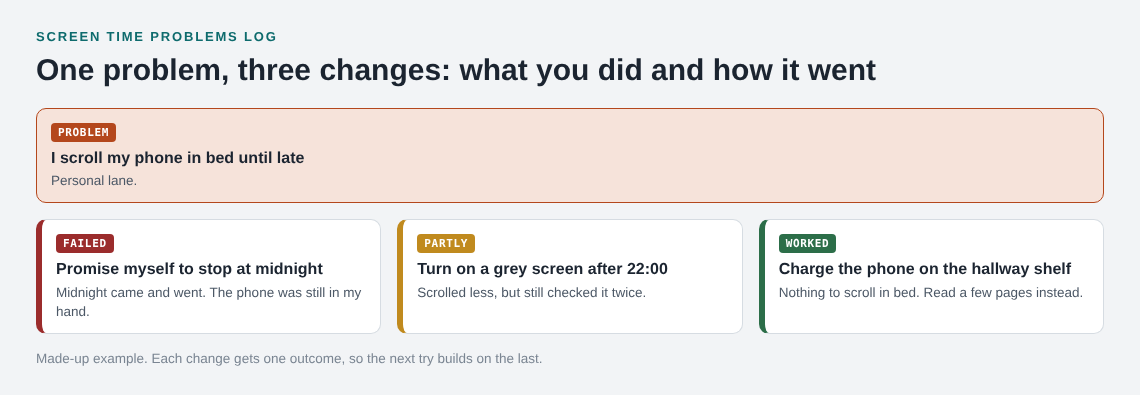
No single entry is magic. The sequence is the value. You can see that a promise failed, a small setting helped a little and moving the phone out of reach did the job.
How to read your log after a week
Read the entries in one sitting and look for four things:
- Repeated failures. A change that failed twice in the same form should not get a third try. Change it or drop it.
- Partly outcomes. These are close. Ask what single change would turn one into a worked.
- What the winners share. Often they change the setup (where the phone is, what is on the home screen) and do not rely on a promise.
- Triggers. If two habits start at the same moment, such as boredom after dinner, one fix may cover both.
Test one change at a time, or you will not know which one helped. The post on one change at a time explains why, and the procrastination log uses the same idea for starting tasks.
Changes worth testing first
Your log tells you what works for you, but three kinds of change are cheap to try:
- Distance. Move the device out of reach at the moment the habit starts.
- Friction. Log out of the app, or move it off the first screen, so opening it takes a few extra taps.
- A replacement. Decide what you will do instead, such as a book on the pillow, so the gap is not empty.
Give each change a few days, write the outcome and keep the ones marked worked. A weekly look at the log helps; see the weekly review post.
Keep the log on a map with Problem Graph
A notes file works. A long list does hide how problems connect, though. In Problem Graph you write the habit as a problem in one line and put it in the personal lane. Then you attach each change as a solution and mark it worked, partly or failed. That is the log above, drawn as a graph.
You can link problems that belong together, even across lanes. If "scroll in bed" and "check messages at meals" both start from boredom, linking them shows the pattern on the map. A failed change stays on the map as failed, which is the memory a promise lacks.
Problems are private by default, so only you see a screen habit you would rather keep to yourself. The app can also propose solutions based on what worked for others on similar problems. Those are proposals to test, not answers.
Frequently asked questions
How long should an entry be?
A few lines. Write the change, the date, the outcome and one line on why. If it takes more than a minute, it is too long.
Do I need an app to keep a screen time problems log?
No. A notes page works. An app that draws the log as a map is useful if you want to link several habits together.
Should I log the numbers from my phone as well?
You can, as a note on the outcome. Keep the log about the changes, so you can see which one moved the number.
What if a change works for a few days and then fails?
Mark it partly and add a note on when it stopped working. That tells you what the next change needs to cover.
Get started with Problem Graph
Try Problem Graph: it is free, and you can look around the public network without an account. Write one problem down in a line and attach the first thing you will try.


Comments
No comments yet.
Sign in or make an account to comment.