Nominal group technique: rank problems as a small group
The nominal group technique is a meeting format that lets a small group rank its problems without letting the loudest voice decide. Each person writes problems alone, the group shares them one at a time, clarifies them without arguing, and everyone votes in private. You leave with a ranked list the whole group built.
Once you have that list, Problem Graph keeps it alive after the meeting: each top problem in one line, shared into a private network for your group, with every fix you try and whether it worked, partly worked or failed.
What the nominal group technique is
The Wikipedia article on the method describes the nominal group technique, often shortened to NGT, as a group process for identifying problems, generating solutions and making decisions. It was first developed by Andre Delbecq and Andrew H. Van de Ven. The group is "nominal" because people work as individuals for much of the session, and the final ranking comes from votes rather than from whoever argues best.
The same article lists when it is most useful, among them:
- When some members are much more vocal than others.
- When some members think better in silence.
- When the issue is controversial or there is heated conflict.
- When people want a number at the end, not just a feeling.
It also names its limits: it handles one question at a time, it takes preparation, and the votes may not agree. Skip it when one person owns the decision anyway, or when you already know the one problem and need to understand it. For that, is is not analysis fits better. NGT picks which problems matter; it does not explain them.
Before the session: one question and a facilitator
One clear question. Everyone answers the same question, so make it specific. "What problems do we have?" is too wide. "What problems keep coming back in our weekly class?" works.
A facilitator. This person explains the steps, keeps time, holds the no-debate rule and writes the master list. Pick someone the group trusts to stay neutral.
The group. The method works in groups of many sizes. If the room is large, you can split it into tables and merge their top results at the end; that is a choice to test, not part of the method.
Materials. Paper for each person with the question written on it, a board or shared document for the master list, and cards or slips for voting.
The first two stages: explain, then write in silence
The method has five stages. The first is short: the facilitator welcomes everyone and explains the purpose and the steps, so nobody is surprised by the silence or the vote.
In the second, everyone writes down every answer to the question that comes to mind, alone and without talking. The Wikipedia article puts this at about 10 minutes.
Ask for one problem per line, written as a problem, not a solution. "Students miss the start of class" is a problem. "Send more reminders" is a solution in disguise. If someone writes solutions, ask them what problem each one would fix.
Stage three: share in turn until every problem is up
Go around the room. Each person reads out one item, and the facilitator writes it on the master list in that person's own words and gives it a number. Then the next person shares one. Keep going round until every item is up. The article gives this stage 15 to 30 minutes.
- No debate about any item at this stage.
- Write every item, even ones that look like duplicates.
- People may add new ideas that what others shared gives them.
Stage four: clarify and group, but eliminate nothing
Now walk through the list item by item. Anyone can ask what an item means, and its author explains. Nobody argues about whether it matters; that is for the vote. The facilitator keeps the talk neutral and makes sure no single item eats the time.
The group may combine items into categories here, but no idea is removed. If three items describe the same thing, group them under one heading and keep all three numbers, so nobody's item quietly disappears. The article gives this stage 30 to 45 minutes. When the list is long, an affinity diagram is one way to do the grouping.
Stage five: vote in private and rank
Each person ranks the items against the original question, in private. In the basic method, the rankings each item gets are added up and the highest total wins.
Groups choose their own voting rule. This post uses one simple choice: each person picks their top five and scores them 5 for the most important down to 1. The facilitator then records two numbers for each item:
- Total score: all the points it got.
- Votes: how many people chose it at all.
Rank by total score and use the vote count to break ties. Show the results straight away, so the meeting ends with an outcome.
A worked example: a team ranks its recurring problems
Here is a made-up example. A team of six runs a weekly online class and wants to pick which recurring problems to fix this term.
Question: "What problems keep coming back in our weekly class?" Silent writing gives 31 lines across six people. Sharing in turn puts all 31 on the board. Clarifying groups them under 19 headings; for example "link goes out late", "people cannot find the join link" and "reminder email bounces" sit under "Students do not get the join link in time".
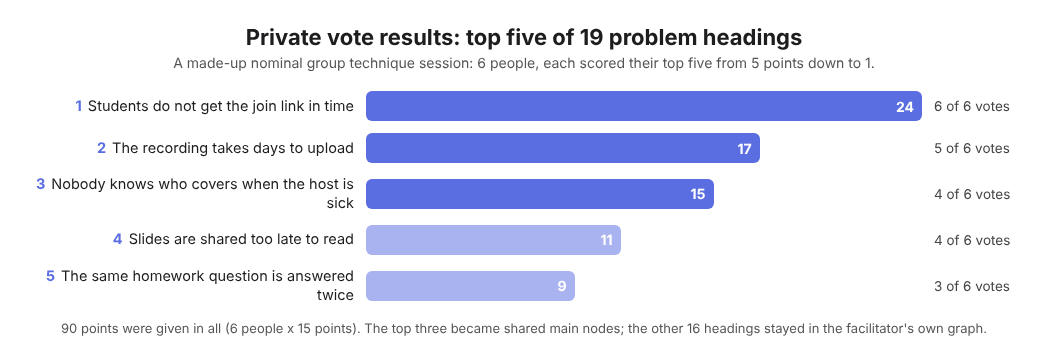
The made-up team's private vote, top five of 19 headings.
Private voting (six people, top five each, 5 to 1 points) gives this top three:
- Students do not get the join link in time: 24 points, chosen by all 6.
- The recording takes days to upload: 17 points, chosen by 5.
- Nobody knows who covers when the host is sick: 15 points, chosen by 4.
Then the facilitator, as the one keeper of the list, puts it in Problem Graph:
- Writes each of the three problems as one line in the work lane and presses Enter.
- Marks each one as a main node, since only a main node can be shared.
- Creates a private network, sends the invite code to the other five, and shares the three main nodes into it. Members see them; nobody else does. Anyone with the code can join, so the code stays inside the team.
- Under the join link problem, adds two solution ideas, "Send the link a day before" and "Post the link in the same place every week", and marks the first as trying.
- Two weeks later records the outcome as partly, since some students still missed it, and marks the second idea as trying.
The other 16 headings stay in the facilitator's own graph, linked to the main node each relates to. Linked problems stay home, so the shared list stays short. At the next session the team opens the List view filtered to Network and sees each shared problem with its fixes and outcomes, failed ones included.
Other groups can run the same session: a running club's organisers or a food bank's shift leads.
Frequently asked questions
How long does a nominal group technique session take?
The Wikipedia article gives about 10 minutes for silent writing, 15 to 30 for sharing and 30 to 45 for discussion, plus the introduction and the vote. Plan for well over an hour.
Who created the nominal group technique?
It was originally developed by Andre Delbecq and Andrew H. Van de Ven, according to the same article.
Can you run it remotely?
You can try. Have people write alone in their own document, share in turn on a call while the facilitator types the master list, and collect votes privately. Keep the same no-debate rule.
Do you have to remove duplicates before voting?
No. In the discussion stage items may be combined into categories, but no idea is eliminated. Group them under one heading and keep every original item visible.
Get started
The vote is the easy part; remembering three months later which fixes you tried is harder. Put your top problems into Problem Graph as main nodes, share them into a private network for your group, and record each outcome as worked, partly or failed. To see how a graph looks first, an empty graph offers a "Load example set" button.
Try Problem Graph: it is free, and you can look around the public network without an account. Write one problem down in a line and attach the first thing you will try.
Every problem you carry, on one map. Solved together.
Visit problemgraph.vlvd.net↗


Comments
No comments yet.