OWASP MASVS: test your mobile app against the standard
OWASP MASVS, the Mobile Application Security Verification Standard, is the list of security controls a mobile app should meet, and it is the fastest way to turn "test the app" into a plan with an end. This post shows how to pick the right level of testing for your app, cut the controls you do not need, find the tests behind each one, and run a first pass in a week.
If you are building the app and the server it talks to, whitehatstoic builds web and mobile apps from database to deploy and tests web apps and APIs for weak spots, so the backend your mobile app depends on can be checked too.
What OWASP MASVS covers
The OWASP MASVS is written for two groups: architects and developers who want to build secure mobile apps, and testers who want complete, consistent results. It sits inside the OWASP Mobile Application Security (MAS) project next to two companions:
- MASVS says what to verify: short control statements, such as "The app securely stores sensitive data."
- MASWE, the Mobile Application Security Weakness Enumeration, lists the concrete weaknesses that break each control.
- MASTG, the Mobile Application Security Testing Guide, describes how to test for those weaknesses on Android and iOS.
So the standard tells you what good looks like, and the other two tell you how to find out whether your app gets there. The controls are deliberately short. You will not find a setting name or a line of code in MASVS itself; that detail lives in MASWE and MASTG.
The eight control groups
MASVS splits the mobile attack surface into eight groups, each labelled MASVS-XXXXX. There are 24 controls in all:
- MASVS-STORAGE (2 controls): sensitive data stored on the device, and data that leaks by accident through backups or logs.
- MASVS-CRYPTO (2): current strong cryptography, and key management from generation to storage.
- MASVS-AUTH (3): secure sign-in protocols, local authentication such as biometrics or a PIN, and extra authentication for sensitive operations.
- MASVS-NETWORK (2): all traffic secured, and identity pinning for the endpoints you control.
- MASVS-PLATFORM (3): inter-process communication, WebViews, and the user interface, such as one-time passwords shown in notifications or captured in screenshots.
- MASVS-CODE (4): an up-to-date platform version, a way to force app updates, no components with known vulnerabilities, and validation of all untrusted input.
- MASVS-RESILIENCE (4): checking the platform's integrity, anti-tampering, and measures against static and dynamic analysis.
- MASVS-PRIVACY (4): less access to sensitive data, no identification of the user, transparency about data collection, and user control over their data.
Read the AUTH group carefully. OWASP says the enforcement of sign-in and permissions must happen on the remote endpoint, and that the server should be checked against the web standard, the OWASP ASVS. A mobile test that stops at the app misses half the system.
Pick a MAS testing profile
You do not test every control at the same depth. The MAS project defines testing profiles, and each one starts from a different idea of who the attacker is.
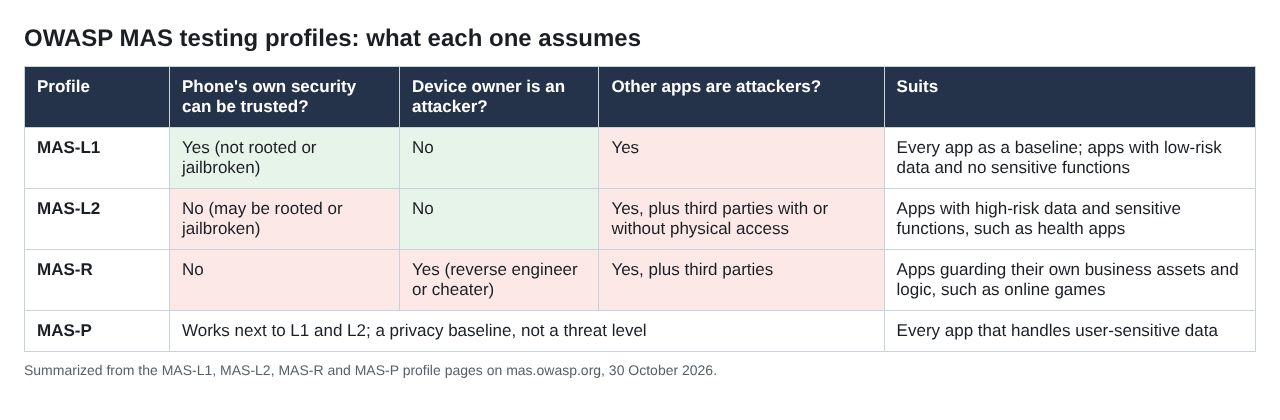
Summarized from the MAS profile pages on mas.owasp.org.
- MAS-L1, essential security. The phone's own security can be trusted, the device owner is not the attacker, and other installed apps are. It is the baseline for every app, and enough for apps with low-risk data and no sensitive functions.
- MAS-L2, advanced security. The device may be rooted or jailbroken, and third parties with or without physical access are attackers too. OWASP recommends it for apps with high-risk data and sensitive functions, with health apps as its example.
- MAS-R, resilient security. Here the device owner is the attacker: a reverse engineer or a cheater. It suits apps that must protect their own business assets and logic, such as competitive online games.
- MAS-P, baseline privacy. It works alongside L1 and L2 and is recommended for every app that handles user-sensitive data.
Choose from your threat model, not from ambition. OWASP's own guidance is that a weather or news app usually does not need to go beyond L1, while an app holding health data might justify L2. You can also mix: data that never leaves the device might need L2 storage tests while L1 is enough for the network tests.
Cut the controls your app does not need
The MAS guidance is plain about this: the goal is not to comply with every profile or every test. An app with no server, no multi-factor sign-in or no biometrics skips the tests for those features. An interface that never handles sensitive data matters less.
Each extra control has a cost. OWASP names four trade-offs to weigh: security against cost, security against usability, security against privacy (SMS codes protect accounts but collect phone numbers), and privacy against the value users get from sharing data. Decide these with everyone who owns the app, during design rather than after launch.
Two groups need special care:
- Resilience is optional. OWASP states that the absence of obfuscation, anti-debugging or anti-tampering is not a vulnerability by itself. These measures add effort for an attacker; they never replace proper security design. For public-interest apps, OWASP even notes they can reduce transparency and lock out legitimate users.
- Privacy has limits. MASVS-PRIVACY looks at the app, not at what servers do with the data, and OWASP says it never replaces a Data Protection Impact Assessment under the GDPR or other legal reviews.
Find the tests behind each control
Once you have your controls, open each one on mas.owasp.org and follow it down. The profile pages list requirements with the weakness they map to. Two examples from MAS-L1:
- "The app encrypts sensitive data stored outside of private storage" maps to MASWE-0002 under MASVS-STORAGE-1.
- "The app stores cryptographic keys inside the platform-provided secure keystore" maps to MASWE-0003.
Each weakness then points to MASTG tests for Android, iOS or both. Write one line per test in your plan: the control, the weakness, the platform, how you will test it, and what counts as evidence.
Some weaknesses have no dedicated MASTG test yet. OWASP's advice for that case is to read the weakness's "Modes of Introduction", look at related tests for a pattern, and check the platform's own documentation. Note these lines in your plan as "test designed by us", so a reader knows which results rest on your own method.
Worked example: a one-week MASVS plan
Say you have a small budgeting app on Android and iOS. Users sign in, link no bank accounts, and type in their own spending. Your threat model says the data is personal but not high-risk, and nobody gains much from cracking the app. So you pick MAS-L1 plus MAS-P and skip MAS-R.
- Day 1, scope. List the app's features against the 24 controls. No WebViews and no biometrics, so PLATFORM-2 and AUTH-2 are out. Write down why each control is in or out.
- Day 2, storage and crypto. Check where the app writes data: private storage, shared folders, backups and logs. Confirm the sign-in token and any keys sit in the platform keystore.
- Day 3, network. Confirm all traffic uses TLS with the platform's secure defaults left on. Decide on pinning with care; our post on certificate pinning covers when it helps and when it breaks apps.
- Day 4, code and platform. Check the minimum OS version, the forced update path, your dependency list for known vulnerabilities, and every input from screens, links and files. Check that one-time codes do not show in notifications.
- Day 5, privacy and the server. Compare what the app collects with what the store listing and privacy policy say. Then test the API: every permission check the app relies on has to hold when someone calls the server directly.
Finish with a short report: each control as pass, fail or not applicable, the evidence for each, and a fix list in order of risk. Retest the fails before release.
Do not forget the server behind the app
MASVS checks the app on the phone. Most of what matters to an attacker, accounts, payments and other users' data, lives on your server. If a user can change a request and see someone else's records, no amount of on-device hardening fixes it.
That is why the plan above ends with the API. Pair MASVS with ASVS for the backend, and use our mobile app security pre-release checklist as a quick pass before each store update.
Frequently asked questions
Is OWASP MASVS only for security testers?
No. OWASP writes it for mobile architects and developers who want to build secure apps, as well as for testers who want complete and consistent results.
Which MAS profile should my app use?
Start with MAS-L1 for every app and add MAS-P if it handles user-sensitive data. Move to MAS-L2 for high-risk data such as health records, and to MAS-R only when you must stop users from tampering with the app itself.
Is a missing anti-tampering control a vulnerability?
Not by itself. OWASP says resilience controls add protection against specific attacks, and every app must still meet the other controls its threat model calls for.
Does MASVS cover my backend API?
Only partly. The AUTH controls say enforcement must be on the server, and OWASP points to ASVS for checking it.
Get started
A MASVS plan is only as strong as the server behind the app. whitehatstoic builds web and mobile apps with Expo and React Native, and tests web apps and APIs with a written report, fixes and a retest after you fix them. Every engagement is scoped and priced after a short call.
Building something that has to be safe? Book a meeting with whitehatstoic: tell us the product, the deadline and your biggest worry, and we reply with a plan and a price.
Build it right. Test it thoroughly. Keep it safe.
Visit whitehatstoic.com↗


Comments
No comments yet.