Post-quantum cryptography: what to plan for now
Post-quantum cryptography is a migration you plan in stages, not a switch you flip. This post follows the OWASP Post-Quantum Cryptography Cheat Sheet, which turns the work into five stages for application developers: inventory your cryptographic dependencies, prioritize, adopt supported implementations, test, and roll out. The sheet's advice on what to plan for now is to start the preparation stages even when a dependency cannot yet migrate.
Building or testing something that has to be safe? Book a meeting with whitehatstoic: it builds web and mobile apps, tests web apps and AI systems for weak spots, and gives independent advice.
Post-quantum cryptography: what the threat changes for your app
The OWASP sheet defines post-quantum cryptography (PQC) as algorithms designed to resist attacks from both classical and quantum computers. Its concern is plain: a sufficiently powerful quantum computer could break RSA, Diffie-Hellman and elliptic curve cryptography. That touches three things your app likely does today: public-key encryption, key exchange and digital signatures.
Notice what the sheet does not ask for: a date, a prediction or a rewrite. It asks for a list, an order and a tested path. The sections below follow its five stages, with a worked example at the end.
Stage 1: inventory every use of cryptography
Create one inventory entry per use of cryptography. The sheet says to include dependencies managed by your platform or service provider, not only the direct calls in your own code. For each entry, record four things:
- Purpose and lifetime: transport, stored data, key protection or signatures, and how long confidentiality or trust must last.
- Implementation: the protocol, algorithms and parameters, the library or service version, and key and certificate identifiers. Store metadata only, never secret key material.
- Dependencies: clients, servers, proxies, signing and verification services, key management services, hardware security modules and backups.
- Ownership: the responsible team or supplier, the supported upgrade path, and any component that cannot be updated.
Three details are easy to miss. Map each transport connection separately, including the one from a gateway to your application. Trace how the encryption keys for stored data are protected and recovered. And inventory the signature verifiers, not just the signers. Stage 1 is complete when each dependency has an owner and either a migration path or a recorded blocker. Our key management post helps with the key side of that list.
Stage 2: prioritize what must stay secret or trusted longest
Prioritize data that must stay confidential for years, and systems that will be hard to update later. Give each migration item an owner and a target date. The sheet sorts the work into three groups:
- Long-lived confidentiality. Start with exposed connections and stored data whose keys depend on RSA or elliptic curve cryptography. The sheet's reason is blunt: updating encryption later cannot protect copies an adversary has already collected.
- Long-lived trust. Plan early for software and firmware verification, trust anchors, and signed records that must stay trustworthy for years, and include the time needed to update every verifier.
- Blocked dependencies. Ask the supplier for a supported release and a migration plan. Record the remaining exposure, a review date, and whether replacement is necessary.
For symmetric encryption, the sheet prefers AES-256 for extra quantum security margin and a secure encryption mode, consistent with the Cryptographic Storage Cheat Sheet. It also notes that NIST's PQC FAQ allows continued use of AES-128, AES-192 and AES-256. The catch: check how the encryption keys themselves are protected by public-key cryptography, even when the data uses AES. Our cryptographic storage post covers the data side. Stage 2 is complete when the backlog separates confidentiality work from signature work and records a decision for every dependency that cannot migrate yet.
Stage 3: adopt supported implementations, one use at a time
Upgrade maintained libraries and platform services to implementations of standardized algorithms, and pick parameters through the supported protocol and your security requirements. The sheet warns that algorithm support alone does not establish protocol interoperability. It also says to use the protocol's own hybrid implementation, never one you assemble yourself. A hybrid construction combines classical and post-quantum algorithms.
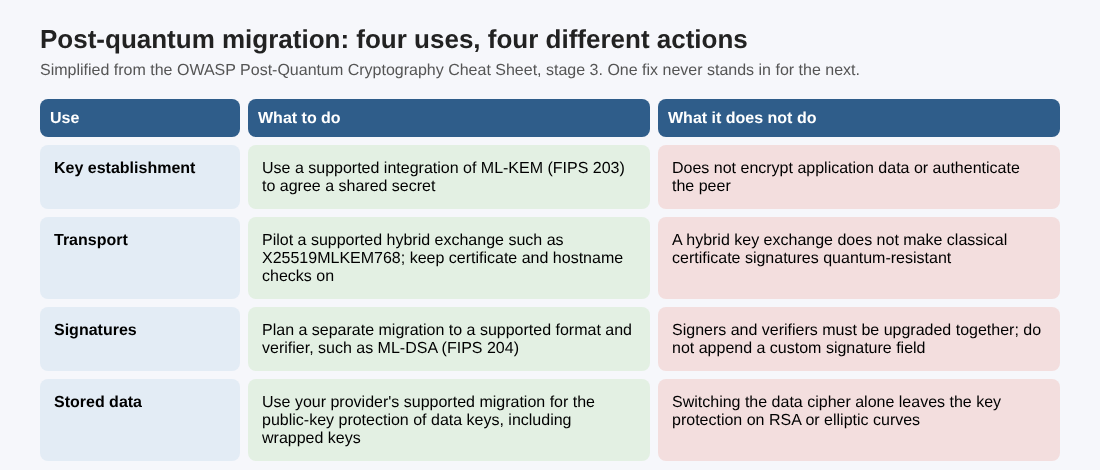
The four rows are separate jobs:
- Key establishment: use a supported integration of ML-KEM (FIPS 203). It establishes a shared secret for symmetric cryptography; it does not directly encrypt application data or authenticate the peer.
- Transport: pilot a supported classical plus PQC hybrid exchange, such as X25519MLKEM768, following the TLS Cheat Sheet. Keep certificate and hostname validation on. Our TLS settings checklist is the baseline to compare against.
- Signatures: plan a separate migration using a supported signature format and verifier, such as ML-DSA (FIPS 204). Signer and verifier upgrades must be coordinated, and tokens follow the JWT guidance; see JWT security.
- Stored data: use your provider's supported migration for the public-key protection of data keys, including existing wrapped keys. Keep recovery access during the migration.
Stage 3 is complete when a supported migration works in a test environment and the team has written down which security properties it provides.
Hybrid key exchange does not authenticate anyone
This is the point teams most often get wrong. The sheet cites RFC 9794, Section 5, which distinguishes hybrid confidentiality from authentication: a hybrid TLS key exchange does not make classical certificate signatures quantum-resistant. So for certificate-based authentication, check the public-key and signature algorithms in the leaf and intermediate certificates, the public-key algorithm of the configured trust anchor, and whether your runtime's certificate validation supports what you chose. A hybrid leaf certificate alone does not guarantee hybrid authentication of the sender's identity.
Where a supported dual-signature scheme requires both signatures, enforce both verifications. Accepting either one permits classical-only acceptance. Do not append a custom signature field to an existing token or certificate format. For signed records that need long-term proof, validate them and keep the evidence through a supported archive timestamp and renewal process before the protecting algorithms become weak. Keeping an old verifier around does not preserve that proof.
Stages 4 and 5: test the whole path, then roll out with an exit date
Test with the actual algorithms and parameter sets you will deploy, because the sheet points out that cryptographic objects get larger and algorithm negotiation needs protecting. The stage 4 checks:
- Use real clients, proxies, gateways and backend connections, and verify the negotiated key exchange for new connections. For resumed TLS sessions, check the resumption mode and how the original secrets were protected.
- Measure handshake and verification cost under expected load, and check certificate, signature, message and database field limits.
- Validate complete certificate paths on the deployed runtime, and test that invalid signatures, untrusted certificates and disallowed algorithms are rejected. If both signatures are required, a missing or invalid one must cause rejection.
- Decide where classical fallback is temporarily allowed. Where PQC is required, confirm a failure cannot silently trigger a classical-only retry.
- Test existing data, older signed artifacts, backup restoration and key recovery before you retire old keys or formats.
Stage 5 is the rollout. Deploy to a small group of services or clients, then widen it using your tests and monitoring. Keep an approved rollback plan and written criteria for ending classical-only support. Record negotiated algorithms and verification results without logging secrets, and alert on unexpected classical-only use. Treat a rollback to classical-only protection as a security exception with an owner and an expiry date. Remove temporary fallback only after required peers and recovery workflows have migrated, and keep the inventory current as dependencies change.
A worked example: one week on a small app
Take a made-up app: a web front end, an API, a database with customer files encrypted at rest, and signed download links. This is an example to practice on, not a real client, and the day-by-day order is ours; the sheet supplies the stages, not a schedule.
- Day 1, inventory. List the TLS connection from browser to gateway, from gateway to API and from API to database; the key protection for the stored files; and the signer and verifier of the download links. Add an owner to each row, and write "blocked" with a reason where a supplier controls it.
- Day 2, prioritize. Decide how long the customer files must stay confidential. If the answer is years, their key protection and the connections that carry them come first. Signed download links that expire in minutes can wait.
- Day 3, ask suppliers. For each blocked row, request a supported release and a migration plan, and record the exposure and a review date.
- Day 4, pilot. In a test environment, turn on a supported hybrid exchange such as X25519MLKEM768 on one connection and confirm with a real client that the new key exchange is what was negotiated.
- Day 5, test the edges. Check handshake cost under load, certificate path validation, and what happens when the pilot fails: the connection should stop, not quietly retry classical-only if your policy requires PQC.
Write each result in one line: what you checked, what you saw, who owns the fix. This list does not prove the app is safe from future attacks; it shows what you depend on and what you can change.
Frequently asked questions
Do I have to wait for every dependency to support PQC before I start?
No. The OWASP sheet says to start the preparation stages even when a dependency cannot yet migrate: inventory it, prioritize it, and record the blocker and a review date.
Does a hybrid TLS key exchange make my certificates quantum-resistant?
No. A hybrid key exchange protects confidentiality, but per RFC 9794 as cited by the sheet, it does not make classical certificate signatures quantum-resistant. Check the whole certificate path.
Is AES-128 still allowed?
The sheet says NIST's PQC FAQ allows continued use of AES-128, AES-192 and AES-256, and that it prefers AES-256 for extra margin. Also check the public-key protection of the encryption keys.
Get started
Start with the stage 1 inventory on one app this week. whitehatstoic tests web apps and APIs for weak spots, with a written report and a retest after fixes, and gives independent codebase and vendor reviews. Book a meeting with whitehatstoic and tell us about your product, your deadline and your biggest worry; work is scoped after a short call.
Build it right. Test it thoroughly. Keep it safe.
Visit whitehatstoic.com↗
Comments
No comments yet.
Sign in or make an account to comment.