Solo retrospective: review your own month of fixes
A solo retrospective is a short review you hold with yourself, usually once a month, to look back at the problems you tried to fix and decide what to keep, change or drop. Teams run retrospectives all the time. If you work alone, or you are the only person in your own life who tracks your fixes, you can run the same review with a pen and thirty minutes. This post gives you a method, a worked example and a way to keep the results.
What a solo retrospective is for
Most of us try fixes and then forget how they went. You start a new morning routine, it works for a week, it slips, and a month later you start it again as if it were new. A retrospective stops that loop. It makes you look at the whole month at once and say what actually happened.
It is not a planning session and not a pep talk. It has one job: turn a pile of attempts into a few clear decisions. You leave with a short list of fixes to keep, fixes to change, fixes to drop, and one thing to test next.
If you also run a team review, the idea is the same. Read the team retrospective post for the group version. Here the only person in the room is you.
What you need before you start
You need a record of what you tried. A retrospective runs on notes, not memory. Memory keeps the dramatic failures and loses the quiet partial wins, so a month reviewed from memory comes out wrong.
For each problem, you want three things written down:
- The problem in one line, such as "I wake up tired".
- Each fix you tried, in one line each, such as "phone charges outside the bedroom".
- The outcome of each fix: worked, partly or failed.
If you have no notes yet, spend the first sitting rebuilding the month from your calendar, messages and photos. It will be rough. It will still beat nothing, and next month you will have the record.
Steps 1 and 2: List every fix and mark what happened
Put every problem you worked on in one list. Under each, list the fixes you tried. Include the ones you only tried once. Include the ones you meant to try and never did, and mark those as "not tried" so they do not hide.
Do not judge yet. The point of this step is a full list, because the next steps need all of it. A month usually gives a handful of problems and a handful of fixes, which fits on one page.
Then give each fix one outcome, in three words: worked, partly or failed. Keep it to those three. A longer scale invites you to dither.
- Worked means the problem got better and the fix is still in place.
- Partly means it helped some of the time, or helped and then slipped.
- Failed means it made no difference, or you could not keep it up.
Add a number where you can. "Slept earlier on 5 of 7 nights" says more than "went well". If you have no number, write one honest sentence instead.
Mark failures as failed. A failed fix is useful data, not a mark against you. It tells you where not to spend next month.
Step 3: Sort every fix into keep, change or drop
Now decide. Each fix goes in exactly one of three piles.
- Keep: it worked. Write down what you need to do to keep it going, and leave it alone.
- Change: it worked partly. Ask what single change would turn it into a worked fix, such as moving the time or making the step smaller.
- Drop: it failed. Stop doing it, or stop trying it in the same form.
The drop pile is the hardest and the most valuable. Dropping a fix frees up time and attention for ones that might work. If you want a deeper habit around this, the stop doing list post covers it.
Step 4: Pick one fix to test next
Choose one change for the coming month. One, not five. If you change many things at once you will not know which one helped; the one change at a time post explains why.
The best candidate is usually from the change pile, because a partly working fix is already close. Write it as a plain sentence that you can check: "Answer email in one block at 11:00, on every working day, for 3 weeks." Then you can say at the next retrospective whether it worked.
A worked example: one month, four fixes
Here is a made-up month for one person. Two problems: sleeping badly, and an overloaded workday.
For the personal problem "I wake up tired", they tried two fixes. Charging the phone outside the bedroom: they slept earlier on 5 of 7 nights, so it worked. Going to the gym before work: they skipped it on all 4 tries, so it failed.
For the work problem "I never finish my day's list", they also tried two. Answering email in one block at 11:00 held on quiet days and broke on busy ones, so it worked partly. A daily to-do list of 12 items: they finished 3 or fewer each day, so it failed.
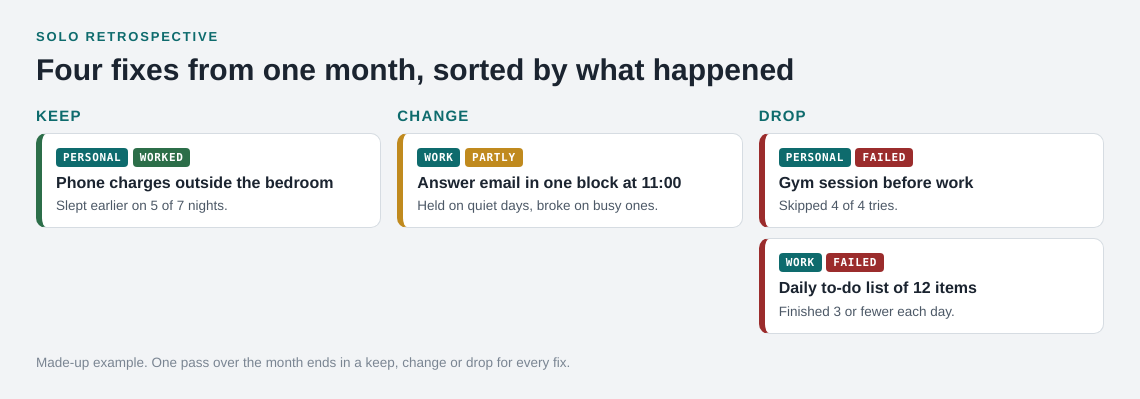
The sort is quick. The phone charging goes in keep. The email block goes in change. The gym session and the 12 item list go in drop. For next month's test, the person picks the email block and makes one change: a fixed 11:00 slot with a 30 minute limit, even on busy days. One test, one sentence, and a clear way to judge it in four weeks.
Keeping the record on a map with Problem Graph
A notes file works. The weak point of a list is that it hides links between problems, and it grows until you stop reading it. Problem Graph is a problem and solution journal drawn as a graph. You write each problem in one line, put it in a lane (personal, work, expert or scientific), attach the solutions you try, and mark the outcome as worked, partly or failed. That matches the first two steps of the review.
When you run the retrospective, the app's List view and its lane filters let you look at one lane at a time. You can also link problems that belong together, even across lanes. In the example above, "wake up tired" and "never finish my list" may be one problem seen twice, and a link would put that on the map. A failed solution stays on the map as failed, which is the record you need in the drop pile.
Your problems are private by default, and nobody else sees a private problem. The app can also propose new solutions when you ask. Treat those as proposals to test, not answers. If you want to keep the habit going between reviews, the weekly review post shows a shorter version.
Frequently asked questions
How long should a solo retrospective take?
Thirty minutes is enough for a month with a few problems. If it takes much longer, you are probably judging fixes while listing them.
How often should I run one?
Monthly suits most people. Run it more often if your fixes are short, or less often if you only try a few things a quarter. Pick a rhythm you will keep.
What if I have no notes from the month?
Rebuild what you can from your calendar and messages, run the review anyway, and start recording from today. The second review will be much easier than the first.
Is a solo retrospective the same as journaling?
No. A journal records what happened. A retrospective looks across the record and ends in decisions: keep, change, drop and one test. It is a way to track fixes, not medical advice.
Get started
Try Problem Graph: it is free, and you can look around without an account. Write one problem from this month in a line and attach the fixes you tried, then run your first retrospective in 30 minutes.
Comments
No comments yet.
Sign in or make an account to comment.