Web cache security: stop caches serving the wrong page
Web cache security comes down to one question: when a cache hands out a stored response, was it made for the person asking? The OWASP Web Cache Security Cheat Sheet says a cache becomes a security boundary when it serves a response to a request other than the one that produced it. Browsers, reverse proxies, CDNs and your own application caches all do this, so each one needs a policy you wrote down, not a default you never looked at.
Building or testing something that has to be safe? Book a meeting with whitehatstoic: it builds web and mobile apps, tests web apps and AI systems for weak spots, and gives independent advice.
Web cache security: why a cache is part of your authorization
The sheet says to treat cacheability and cache key design as part of the application's authorization model. A route that checks who you are and then lets a shared cache store the answer has only checked the first visitor. Everyone after is served from the store, and the store never asks.
The sheet covers four kinds of harm: sensitive data exposure, web cache poisoning, web cache deception and cross-tenant leakage. It applies to developers and operators of origin apps, reverse proxies, CDNs and application-level caches. The rest of this post follows its sections, then ends with a test you can run.
The six risks the cheat sheet names
The sheet lists six key risks: sensitive response exposure, web cache poisoning, web cache deception, cache key confusion, cross-tenant leakage and stale security state. The table shows what goes wrong in each and the first fix.
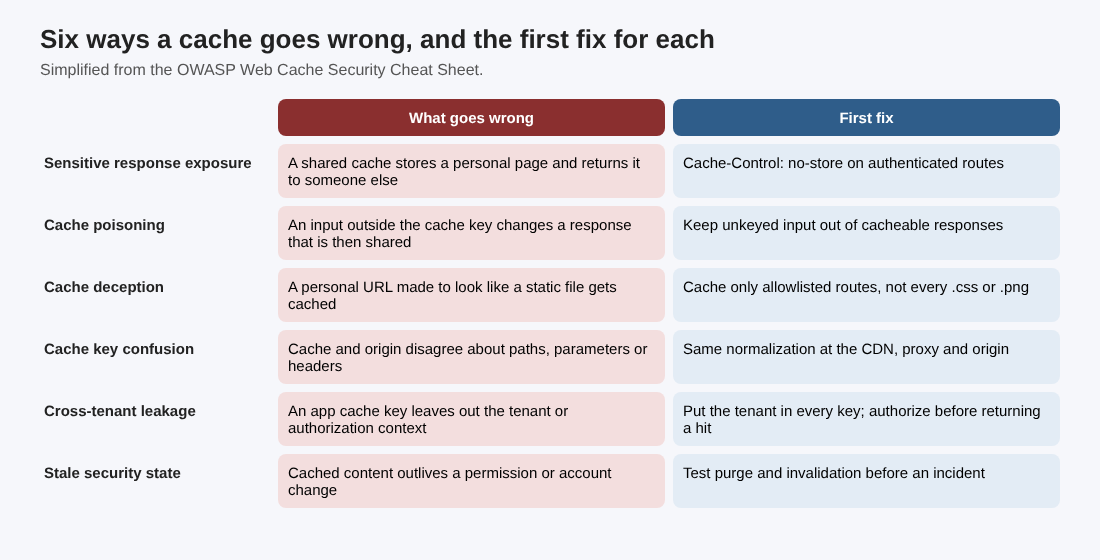
Six ways a cache goes wrong, and the first fix for each
Decide what may be cached before anything is
The first control is a written policy for every route. The sheet says to default to preventing shared caching for authenticated, personalized, tenant-specific or sensitive responses. Three directives do most of the work, and one is easy to misread:
Cache-Control: no-storemeans no compliant cache may store the response. Use it when a response is sensitive.Cache-Control: privatelets a user's own cache keep the response but not a shared cache.no-cachedoes not mean "do not store." It permits storage but requires successful validation before reuse.
Two more traps from the sheet. A Set-Cookie header alone does not stop a response being cached, so cookies are not a privacy setting. And a response shaped by an Authorization header or a session cookie should not be marked public or given an s-maxage unless sharing it was designed and reviewed on purpose.
One operational detail: switching a route to no-store does not delete entries stored earlier. Purge them when you change the policy. The same logic runs through session cookie security: the settings only help if the whole path respects them.
Build a complete cache key
The sheet's rule: every request input that can change a cacheable response must either be part of the cache key or be rejected for that route. In practice that means:
- Include the request method, scheme, host, normalized path and every relevant query parameter.
- Use
Varyfor headers that pick a representation, such asAccept-EncodingorAccept-Language. - Do not lean on
Vary: Cookieas an authorization boundary. For personalized responses, turn off shared caching instead. - Take tenant and user identifiers from trusted, authenticated server-side context, never straight from an untrusted header or query parameter.
- Apply the same URL normalization and parameter handling at the CDN, the reverse proxy and the origin.
- Reject ambiguous requests: conflicting host information, duplicate parameters that mean different things, and malformed path encodings.
For caches inside your app, the sheet suggests a structured, versioned key: environment, resource version, tenant id, resource type and resource id, joined in that order. It also says not to put session tokens, API keys or other secrets in a key, because keys often show up in logs and admin screens.
Stop poisoning and deception
Poisoning and deception look like opposites. In poisoning, an attacker gets a bad response stored for everyone. In deception, an attacker gets a victim's private page stored where it can be read. The defenses overlap.
For poisoning, the central rule is that untrusted input outside the cache key must not influence a cacheable response. The sheet turns that into habits:
- Cache only routes that are meant to be shared.
- Do not let unkeyed headers, or a body on a
GETrequest, change a cacheable response. - Trust
ForwardedandX-Forwarded-*headers only when a trusted proxy added or replaced them. - Canonicalize the host and scheme before using them to build links, redirects or security headers.
- Do not reflect unvalidated request metadata into cached HTML, JSON, redirects or response headers.
If poisoning does happen, purge every affected cache layer and fix the key or the origin behavior before you turn caching back on. Purging alone does not fix the hole.
For deception, the sheet's example is a request such as /account/profile/image.css. It must not resolve to the same personalized handler as /account/profile. So decide cache eligibility from an allowlisted route and a response policy, not from a file extension alone. Make dynamic routes reject unexpected path segments and static-looking suffixes rather than quietly routing them to the same handler. Check that the URL extension and the response Content-Type agree before a static asset is cached. If your app builds redirect links from request data, the same care applies, as in open redirect testing.
Line up the CDN, proxy and origin
A safe origin policy can be undone by a CDN rule, a proxy override or a framework default. The sheet points to the MDN HTTP caching guide, which recommends controlling caching explicitly instead of relying on heuristics. The checks:
- Set browser and shared-cache lifetimes independently, with the right directive for each.
- Review CDN rules that override origin
Cache-Controlheaders or cache by status code, path pattern or file extension. - Give error pages, redirects and authentication responses an explicit cache policy too.
- When a CDN normalizes its cache key, send the normalized form to the origin as well.
- Keep a tested purge mechanism for single keys, tags or narrow groups of routes.
- Fail closed: a sensitive route with a missing, malformed or conflicting policy should not be cached.
Caches inside the app need the same care, because they leak even when HTTP caching is off. Put the tenant and every authorization-relevant detail in the key, and check authorization on every request before returning a hit. A cache hit must not skip object-level or tenant-level checks. Avoid caching final authorization decisions unless the key holds the subject, object, action and policy version, with a tightly bounded lifetime. Version your key format, and limit who can read, configure or purge the cache. Our posts on multi-tenant security and authorization checks cover the other half.
A worked test for your own app
The sheet's last section is about testing the whole cache path, through the same CDN and proxy as production. Here is one afternoon's version for a single authenticated route, such as an account page. Use systems you own or may test.
- Two identities. Request the page as user A, then as user B, through the production path. Neither response may contain the other's data. If you run several tenants, repeat with two tenants.
- One change at a time. Change a single header, query parameter, cookie or path part, and watch whether the cache behaves as you expect. A change that alters the response but not the cache entry is a poisoning lead.
- Static-looking suffixes. Add a suffix like
.cssor an extra path segment to the authenticated route. The app should reject it and the cache should not store it. - Life changes. Change a permission, log out, update the content, then purge. Confirm already stored entries do not survive any of them.
- Watch afterward. The sheet suggests monitoring for unexpected cache hits on authenticated routes, sudden hit-ratio changes, unusual forwarded headers and repeated purges. Log cache status, never secrets.
Write down what each step showed. A clean run means those cases did not leak; it does not mean the app is free of cache bugs, and a new CDN rule can reopen a hole. For a wider look at the headers your pages send, see security headers for web apps.
Frequently asked questions
What is the difference between cache poisoning and cache deception?
In poisoning, an input left out of the cache key changes a response and the harmful version is served to other users. In deception, a personalized URL is made to look like a static file so a cache stores private content.
Does Cache-Control: no-cache keep a page out of the cache?
No. The sheet says no-cache permits storage but requires successful validation before reuse. Use no-store when a response must not be stored.
Does a cookie or a login make a response private?
Not by itself. The sheet says a Set-Cookie header alone does not prevent caching, and authentication does not either. Set an explicit policy on the response.
Do I need a CDN to be affected?
No. The sheet applies to browsers, reverse proxies, CDNs and application-level caches such as in-memory, database and distributed stores.
Get started
Pick one authenticated route this week and run the two-identity test through your production cache path. If you want help with this kind of check, whitehatstoic tests web apps and APIs for weak spots, with a written report and fixes and a retest after fixes. Book a meeting with whitehatstoic and tell us about your app, your deadline and your biggest worry; work is scoped after a short call.
Build it right. Test it thoroughly. Keep it safe.
Visit whitehatstoic.com↗


Comments
No comments yet.
Sign in or make an account to comment.