When to Restart a 2048 Game Instead of Playing On: 6 Signs
Knowing when to restart a 2048 game instead of playing on saves you time and protects your best score. The short version: restart when the board can no longer make the tile you are chasing, and play on while you still have a merge, an empty square, or a way to bring two equal tiles together. On a flat board that point comes fast. On a cube it comes later than you think, because the squares you cannot see are often still empty.
If you want to practise this judgment, Evolved 2048 puts the 2048 puzzle on a cube you turn like a Rubik's cube. A stuck front face is not always the end, because you can twist a row or column to carry tiles round from the other five faces.
When to restart a 2048 game instead of playing on: the quick answer
Restart if both of these are true:
- Your biggest tile is trapped where it cannot grow, with small tiles walled around it.
- You have looked at every face and found no pair you can bring together in the next few moves.
Play on if either is false. One open square, one equal pair, or one twist that lines up a match is enough to keep going.
In Evolved 2048 the game only ends on its own when all 54 squares are full and no face has two equal tiles side by side. In Edge mode the rule adds pairs that sit across an edge. So the game rarely makes the call for you. You make it.
Why restarting early can raise your best score
A good game is mostly decided in its first few dozen moves. That is when you set up a corner and a chain of tiles. If the start goes wrong, every later move spends effort repairing it instead of building.
Restarting costs you nothing on the scoreboard. When you press New game, the box tells you what happens: "This game ends and its score of {score} is kept only if it is your best." Your Best stays where it was. And each mode (Evolved, Edge and Fun) keeps its own best score, so trying a fresh start in one mode does not touch the others.
Luck plays a part too. New tiles are a 2 most of the time and a 4 about one time in ten. In one scripted test, the same opening position played two different ways got stuck at move 32 and move 28. Two fresh games with the first key order got stuck at move 37 and move 42. Those are single games, not averages, but they show how much the early tiles can swing a run.
Six signs your 2048 board is beyond saving
- Your biggest tile is in the centre square. On a 3 by 3 face, the centre touches four neighbours. Small tiles crowd in from every side and you cannot build a chain off it.
- You see "The cube is full. Merge two tiles on a face to make room before you twist." A twist needs one empty square for its new tile. If no face has a merge either, you are out of tools.
- The board is full of 2s and 4s spread across many faces. Lots of small, scattered tiles means many moves of cleanup before any big merge.
- Your chain is broken in two places. A row like 64, 8, 32 with a 4 next to the 32 needs several lucky tiles to fix. One break is repairable. Two usually is not.
- You are early in the game and the corner is already gone. At 30 moves, a restart costs you 30 moves. At 300, it costs far more.
- You started in the wrong mode. If you meant to chase your Edge best and you are in Evolved, the run will not count where you wanted. Check the bottom left of the screen, which names the mode.
For the moves that cause signs 1 and 4, read should you merge small tiles first in 2048.
When a messy board is still worth rescuing
Most boards that feel lost are not.
The front is full but the other faces are empty
In one scripted test that used slides only, the front face filled up and could not slide at move 46. The other five faces were completely empty. That board looked dead from the front. It was not. A single twist carries a row of tiles off the front and brings empty squares on.
Every square is full but pairs exist elsewhere
In another test that mixed slides and twists, all 54 squares were full at move 165 with a score of 1160. The front had no slide. But other faces still had equal tiles side by side, so the game was not over. Turning the cube to that face and sliding would merge them.
A match sits just over an edge
A twist can bring a tile from the right face onto the front next to its match. In one test, a 16 on the right face's top left square and a 16 on the front's middle left square were apart. Pressing Shift and 1 twisted the top row left, which put the right face's 16 above the other 16. Then Up merged them into a 32 in the top left corner. Two moves, and a broken corner was fixed.
For a full walkthrough of repairs like this, see how to recover a 2048 game after a bad move.
Count the cost: score, time and the tile you are chasing
Score. Look at Score and Best in the top bar. Best rises with your Score as you play, so if the two numbers match, this game is your best and it will be kept when you restart. If Score is far below Best, ask whether the board can realistically pass it.
Time. Moves are the honest measure of time spent. A slide counts one move. A twist counts one move and adds a new tile. A whole-cube turn counts no move at all.
The tile you are chasing. If you want 2048, ask whether your board can still build a 1024 next to another 1024. If you already made 2048, the game offers Keep going, and the cube, Score and Moves carry on. A messy board past 2048 may be worth playing out just to see how far it goes.
One more cost to know: there is no undo. A twist can be reversed with Shift and the same key, but that counts as a second move and adds a second new tile. So "I will just try it and take it back" always costs you something.
A 30-second check before you hit New Game
Run this check every time you feel the urge to restart.
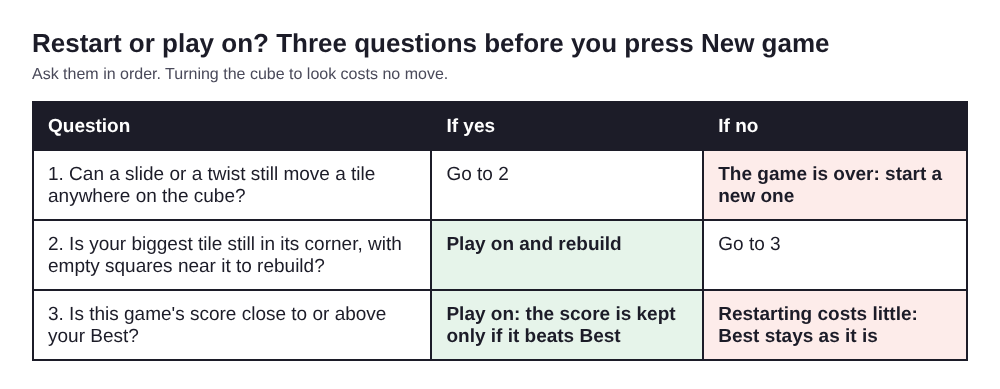
Three questions, in order, before you press New game.
- Turn the cube all the way round. Press Shift and Left four times to see the four side faces and come back to where you started. Then press Shift and Up: the first press brings the bottom face to the front, the second brings the back, and the third brings the top. A fourth press puts the cube back as it was. Turning is free: no move, no new tile, no score change.
- Look for any equal pair side by side on any face. If you find one, you can turn that face to the front and slide.
- Look for one empty square. If there is one, a twist is possible: drag a row on the right face sideways or a column on the top face, or press a number key from 1 to 6, and add Shift to twist the other way.
- Ask where your biggest tile will be after the next move. If every option pulls it out of its corner, that is a strong restart sign. If two options look equally good, our guide on two equal moves in 2048 helps you choose.
- Open New game and read the score line. The box shows the score you would leave behind. If you change your mind, press Keep playing or Escape. Your game, Score, Moves and mode stay exactly as they were.
Opening the box does not end anything. Only picking a mode starts a new game, and that includes picking the mode you are already in.
Frequently asked questions
Is it bad to restart 2048 a lot?
No. Restarting a bad opening is often the fastest way to a higher best score. In Evolved 2048, your best score is kept for each mode no matter how many times you start again.
Can you come back after your largest tile leaves the corner?
Often, yes, especially on a cube. A twist can carry a tile from another face onto the front, and a slide can then push your big tile back into a corner. If the corner fills with small tiles first, restarting may be quicker.
How many empty cells do you need to recover?
In Evolved 2048, a twist needs one empty square somewhere on the cube for its new tile. One is enough to keep playing, but more empty squares give you more choices and more time to repair a broken chain.
Should you restart if you have no undo?
Not just because a move went badly. With no undo, every move counts, so take the 30-second check first. Turning the cube is free, so you can always look before you decide.
Get started with Evolved 2048
Open the game, pick a mode, and play until your first board feels stuck. Then run the check above before you touch New game. You will find that many "lost" boards still have a twist left in them. You can play without an account, and your game, best score and settings are saved on your own device. If you want to know more about that, read what the game keeps about you.
Play Evolved 2048: it is free and plays in your browser on a computer or a phone.
The 2048 puzzle on a Rubik's cube, and past 2048.
Visit evolved2048.vlvd.net↗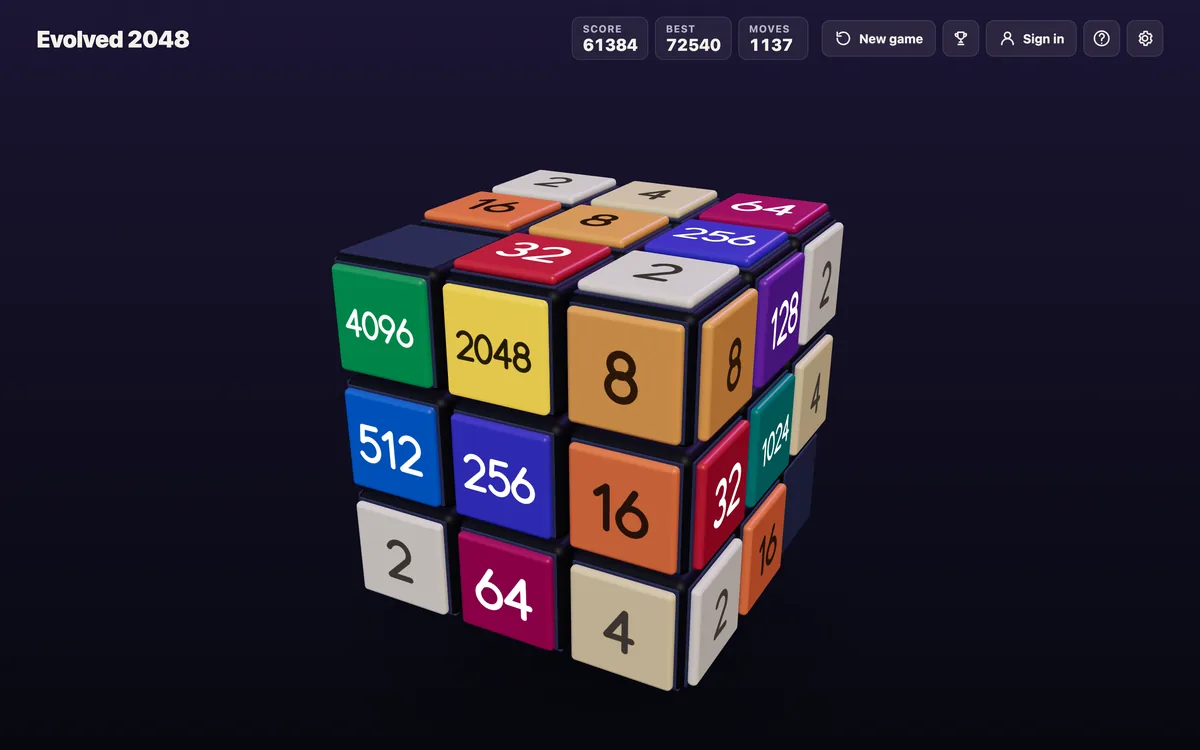
Comments
No comments yet.