Recover a 2048 Game After a Bad Move: Rebuild on a Cube
To recover a 2048 game after a bad move, stop sliding and read the board. Find your biggest tile, find the nearest tile that matches something next to it, and rebuild one merge at a time. On a cube you have more ways back than on a flat grid: you can turn the whole cube for free to look at other faces, and you can twist a row to carry a tile from another face next to its match. This post shows you how to rebuild on a cube after a mistake.
Evolved 2048 puts the 2048 puzzle on a cube you turn like a Rubik's cube, with six faces of nine squares. It is free and plays in your browser, so you can try each recovery move below as you read.
What counts as a bad move in 2048 and why it hurts
A bad move is any slide that breaks the order you were building. The usual ones are these:
- A slide that pulls your biggest tile out of its corner.
- A slide that drops a new small tile into the square your big tile just left.
- A slide that scatters a chain like 64, 32, 16 so the pieces no longer touch.
It hurts because every slide or twist adds a new tile. In Evolved 2048 that tile is a 2 nine times out of ten, otherwise a 4, and it lands on a randomly picked empty square of the front face. So a small tile can land right in your corner, and now your 64 has a 2 sitting where it should be.
The board is also small. Each face is 3 by 3, so the front fills fast. In one test game played with slides only, the front was full and stuck at move 46 while the other five faces were still empty. A single bad slide on a nine square face can cost you a lot of room.
First steps to recover a 2048 game after a bad move
There is no undo in Evolved 2048. Control and Z, Backspace and the other usual keys change nothing, and a reload keeps the board as it is. So recovery means playing forward. Do these three things first.
- Stop and look. Do not slide again on reflex. A second quick slide often makes it worse.
- Turn the cube to scout. Press Shift and an arrow key, or drag the space around the cube. The whole cube turns. Turning adds no points, counts no move and adds no new tile, so you can look at every face and turn back at no cost. Our post on whether turning the cube costs a move covers this in more detail.
- Find a match. Look for a tile on another face that equals a tile on your front. That pair is your way back.
Rebuild your corner chain one tile at a time
The goal is a chain: your biggest tile in a corner, the next biggest beside it, and so on, so each merge feeds the next. You rebuild it from the small end, not the big end.
Here is a chain played out on a set-up front face. The top row read 64, 32, 16 from left to right. The middle row read 4, 8, 16. The bottom row was empty.
- Up merged the two 16s into a 32 at the top right.
- Left merged the two 32s into a 64, next to the 64.
- Left again merged the two 64s into a 128 in the top left corner.
Three slides, and the score went from 0 to 228, counting two new 2s that merged into a 4 on the last slide. The lesson for recovery: fix the smallest broken link first. If your bad move left a stray 2 in the chain, build that 2 up to match its neighbour, then let the chain fold back into the corner.
Know how slides merge so you do not break the chain again. A tile made in a merge does not merge again in the same slide. And the pair nearest the wall you slide towards merges first. A row of 2, 2, 4 slid right becomes empty, 4, 4, not a single 8. Plan for that extra slide.
Use the cube to rebuild: free turns and new faces
The twist is your strongest recovery tool. Drag a row on the right face sideways, or a column on the top face. That layer turns a quarter and carries its tiles to the next face. On a keyboard, 1, 2 and 3 twist the top, middle and bottom row right. 4, 5 and 6 twist the left, middle and right column up. Hold Shift to twist the other way.
Here is a worked example. Your front has a 16 on the middle left square. The right face has a 16 on its top left square, just over the front's top right edge. Press Shift and 1. The top row twists left, and the right face's 16 lands on the front's top left square, right above your other 16. Then press Up. The two merge into a 32 in the top left corner. Two moves, and you have pulled a tile in from another face to fix a gap.
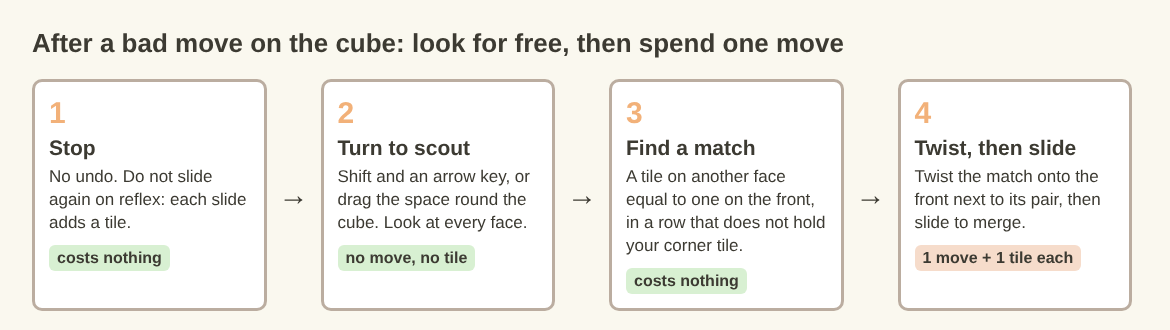
The recovery loop: look first for free, then spend a move only when it lands a match.
Keep three rules in mind:
- The whole layer moves. When you twist the top row, the front's own top row leaves for the next face. If your big tile sits in that row, it goes too. Pick a row or column that does not hold your corner tile.
- A twist costs a move and adds a tile. It adds no points, counts one move and adds a new 2 or 4, on the front when there is room.
- A twist needs one empty square. If all 54 squares are full, the game says "The cube is full. Merge two tiles on a face to make room before you twist." Our post on what to merge when the cube is full walks through that spot.
If you are not sure which face is which after a few turns, read which face is the front and which to twist. In Evolved and Edge modes, slides work on the front face, so you always bring the action back there. Fun mode is different: a slide runs each row or column all the way round the cube, equal tiles along it merge, and the tiles pile up on the front.
If you play in Edge mode, you get one more way back. A slide towards an edge of the front also merges the tile at that edge with an equal tile just over the edge, on the next face, and the new tile stays on the front. In tests, it only merged with the square directly across the edge, not one beside it.
Which tiles to merge first when the board is crowded
After a bad move the front is often crowded. Merge in this order:
- Merges that open the square next to your corner. That square is where your chain grows.
- Small pairs away from your corner. Two 2s far from your big tile are cheap room.
- Merges that keep one face with space. When the game ends, the game's own advice is: "Next time, keep room on one face so a twist can still bring tiles round to their match."
Do not chase a big merge that drags your corner tile into the middle. A 128 in the centre of a full face is harder to use than a 64 in a corner. For more on timing, see whether to merge small tiles first.
Common recovery mistakes that end the run
- Sliding fast to "fix" it. Each slide adds a tile. Panic slides fill the face.
- Twisting back on reflex. You can reverse a twist with Shift and the same key, but it counts as a second move and adds a second new tile. Only do it if the first twist really hurt.
- Twisting the row that holds your big tile. The whole layer leaves the front.
- Sliding on an empty face. If you turn to an empty face and slide, nothing moves. Turn back to the face with tiles.
- Quitting too early. A stuck front shows "Nothing moves that way. Try another way, or twist a row." That is not the end. In a test game with slides and twists, all 54 squares were full at move 165, and the game was still not over because other faces had equal tiles side by side.
If you do decide to start again, the New game box tells you: "This game ends and its score of {score} is kept only if it is your best." Your best score is kept for each mode, so a fresh start does not wipe it.
Frequently asked questions
Can you undo a move in 2048?
In Evolved 2048, no. Undo keys like Control and Z change nothing. You can reverse a twist with Shift and its key, but that counts as another move and adds another new tile.
How do you get your big tile back into the corner?
Clear the path first: merge the small tiles between your big tile and the corner, then slide towards it. If a stray small tile blocks the corner, twist a row or column to bring its match in from another face, merge it, and then slide your big tile home.
Does turning the cube count as a move?
No. A whole-cube turn adds no points, counts no move and adds no new tile. Use it freely to scout the other faces before you commit.
When is a 2048 game too far gone to save?
In Evolved mode the game ends only when all 54 squares are full and no face has two equal tiles side by side. Until then, look for a pair on any face and a twist to bring it to the front.
Get started with Evolved 2048
The best way to learn recovery is to make a mess on purpose and fix it. Start a game, slide your big tile out of its corner, then turn the cube to scout and twist a match back in. Watch the Moves counter: turns leave it alone, slides and twists add one. A signed-out game, best score and settings are saved on your own device, as our post on what the game keeps about you explains.
Play Evolved 2048: it is free and plays in your browser on a computer or a phone.
The 2048 puzzle on a Rubik's cube, and past 2048.
Visit evolved2048.vlvd.net↗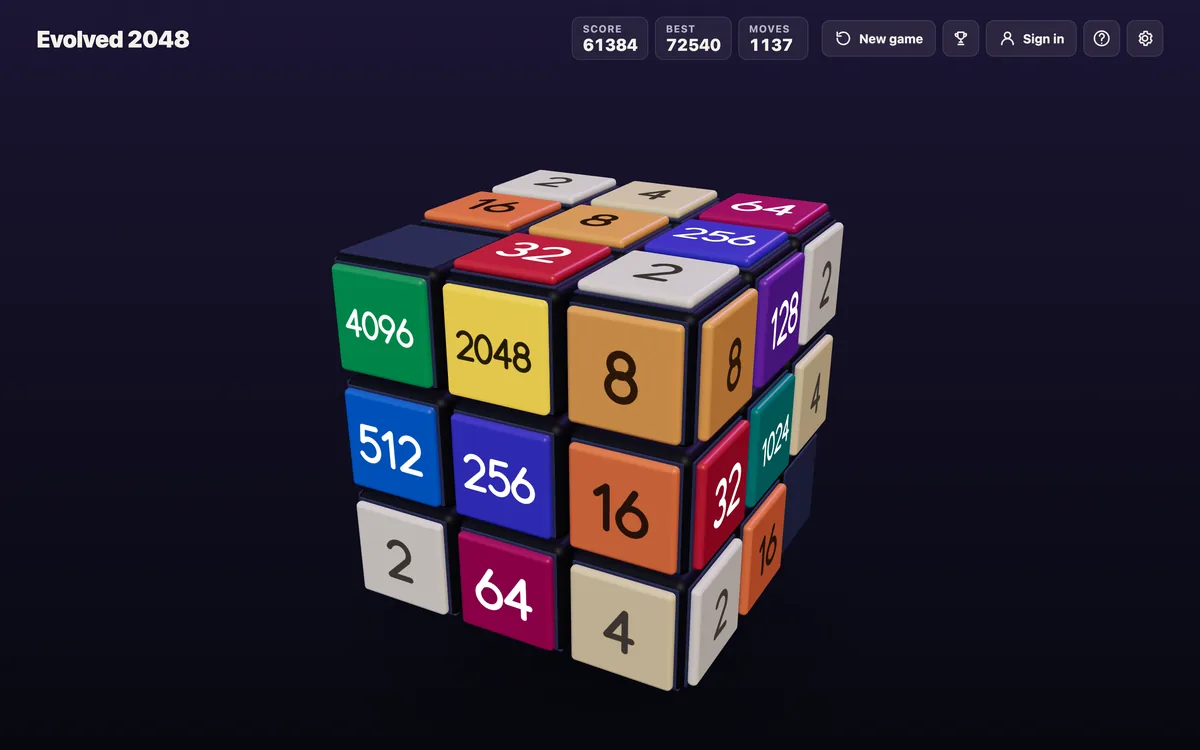
Comments
No comments yet.