Aquarium problems log: what you tried in the tank
An aquarium problems log is a short record of each problem in your tank, the readings and changes around it, every fix you tried and what happened after. When algae comes back or a fish starts acting oddly, you want three answers fast: what the water looked like last time, what you changed, and whether it helped. Written down, those answers are still there months later.
If you want that log to draw itself as a map, Problem Graph lets you write each tank problem in one line, attach the fixes you try, mark each one worked, partly or failed, and link the problems that keep turning up together.
Why keep an aquarium problems log
A tank problem can have more than one possible cause, and advice tends to arrive in bundles. If you try three suggestions in the same week and the water clears, you have solved the problem without learning anything. The next time it happens, you are back to guessing.
Advice from other keepers also describes their tank, not yours. Their stock, their tap water, their light and their routine are different. Your own record, even a messy one, is the only one that matches your tank.
A log has one more use: it shows you when you are stacking changes. Once every change has to be written down, it is easier to notice that you are about to make a third one before the first has had time to show a result. The one change at a time post explains why that matters for any fix.
What to record for each tank problem
Keep each entry short; a log you write in a minute is a log you keep writing. For every problem, note:
- The symptom in one line. "Green film on front glass, back four days after cleaning." Say where and how fast.
- The readings you take. Whatever you already test for, written the same way each time, so two entries can be compared.
- Recent changes. New fish or plants, a new food, a filter clean, a different light schedule, a holiday feeder, a bigger or smaller water change than usual.
- The date you first noticed it. Patterns only show up when entries are dated.
Of these, the recent changes line does the most for you later. A problem that starts three days after a filter clean, a new fish or a move is a clue you would never rebuild from memory.
Log what you tried and whether it worked
The heart of the log is the attempts. For every fix, write what you did, the date you started, and what happened after a wait you decide in advance. Use three outcomes, not two:
- Worked: the problem went away and stayed away for as long as you said you would wait.
- Partly: it improved but came back, or only one symptom changed.
- Failed: no change, or it got worse.
Partly is often the honest answer, and it is useful. If cutting the light hours slows the algae without stopping it, light is part of the story you suspect, not all of it.
Keep the failed ones too. Problem Graph's home page puts it plainly: "The graph is honest. A solution that failed three times stays on the map as a failed solution, and that is exactly what the next person needs to know." In a tank log, the next person is usually you, six months later, about to buy the same bottle that did nothing last time.
In Problem Graph you add a fix as an idea first, mark it as the one you are trying, then record the outcome once you know. That shows at a glance which fixes are still waiting on a result. The same habit works for any repeat problem; the bike repair log post shows it with a different kind of machine.
An example aquarium problems log
Here is a made-up log for one small planted tank over a few months. Each problem is one line, and each fix sits under it with an outcome. The causes are the keeper's own suspicions, written as suspicions, not as rules about fishkeeping.
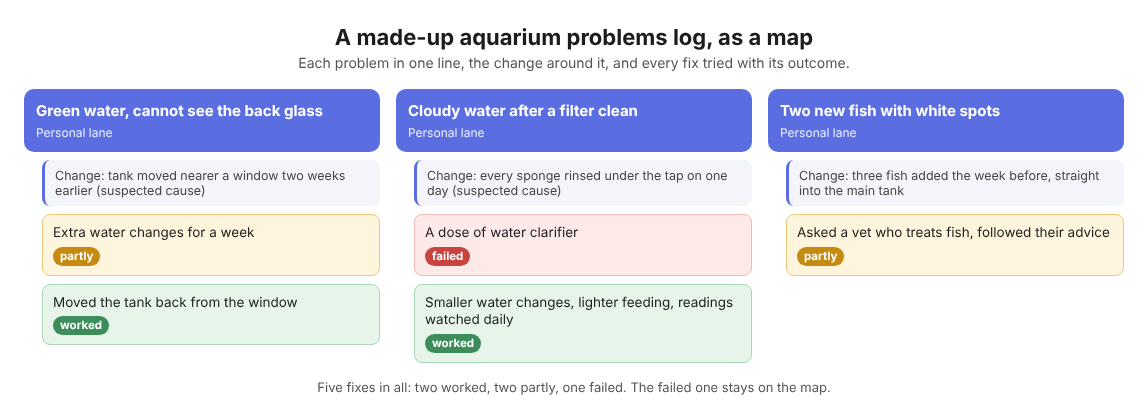
The made-up tank's three problems and the fixes tried, as a map.
Problem 1: green water, cannot see the back glass
- Recent change: the tank was moved nearer a window two weeks earlier. Suspected cause: more daylight.
- Tried: extra water changes for a week. Partly. Clearer for a day, then green again.
- Tried: moved the tank back away from the window. Worked. Still clear a month later.
Problem 2: cloudy water after a filter clean
- Recent change: every filter sponge was rinsed under the tap on the same day. Suspected cause: that rinse.
- Tried: a dose of a water clarifier. Failed. No change after three days.
- Tried: smaller water changes and lighter feeding while the readings were watched daily. Worked. Clear and back to the usual readings in about a week.
- Note for next time: clean one sponge at a time and write down how.
Problem 3: two new fish with white spots
- Recent change: three fish added the week before, straight into the main tank.
- Tried: asked a vet who treats fish and followed their advice. Partly. One fish recovered, one died.
- Note for next time: ask the vet how to settle new fish before adding them.
Notice how the notes turn into the keeper's own house rules. That is the payoff: the log is where your rules come from, each one tied to the problem that taught it. For a sick fish, the log helps you describe what happened to a vet or an experienced keeper; it does not replace their advice.
Spot patterns across months
After a few months, read your entries side by side and look for problems that share a change:
- Did several problems start within days of a filter clean?
- Do algae entries cluster after the light schedule changed, or in one season?
- Did every sick fish entry follow a new arrival?
- Which fixes appear more than once, and what were their outcomes each time?
These are questions to ask of your own log, not answers. When the pile of entries gets large, the affinity diagram example shows how to sort them into groups. The houseplant problems journal uses the same idea for living things on a windowsill.
Turn the log into a map of connected problems
A list hides connections. In Problem Graph, each problem is a node, each fix is a solution attached to it, and you link the problems that belong together. Link "Green water" to "Tank moved near window". Link "Cloudy water after filter clean" to "Filter sponges rinsed under the tap". As the home page says, "Patterns show up on the map that never show up in a list."
You can also add requirements, the things a solution needs. If "Settle new fish before adding them" needs a spare tank and a heater, put those on the map, and you will see why the fix has not happened yet.
- Private by default. Your problems are saved to your account and nobody else sees them. Check the log on your phone next to the tank, or on a computer.
- Lanes. Put tank problems in the personal lane and filter the map by lane when you only want to see the tank.
- List view. If you want the plain list next to the map, it sits beside the graph in the app.
- Private networks. If you look after a tank with a partner or a family, create a network, hand out the invite code and share a main node into it. Its solutions, their outcomes and their requirements go along; anything only linked to it stays private.
Frequently asked questions
What should I write when I do not know the cause?
Write the symptom, the date and every recent change, then list your suspected causes as suspicions. The log is there to test them, one fix at a time.
Should I keep a separate log for each tank?
Yes, because each tank has its own water, stock and light. In Problem Graph, start each problem line with the tank's name so you can tell them apart and link problems within one tank.
How long should I wait before calling a fix failed?
Decide the wait before you start and write it next to the fix, so the outcome is not chosen by your mood that day. If you are unsure how long a fix needs, ask a shop or keeper you trust and write their answer down too.
Is a log a substitute for a vet?
No. A log helps you tell a vet what happened and when, but a sick fish needs their advice, not a guess from your notes.
Get started
Pick the tank problem that bothers you most right now. Write it in one line, add today's readings and recent changes, and attach the first fix you will try with the date you will check it.
Try Problem Graph: it is free, and you can look around the public network without an account. Write one problem down in a line and attach the first thing you will try.
Every problem you carry, on one map. Solved together.
Visit problemgraph.vlvd.net↗


Comments
No comments yet.