Beekeeping problems log: what you tried at each hive check
A beekeeping problems log is a running record of what went wrong in a hive, what you tried at each hive check, and what happened after. It is different from your inspection notes. Inspection notes say what you saw. A problems log says what you did about it and whether it worked. If you keep bees for more than one season, the second record is the one you can reuse.
Problem Graph is a free journal that fits this kind of record. You write each hive problem in one line, attach the fixes you try, and mark each one as worked, partly or failed. You can also link problems that belong together, and they all show up on one map.
Why a beekeeping problems log beats memory and scattered notes
Memory tends to keep the outcome and lose the steps. By March you may know Hive 2 died over winter, but not whether you treated it in August or September, or whether you had already combined it with a weak nuc.
Scattered notes fail in a different way. You have frame counts written on the lid in marker, a notebook in the truck, a few lines in your phone, and a text thread with your mentor. Each one holds part of the story. None of them tells you which fix worked.
A problems log fixes both. Each problem gets one entry. Each thing you tried is attached to that problem. Each attempt gets an outcome. When the same problem comes back next year, you read the answer instead of guessing.
What to record at each hive check: symptom, hive, date, and conditions
Keep it short. You are wearing gloves and the bees are flying. Write the minimum at the hive and fill in the rest in the car.
- Symptom in one line. "Hive 3: no eggs, no young larvae" is enough. Describe what you saw, not what you think caused it.
- Which hive. Name or number every colony and use the same name every time.
- Date. This is the basis for every later comparison.
- Conditions. Weather, rough temperature, whether a flow is on, and anything you changed recently, like a honey pull or a new super.
- Evidence. A mite count, the number of frames of brood, queen cells seen. Numbers beat adjectives.
If you want to count something before deciding it is a problem, a simple tally helps. The method in this check sheet example works well for mite washes across several hives.
Logging what you tried at each hive check and what happened next
This is the part that turns notes into answers. For every problem, record three things:
- The ideas. List the options you considered, even the ones you did not try.
- What you are trying. Mark the option you actually used, and the date.
- The outcome. At the next check, come back and mark it worked, partly or failed.
In Problem Graph this is the basic structure. A problem is a node on your graph. You attach solutions to it as ideas, mark the ones you are trying, and record the outcome as worked, partly or failed. A problem lands on the graph the moment you press Enter, so a one-line entry at the hive is enough to start.
Keep the failures. The product page puts it this way: "The graph is honest. A solution that failed three times stays on the map as a failed solution, and that is exactly what the next person needs to know." That next person is often you, a year later, about to try the same thing again.
Common hive problems worth tracking: varroa, queenlessness, swarming, and robbing
Varroa
According to Wikipedia's Varroa mite article, varroa management centres on monitoring mite numbers, and about 3% of bees infested is treated as the point where more management is warranted. The same article describes two kinds of count: a sticky board under a screened floor estimates the total mites falling in the hive, while a powdered sugar or alcohol wash of a known sample of bees, such as 300, estimates mites per bee. Those numbers are not the same measure, so log which method you used, the count, what you did, and the count after. A fix marked "partly" is still useful: it tells you to check sooner next time. This post is about the record; for treatment choices, follow your local bee inspector or beekeeping association.
Queenlessness
Record what you saw (no eggs, a laying worker pattern, emergency cells) and what you did: waited, added a frame of eggs from another hive, combined, or requeened. Link the problem to the donor hive if you pulled a frame from it, because that hive is now part of the story.
Swarming
Note queen cells, how crowded the boxes were, and what you tried: a split, more space, removing cells. Swarm season comes round each year, and last year's outcome is a useful thing to read before it does.
Robbing
Write down when it started, what changed just before, and whether a weak colony or an open feeder was nearby. Record the fix you used, like a reduced entrance or a robbing screen, and whether it held.
A sample problems log entry from an example inspection
Here is how one entry might look, built around a made-up but ordinary late summer inspection. The numbers are only an example.
Problem (Personal lane): "Hive 2: high mite count after honey pull."
Conditions and evidence: Warm, dry, flow ending. Alcohol wash showed a count well above where you want it. Brood pattern spotty.
Solutions attached:
- Idea: treat now with the product you used last year.
- Idea: brood break by caging the queen, then treat.
- Trying: treat now. Date noted.
Next check: Count down, but not as low as you wanted. Outcome marked partly. A second round is added as a new solution and marked trying.
Linked problem: "Hive 2: robbing at entrance," logged the same week on the same weakened colony, so you link the two problems.
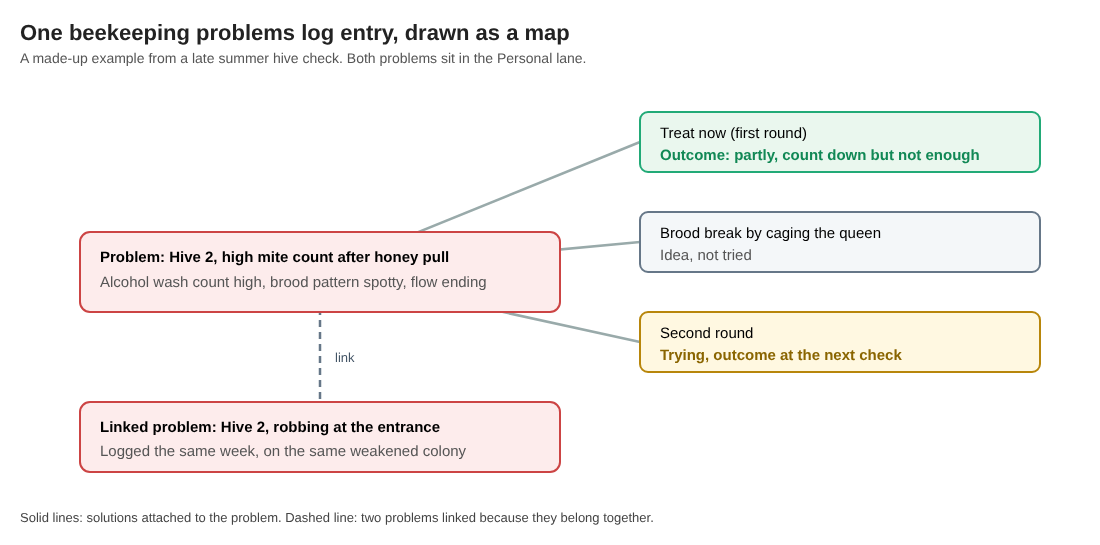
A made-up example: the first round is marked partly, the second is being tried, and the robbing problem is linked.
That is the whole entry. It takes a few minutes. Next August it answers the question "what happened last time?" in one look.
Spotting patterns across hives and seasons
One entry is a note. Twenty entries across three hives and two seasons start to show you things. As the home page puts it, "Patterns show up on the map that never show up in a list."
On the graph you might see that every robbing problem links back to a colony you had just treated. Or that every queenless problem followed a split made in cool weather. Those links are the patterns. You make them by linking problems that belong together, and they can cross lanes if a work or family schedule kept you from checking on time.
The app lets you filter by lane and switch to a List view beside the map when you want to scan entries in order. If your pile of problems gets large, sorting them into groups first can help. This affinity diagram example shows one way to do that.
You can also take your log beyond yourself. Everything is private by default: only you see it, and it follows you to any phone or computer you log in on. If you belong to a local club, you can create a private network, give members the invite code, and share a problem into it. Note that anyone with the invite code can join. To share a problem, you mark it as a main node. Its solutions, their outcomes and the requirements they need go along with it. Problems you only linked to it stay home.
If a club wants to decide which shared problems to work on first, the nominal group technique is a fair way to rank them as a small group.
You can also make a main node public, so others in the app can link their own problems to it and borrow solutions that worked. Borrowing one into your graph takes one tap and keeps a link back to where it came from. You can also ask for suggestions: the AI proposes new solutions grounded in what worked for others on similar problems. Treat each one as an idea to weigh and record its outcome like any other attempt.
Frequently asked questions
How often should I update my hive problems log?
Update it at every hive check, even if the update is only "no change." Add a fix's outcome at the check where you can first see it.
Should I keep one log per hive or one for the whole apiary?
Keep one log for the whole apiary and name the hive in each problem's first words. That way you can link problems between hives, like a frame moved from one colony to rescue another.
What is the difference between a hive inspection record and a problems log?
An inspection record lists what you saw on every visit, problem or not. A problems log only tracks things that went wrong, what you tried, and whether it worked, so you can reuse the answer later.
Can I use the same method for other hobbies like aquariums?
Yes. The structure of problem, attempts and outcome works for any living system you look after. See this aquarium problems log for the same idea applied to a fish tank.
Get started
Open the app before your next inspection. If your graph is empty, the app page has a "Load example set" button so you can see how problems, solutions and outcomes fit together before adding your own. You can browse the public network with no account. To add your own problems, create an account with a username and a password. It works in your phone's browser, so you can write the first line while you are still in the bee yard.
Try Problem Graph: it is free, and you can look around the public network without an account. Write one problem down in a line and attach the first thing you will try.
Every problem you carry, on one map. Solved together.
Visit problemgraph.vlvd.net↗


Comments
No comments yet.