.NET security checklist: what to check in ASP.NET Core
A .NET security checklist is easiest to trust when it comes from one maintained source. This one follows the OWASP DotNet Security Cheat Sheet, which covers modern .NET and ASP.NET Core and keeps advice for older .NET Framework apps in a separate part at the end. Its first rule is plain: keep the runtime and your packages supported and patched, and follow the .NET security announcements, which include ASP.NET Core advisories. The rest of this post walks the sheet in the order a team can check it.
Building or testing something that has to be safe? Book a meeting with whitehatstoic: it builds web and mobile apps, tests web apps and AI systems for weak spots, and gives independent advice.
A .NET security checklist starts with what you already use
The OWASP DotNet Security Cheat Sheet is written around security decisions, not around a list of attacks. For each area it names the framework feature to use and then says where that feature stops. Those stopping points are the useful part, because they are where teams assume they are covered and are not.
The order below is sign-in, authorization, input, data and transport, then an afternoon pass to put it into practice. If your app still runs on .NET Framework, the data and configuration section ends with the sheet's short list for that.
Sign-in, passwords and cookies: use Identity, then check the settings
The sheet says to use ASP.NET Core Identity or a supported identity provider integration, and not to write password recovery or session management yourself. Then it lists settings that are easy to miss:
- Lockout has to be turned on and counted. Use a store that supports lockout, enable it for the affected users (LockoutEnabled), configure IdentityOptions.Lockout, and pass lockoutOnFailure: true to PasswordSignInAsync. Without that argument, failed attempts do not count toward lockout.
- Lockout does not cover every flow. Add login throttling and multifactor authentication, and protect registration and password recovery too. Return consistent responses, with comparable timing, so those pages do not reveal whether an account exists. Our login rate limiting checklist goes further on this.
- Do not hash passwords yourself. Use Identity's PasswordHasher<TUser>, not KeyDerivation.Pbkdf2 called directly. Set PasswordHasherOptions.IterationCount to meet the Password Storage Cheat Sheet's PBKDF2 guidance for your Identity version, and benchmark it on the machines you deploy to, because the default may not meet current guidance. See password storage.
- Length over composition. Set IdentityOptions.Password.RequiredLength by the strength guidance and switch off RequireDigit, RequireLowercase, RequireUppercase and RequireNonAlphanumeric. Update the scaffolded registration and reset validation to match, and screen for common and breached passwords, which length settings do not do.
For the application cookie, configure it through ConfigureApplicationCookie. Set Cookie.HttpOnly to true and Cookie.SecurePolicy to CookieSecurePolicy.Always. Pick Cookie.SameSite to fit your sign-in flow and test federated sign-in before tightening it. Set an ExpireTimeSpan, and remember that with SlidingExpiration on, activity renews the ticket, so it is not an absolute limit. HttpOnly keeps scripts from reading the cookie, but injected scripts can still make authenticated requests.
One more check: when a security-sensitive change happens, such as a password or role change, the user's security stamp should change, with UserManager.UpdateSecurityStampAsync(user) if the operation does not already do it. Old cookies are rejected only at the next stamp validation, so revocation is not instant.
Authorization: a fallback policy is not a resource check
The sheet prefers a fallback policy that requires authentication, with intentionally public endpoints marked [AllowAnonymous] or AllowAnonymous(). Two limits apply. The fallback covers only requests that reach the authorization middleware, so static files served earlier are not protected by it. And named policies do not inherit the fallback, so each one must include the authentication requirement itself.
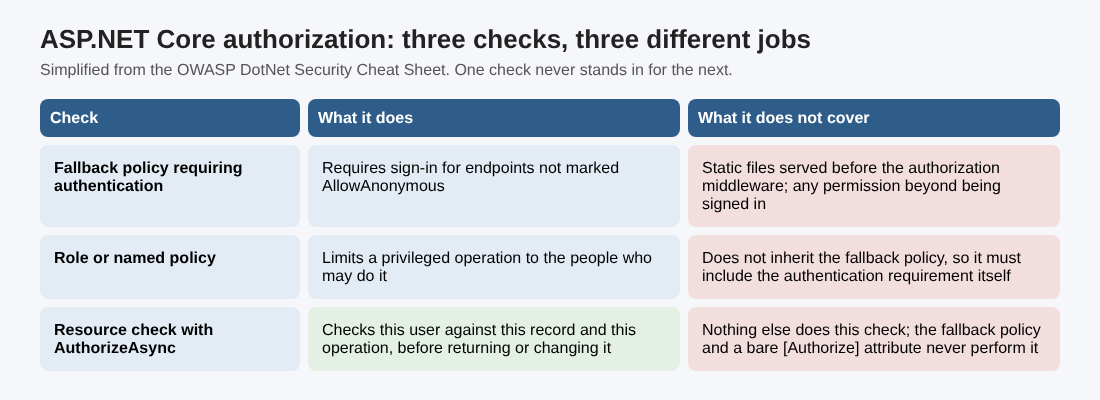
Signed in does not mean allowed. Privileged operations need a role or named policy, such as [Authorize(Policy = "...")] or RequireAuthorization("..."). And for object-specific permissions, call IAuthorizationService.AuthorizeAsync with the resource and the requested operation before you return or change it. Neither the fallback policy nor an [Authorize] attribute does that check. Our posts on authorization checks and IDOR prevention show why this is where many apps leak records.
Redirects belong here too: for a local return URL use LocalRedirect or check Url.IsLocalUrl, and choose any outside destination from a server-controlled allowlist.
Input, output and serialization
The sheet's input rules are short and specific:
- SQL. Prefer Entity Framework LINQ queries. For SQL text use the parameterized API your EF Core version supports, such as FromSql or FromSqlInterpolated, and never concatenate untrusted values into text passed to FromSqlRaw or other command APIs. Parameters stand for values, not table or column names, so map a dynamic name to a fixed allowlist. See SQL injection testing.
- Cross-site request forgery. When the browser sends credentials automatically (cookies, or Windows, Basic or Digest authentication), protect state-changing operations with ASP.NET Core antiforgery validation, and never change state in GET requests. In MVC, register AutoValidateAntiforgeryTokenAttribute globally; Razor Pages protect by default; other endpoint types need their own configuration. JavaScript requests must send the request token in the configured header or form field, along with the antiforgery cookie. Do not add IgnoreAntiforgeryToken just to make a failing request pass. See CSRF protection.
- Cross-site scripting. Razor encodes ordinary output in HTML contexts. Do not bypass it with Html.Raw or HtmlString for untrusted content, and remember that HTML encoding does not make a value safe inside JavaScript, CSS or a URL. If users must submit HTML, run it through a maintained sanitizer, and add a Content Security Policy as a second layer.
- Deserialization. Do not use BinaryFormatter, which cannot be made secure. Prefer a data-only format such as JSON with System.Text.Json, read it into types your application defines, and validate the values before use. A different serializer does not remove the need to validate data or to constrain custom converters and type selection. For XML, turn off external resource resolution you do not need, since defaults differ by API and framework version.
Data, transport, configuration and older apps
For keys and encrypted data, the sheet warns about scope. With Windows DPAPI through ProtectedData, user scope ties decryption to one account while machine scope lets other accounts on the computer decrypt; neither protects against code running as the decrypting account. Protect ASP.NET Core's Data Protection keys as well as the data they protect: if you override key persistence, configure encryption at rest and limit who can read the key repository. If you use AesGcm directly, give the constructor an explicit tag size and never reuse a nonce with the same key.
For transport, use TLS and not a custom key-exchange protocol. Browser apps should configure UseHttpsRedirection and UseHsts, or do the same at the reverse proxy. APIs should reject insecure HTTP requests, since a redirect cannot undo what the first request exposed. Our HSTS guide covers the header.
For configuration: keep secrets out of source code and checked-in files. User Secrets is for development and is not encrypted storage; production credentials come from a managed secret store. Run production outside the Development environment, use exception handling middleware and return generic errors with no stack traces. Put security headers in one place, either the app or the reverse proxy, and test them instead of pasting a generic set. Code Access Security and partial trust are not supported security boundaries, so use operating-system permissions and isolation for untrusted components.
If you still run .NET Framework, the sheet's extra items are short. In Web Forms set ViewStateUserKey to an unpredictable value unique to the session. Keep debugging and tracing off in production. In Forms Authentication use cookieless="UseCookies", requireSSL="true" and a sensible timeout. In WCF, pick a binding and security mode that give the confidentiality and authentication you need, and do not assume a binding name alone secures a service.
A worked example: one afternoon on a small ASP.NET Core app
Take a made-up app with customer accounts, an orders page and an admin area. This is an example to practice on, not a real client, and the order of steps is ours; the sheet gives the checks, not a test plan.
- Check the platform. Write down the runtime and package versions, and find out whether each is still supported and patched.
- Read the sign-in call. Find PasswordSignInAsync and confirm lockoutOnFailure is true. Then try a few wrong passwords on a test account and see whether it locks.
- Read the cookie setup. Look in ConfigureApplicationCookie for HttpOnly, the Secure policy and an expiry you chose on purpose.
- Test the resource check. Sign in as customer A and request an order that belongs to customer B. The server should refuse. If it returns the order, the code has authentication but no resource check.
- Search for bypasses. Search the code for Html.Raw, FromSqlRaw, IgnoreAntiforgeryToken and BinaryFormatter, and justify or remove each hit.
- Look at the edges. Request the site over plain HTTP, force an error on a production-like deployment, and check where the secrets are read from.
Write each result in one line: what you checked, what you saw, who owns the fix. This pass finds gaps in your own checks; it does not prove the app is secure.
Frequently asked questions
Does the fallback authorization policy protect every file and route?
No. It covers requests that reach the authorization middleware, so static files served earlier are not protected, and named policies must add the authentication requirement themselves.
Is it safe to use BinaryFormatter on data from my own database?
The sheet says BinaryFormatter cannot be made secure and recommends a data-only format such as JSON with System.Text.Json, read into types your app defines and validated before use.
Do I need antiforgery tokens for an API?
If the browser sends credentials automatically, such as cookies, state-changing requests need antiforgery validation. Check how the endpoint authenticates before you exclude it.
Get started
Run the six steps on one app this week and write down what you find. whitehatstoic tests web apps and APIs for weak spots, with a written report and a retest after fixes. Book a meeting with whitehatstoic and tell us about your product, your deadline and your biggest worry; work is scoped after a short call.
Build it right. Test it thoroughly. Keep it safe.
Visit whitehatstoic.com↗


Comments
No comments yet.
Sign in or make an account to comment.