Next.js security: what to check before you deploy
Next.js security comes down to one idea: your app has many places where server code can be reached, and a check in one place does not protect the others. The OWASP Next.js Security Cheat Sheet builds its advice around that idea, and this post turns it into a pass you can run before you deploy.
whitehatstoic builds Next.js apps and tests web apps and APIs for weak spots, so a second review of your result is one booking away.
List every server entry point first
The sheet starts by telling you to classify every server entry point and enforce controls that fit its audience and effects. A Next.js app can have all of these:
- Proxy (
proxy.tsin Next.js 16 and later) or the oldermiddleware.ts. - Server Actions.
- Route Handlers (
route.ts) or Pages API Routes (pages/api). - Server Components, pages and data loaders.
- Layouts and Client Components.
Write them down in a list, one line each, with who is allowed to call it and what it changes. That list is the map for every check below. If you have worked through the same exercise for another stack, the posts on FastAPI security and Django security settings follow the same pattern.
Do not rely on Proxy or middleware alone. Proxy is good for optimistic redirects, such as sending a signed-out visitor to the login page early. The sheet says not to make it the only authorization layer. Its matcher can leave a route out, and a routing change can quietly move an operation outside its coverage.
The sheet also names a real case. CVE-2025-29927 let affected self-hosted Next.js versions bypass authorization that was implemented only in middleware. Patching fixes that one bug, but the lasting lesson is to authorize again at the handler or the data source, so one bypass cannot expose data.
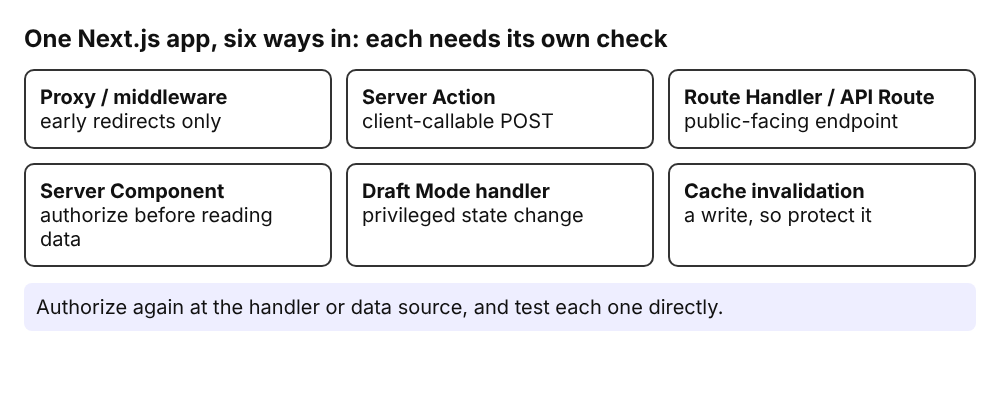
Each entry point needs its own check; one guarded door does not guard the others.
Treat every Server Action as a public endpoint
A Server Action that your app references can receive a POST from a client on its own, without the page that renders its form. Showing the form only on a protected page does not authenticate the request.
For each action, decide whether it is public or protected. For a protected one, the sheet asks for these controls:
- Validate every argument as untrusted input.
- Work out who is calling on the server. Never accept an identity claim in the arguments.
- Check permission on the exact object being read or changed. A user or tenant ID sent by the client is only a selector, not proof.
- Return only the fields the caller may see, because action results are serialized to the client.
- Rate limit or ask for a fresh sign-in on expensive or high-impact actions.
Next.js compares the request Origin with the host for Server Actions. Keep serverActions.allowedOrigins narrow if a trusted proxy needs more origins. The sheet is clear that this built-in check does not replace authentication or authorization.
Protect Route Handlers and API Routes separately
Protecting a page does not protect the Route Handler that serves related data. Treat each handler as a public-facing endpoint and decide its audience. A public endpoint needs input validation and abuse controls. A webhook can check a signature. A protected API needs authentication plus object-level or tenant-level authorization, the same idea as in the post on authorization checks.
Do not assume a handler is private because only your own Server Component calls it. If no browser, service or webhook needs that HTTP endpoint, call the data layer directly from the Server Component and delete the extra entry point.
If you use Draft Mode, the handler that turns it on is a protected entry point too. Calling enable() on the value from await draftMode() sets the __prerender_bypass cookie and checks nothing. Validate a shared secret, confirm the requested content exists, and test that an unauthenticated caller cannot get that cookie.
Control what crosses into the browser
Code that runs only on the server can still send its return values to the browser. The App Router serializes values passed to Client Components, and the Pages Router puts page props in the initial HTML. The sheet warns that getServerSideProps values are visible to the client.
- Build an explicit data transfer object with only the fields the browser may receive. Do not pass a database record or session object just because it is handy.
- Prefix a variable with
NEXT_PUBLIC_only when its value is meant to be public. It ends up in client JavaScript. - Import
server-onlyin sensitive modules. It stops a Client Component importing them at build time, but it does not stop server code from returning sensitive data on purpose. - Treat any token you do send to the browser as exposed, and keep its scope narrow.
Scope every cache to its audience
Before you cache a response or function result, name its audience: public, tenant, user, permission set, locale or a single request. A cache entry must never be reusable by a wider audience than the data allows.
- Include a verified user or tenant in the cache key when it changes the value. Never use a raw cookie or bearer token as a key.
- Use caches that can answer before per-request authorization, such as ISR,
getStaticPropsor a shared CDN cache, only for data every visitor may read. - Do not add shared
Cache-Controldirectives to personalizedgetServerSidePropsresponses. - After a role or tenant change, invalidate affected keys or use a bounded expiry so stale permissions do not live on.
- Protect
revalidatePathandrevalidateTaglike any other write. Authenticate callers and rate limit handlers that outsiders can reach.
Next.js security starts in next.config
The sheet asks you to review next.config.*, Proxy matchers and route configuration with the care you give handlers.
- Pick external rewrite hosts from a fixed allowlist. A header, cookie or query value must never choose the scheme, host or port of an upstream. A rewrite hides the destination URL; it is not an authorization boundary.
- Set
images.remotePatternsas tightly as you can. Fields you leave out act as broad wildcards. - Keep
images.dangerouslyAllowLocalIPoff unless a reviewed private network case needs it. Turning it on can let users reach internal content. - Leave
productionBrowserSourceMapsoff unless you accept publicly served source maps. - Run an optimized production build. Never expose
next devas the live service.
For a Content Security Policy, remember the cost of nonces. A nonce-based policy needs dynamic rendering, so it turns off static optimization and ISR for those pages. If you keep static pages, a policy without nonces may fit better. Do not add development-only directives like 'unsafe-eval' to a production policy.
Worked example: one afternoon before launch
Say you run a small invoicing app with a dashboard, a delete-invoice Server Action and one export route. Here is a pass you can finish in an afternoon:
- List the entry points: three pages, one action, one export route handler, one Proxy rule.
- Sign out and send a POST to the delete action directly, without opening the page. It should fail.
- Sign in as user A and delete an invoice that belongs to user B by changing the ID. It should fail with the wrong-owner check.
- Request the export route as a signed-out visitor. It should deny you even though the dashboard page is behind Proxy.
- Open the page source and the action response. Look for fields you did not mean to send, such as an email or an internal ID.
- If the dashboard uses a cache, fill it as user A and request the same URL as user B.
Each step is a negative-path test, which is what the sheet recommends: call the action or handler without its page, and prove that unauthenticated, unauthorized, wrong-owner and wrong-tenant requests fail. Keep Next.js on a supported patched release as well. For the hosting side, the post on cloud setup before launch covers what sits under the app. If a mobile app calls the same API, read mobile app security before release too.
Frequently asked questions
Are Server Actions safe by default?
No. Treat each reachable action as a client-callable POST endpoint. It needs its own input validation, caller check and permission check on the exact object.
Is Proxy or middleware enough to protect my routes?
No. Use it for early redirects, then authorize again at the handler or data source, so a missed matcher or a framework bypass does not expose data.
When is NEXT_PUBLIC_ safe to use?
Only for values that are meant to be public. The value is included in client JavaScript, so keep secrets in variables without the prefix.
How do I test a cache for data leaks?
Fill the cache as one user, then request the same route and object as a second user. Repeat after changing a role or tenant membership.
Get started
whitehatstoic builds web and mobile apps from database to deploy, including Next.js, Node and Postgres, and tests web apps and APIs for weak spots, with a written report and a retest after fixes. Book a meeting with whitehatstoic and tell us about your app, your deadline and your biggest worry.
Comments
No comments yet.
Sign in or make an account to comment.