PHP configuration security: php.ini settings
PHP configuration security starts in one file: php.ini. The OWASP PHP Configuration Cheat Sheet is a short list of values for those configuring PHP and the web server it runs on, so that the setup is very secure. This post walks through those values in the order a review would take them, says what each group is for, and ends with a one-hour check you can run on your own server.
Building or testing something that has to be safe? Book a meeting with whitehatstoic: it builds web and mobile apps, tests web apps and AI systems for weak spots, and gives independent advice.
PHP configuration security begins with a supported version
Before any setting, check the version. The OWASP sheet says to run a PHP branch that is listed on the official Supported Versions page, and to plan upgrades before the branch's security-support end date. It adds a careful note: distribution vendors may provide separate extended support, but that does not make the upstream PHP branch supported. If your server runs on a vendor's long-term package, write down who patches it and until when. Our dependency updates post covers the habit.
The sheet also warns that some values are yours to adapt, in particular session.save_path, session.cookie_path (for example /var/www/mysite) and session.cookie_domain (for example ExampleSite.com). Copying the whole list without changing those three is the first mistake to avoid.
Errors: log everything, show nothing
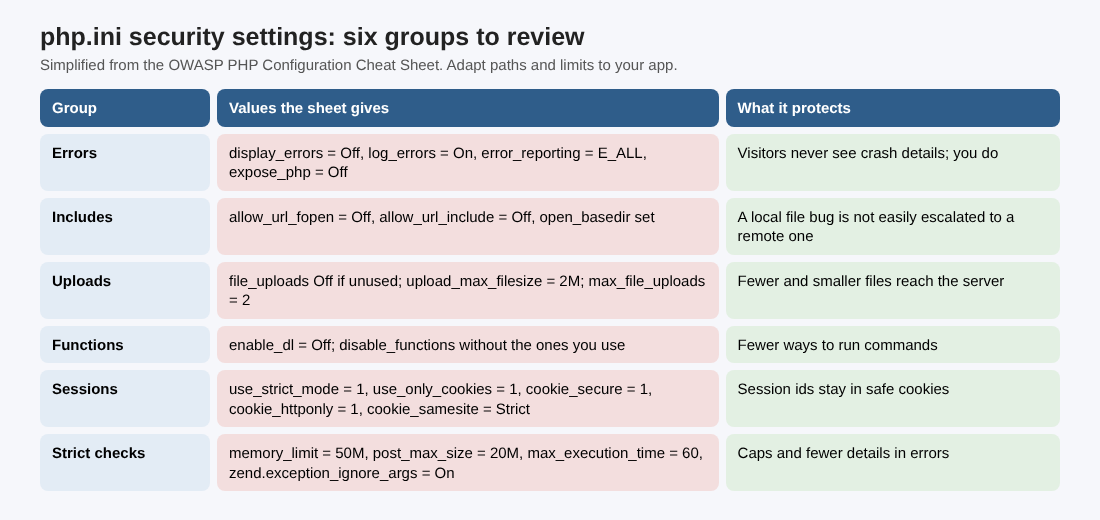
The error group is about what visitors can learn from a crash. The sheet sets:
expose_php = Offerror_reporting = E_ALLdisplay_errors = Offanddisplay_startup_errors = Offlog_errors = On, witherror_logpointing at a valid pathignore_repeated_errors = Off
The sheet's own comment is the one to remember: display_errors must be Off on a production server, and it is a good idea to look at the logs often. Reporting everything while showing nothing means you see every notice and the visitor sees none. See error handling for what leaky error pages give away.
Files and URLs: paths, open_basedir and allow_url
The general group pins PHP to the paths it needs: doc_root, open_basedir, include_path and extension_dir all get explicit paths. It also sets allow_url_fopen = Off, allow_url_include = Off, variables_order = "GPCS", allow_webdav_methods = Off and session.gc_maxlifetime = 600.
The sheet gives one reason for the two allow_url_* lines: they stop a local file inclusion bug from being easily escalated into a remote file inclusion. In plain terms, if an attacker finds a way to make your code include a file, these settings keep that file from being fetched from another server.
Uploads and dangerous functions
For uploads, the sheet sets file_uploads = On, a dedicated upload_tmp_dir, upload_max_filesize = 2M and max_file_uploads = 2. Its advice for apps without attachments is direct: turn file_uploads Off. For the code side of uploads, see file upload security.
The executable group sets enable_dl = Off and a long disable_functions list that starts with system, exec, shell_exec, passthru, popen and proc_open. The sheet calls these dangerous PHP functions and says to disable all that you do not use. That wording matters. The same list also holds functions an ordinary app may need, such as move_uploaded_file, mkdir and chmod, so the sheet's list is a starting point you trim to your app, not a block to paste. Search your code for each name before it goes in. If something outside the list runs commands, our command injection post shows how to keep input away from the shell.
Sessions: the values the sheet calls most important
The sheet says session settings are some of the most important values to concentrate on, and suggests changing session.name to something new. The values:
- Where and what:
session.save_pathset to your own path,session.name = myPHPSESSID,session.auto_start = Off,session.use_trans_sid = 0. - How the id travels:
session.use_cookies = 1,session.use_only_cookies = 1andsession.use_strict_mode = 1. - Cookie flags:
session.cookie_secure = 1,session.cookie_httponly = 1,session.cookie_samesite = Strictandsession.cookie_domainset to your full domain. - Lifetime and size:
session.cookie_lifetime = 14400(four hours),session.cache_expire = 30,session.sid_length = 256andsession.sid_bits_per_character = 6.
Those flags are the same ones our session cookie security post explains for any language.
The stricter checks and Snuffleupagus
The sheet adds a group it calls the more security-paranoid checks: session.referer_check set to the application path, memory_limit = 50M, post_max_size = 20M, max_execution_time = 60, report_memleaks = On, html_errors = Off and zend.exception_ignore_args = On. The limits are ours to tune to the app; a report generator may need more than 50M, so measure before you copy.
For a layer beyond php.ini, the sheet names Snuffleupagus: the spiritual descendant of Suhosin for PHP 7 and onwards, with modern features, which it considers stable and usable in production.
A worked example: a one-hour review of one server
Take a made-up PHP site with a contact form and an admin login. This is an example to practice on, not a real client, and the order is ours; the sheet supplies the values.
- Minutes 0 to 10, version. Find the PHP version in production and look it up on the Supported Versions page. Write the security-support end date and who patches it.
- Minutes 10 to 25, find the file. Work out which
php.inithe web server loads. The command line and the web server can load different files, so check the one your web server uses. - Minutes 25 to 45, compare. List every value from the sections above in one column and your server's value in the next. Mark each difference as "change", "adapt" or "keep, with a reason".
- Minutes 45 to 60, test one change. In a test copy, set
display_errors = Off, trigger an error on purpose, and confirm the visitor sees a plain page while the error lands in the file named byerror_log.
Write each result as one line: the setting, the value found, the decision and who owns it. This is a configuration review, not a test of your code.
Frequently asked questions
Can I paste the whole sheet into my php.ini?
No. The sheet says some values, such as session.save_path, session.cookie_path and session.cookie_domain, must be adapted to your system, and its function list includes names your app may use.
Which setting matters most?
The sheet itself singles out the session values as some of the most important, and says display_errors must be Off in production.
Does a vendor's extended support count as a supported PHP version?
The sheet says it does not make the upstream branch supported. Plan the upgrade before the security-support end date.
Get started
Run the one-hour review on one server this week. whitehatstoic tests web apps and APIs for weak spots, with a written report and a retest after fixes, and gives independent codebase and vendor reviews. Book a meeting with whitehatstoic and tell us about your product, your deadline and your biggest worry; work is scoped after a short call.
Build it right. Test it thoroughly. Keep it safe.
Visit whitehatstoic.com↗


Comments
No comments yet.
Sign in or make an account to comment.