Security questions: why they fail and what to use instead
"What was your first car?" looks like a harmless extra check on a password reset. This guide covers security questions: why they fail and what to use instead, using the OWASP Choosing and Using Security Questions Cheat Sheet. It is written for the person who builds or reviews a sign-in flow, and it ends with a plan you can run in an afternoon.
Security questions: why they fail and what to use instead
The OWASP sheet opens with a warning: security questions are no longer recognized as an acceptable authentication factor under NIST SP 800-63. It adds that account recovery is just another way to authenticate, so it should be no weaker than regular authentication. It also says there are no acceptable uses of security questions in secure software, and keeps its advice on choosing good ones for legacy systems only.
So the short answer has two halves. Why they fail: the answer is a fact about a person, not a secret. What to use instead: a recovery path built on proof of the email address and on stronger factors than something you know. The rest of this post takes each half in turn.
What makes a security question hold up
The sheet lists five traits a question must have before it can be used to reset a forgotten password:
- Memorable. The user can recall the answer years after creating the account.
- Consistent. The answer does not change over time.
- Applicable. The user can answer it at all.
- Confidential. The answer is hard for an attacker to obtain.
- Specific. The answer is clear to the user.
Few questions meet all five. Memorable answers tend to be public, and confidential answers tend to be forgettable. That tension is the root of the problem.
Why the usual questions fail
The sheet gives a short list of bad questions and the reason for each:
- Date of birth: easy for an attacker to discover.
- "Memorable date": most users just enter their birthday.
- Favourite movie: likely to change over time.
- Favourite cricket team: not applicable to most users.
- Make and model of the first car: a fairly small range of likely answers.
- Nickname: could be guessed by glancing through social media posts.
Context matters too. A question about a maths teacher's surname would be easy to guess in a virtual learning environment for a school, since other students probably know it, but much stronger on an online gaming site.
The sheet separates two types. With user defined questions, the user picks a question from a list and supplies the answer. These are easy to build, but users often choose weak or easily discovered answers. System defined questions use information the app already holds, such as a full name, address or date of birth. These can easily be found on social media, so they are a very weak form of authentication.
A password plus a question is not MFA
Teams sometimes add a security question to a password and call it two factors. The sheet is plain about it: the combination does not make multi-factor authentication, because both are something you know. It says applications should generally use a password along with a second factor such as a one-time code, and that questions should never be the only way to authenticate a user.
It does allow that questions can add a layer when stronger factors are not available, and names three places they show up: logging in, resetting a forgotten password and resetting a lost MFA token. If you are planning the stronger factor, the post on choosing and rolling out MFA is the place to start.
Put the question last in the forgotten password flow
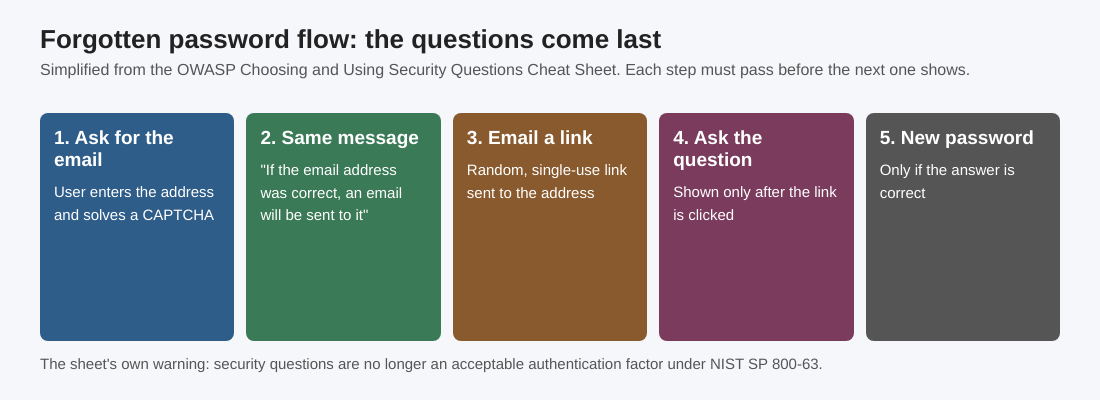
If a question stays in your flow for now, where it appears matters. A forgotten password page often lets attackers find out which accounts exist. The sheet's flow avoids that by showing the question only after the user has proved they own the email address:
- The user enters their email address and solves a CAPTCHA.
- The app shows a generic message such as "If the email address was correct, an email will be sent to it".
- An email with a randomly generated, single-use link goes to the user.
- The user clicks the link.
- The user is shown the security question or questions.
- If the answer is correct, the user can enter a new password.
When a question is used at login, the sheet's flow is: password first, then the question, and a wrong answer counts as a failed login attempt that raises the account lockout counter. The post on testing your password reset flow goes through the generic message and the single-use link in more detail.
If you must keep them: the sheet's rules for legacy systems
Some systems cannot drop security questions yet. The sheet gives these rules for the time you keep them:
- Offer a list, not a free text box. Many good questions do not apply to every user, so give a list to choose from. The sheet says it is generally best not to let users write their own questions, because some will pick weak ones or set a reminder of their password.
- Prefer questions tied to your own kind of app. Users reuse recovery questions between sites, so a targeted question unlikely to be shared helps. The sheet's example for a share dealing platform is the first company the user owned shares in.
- Check answers against a denylist. Refuse the username or email address, the user's current password, and common strings such as "123" or "password". Take care with a minimum length: a surname such as "Li" is valid.
- Treat answers like passwords. They can hold personal information and users reuse them, so store them with a secure hashing algorithm such as Bcrypt.
- Compare without case. Lowercase the answer before hashing it to store it and lowercase the typed answer before comparing. Show the format you expect, such as DD/MM/YYYY for a date.
- Protect changes. Updating the answers is a sensitive operation. Ask for the password, or ideally MFA, first, so someone with brief access to the account cannot swap them.
- Ask more than one. Several diverse questions give more assurance, and a mix of user defined and system defined questions can work well. If you ask one question out of a bank, do not change it until the user has answered it correctly, so an attacker cannot cycle through every question.
- Review them now and then. When a user changes an expired password, ask them to confirm they still know their answers.
A worked example: retiring the question from a small shop's reset flow
Take a small online shop whose password reset asks for an email address and then for "What was the name of your first school?". Here is a plan for one afternoon, in the order a reviewer would work.
- Find every use. List where the question appears: sign-up, reset, login, and any support screen that reads the stored answer.
- Fix the order. Make sure the page gives the same message whether or not the email exists, and that the question shows only after a single-use emailed link is clicked.
- Cut the weak questions. Remove anything on the sheet's bad list, such as date of birth or a nickname, and add the denylist check to the answer field.
- Check storage. Confirm answers are hashed like passwords. The post on checking how your app hashes passwords covers the checks.
- Count failures. A wrong answer should count toward the lockout, the way a wrong password does. See the login rate limiting checklist.
- Plan the exit. Put a date on removing the feature and decide which stronger factor replaces it, using the authentication design checklist as a guide.
None of this makes the question strong. It limits the harm while the real fix, a recovery path with no question in it, is built.
Frequently asked questions
Are security questions safe to use?
OWASP says there are no acceptable uses of security questions in secure software, and NIST SP 800-63 no longer recognizes them as an authentication factor. Its advice on choosing good questions is for legacy purposes only.
Do a password and a security question count as two factors?
No. Both are something you know, so the combination is not multi-factor authentication. The sheet advises a password plus a second factor such as a one-time code.
Should users write their own security questions?
Generally not. Users can write very strong questions, but some will write weak ones or even set a reminder of their password as the question. A list to choose from is safer.
How should I store security answers?
Like passwords, with a secure hashing algorithm such as Bcrypt. Answers can hold personal information and users reuse them across sites.
Get started
Recovery flows are easy to get wrong and hard to see from the inside. whitehatstoic runs security tests on web apps and AI systems, with a written report and fixes, covering web app and API review and a retest after fixes. Its home page also lists auditing sign-in and payments among the things it can do. No test finds every weakness, but a focused look at your sign-in and recovery pages is a sound place to start.
Building something that has to be safe? Book a meeting with whitehatstoic: tell us the product, the deadline and your biggest worry, and we reply with a plan and a price.
Comments
No comments yet.
Sign in or make an account to comment.