Symfony security: settings and checks before you launch
Symfony security is mostly a matter of letting the framework do its job and then checking where your own code or settings step around it. Twig escapes output, the Form component adds CSRF tokens and Doctrine uses prepared statements, but a built-in protection does not help once a developer turns it off, skips it or writes around it.
Building or testing something that has to be safe? Book a meeting with whitehatstoic: it builds web and mobile apps, tests web apps and AI systems for weak spots, and gives independent advice.
Symfony security: what the framework covers and what it leaves to you
The OWASP Symfony Cheat Sheet walks through the usual web risks one at a time. For each it says what Symfony does by default and where a developer can still get it wrong. This post follows the same order and ends with a pass you can run the day before launch.
The pattern repeats: Twig escapes unless you use raw, forms carry tokens unless you write one by hand, and Doctrine binds parameters unless you build the query string yourself. Most of the work is a search of your own code for the exceptions.
Output and forms: Twig escaping and CSRF tokens
Cross-site scripting. Twig escapes any variable you print with {{ name }}, so a script tag comes out as harmless text. The sheet says the raw filter turns escaping off and belongs only on a variable you trust and that holds HTML. Search your templates for raw and ask of each hit where the value comes from. The XSS prevention post has the general rules.
Cross-site request forgery. The Form component adds a hidden _token field and checks it for you. You can change the field name, the token id or turn it off for one form with csrf_protection, csrf_field_name and csrf_token_id, so look for any form where it is switched off.
When you do not use Symfony Forms, the protection is manual, and the sheet shows the steps.
- Install the
symfony/security-csrfcomponent and setcsrf_protection: trueinconfig/packages/framework.yaml. - Print a token in the template with the
csrf_token()function, using a token id such asdelete-post, and send it in a POST. - At the start of the controller action, check it with
isCsrfTokenValidand the same id, and reject a missing or invalid token before anything changes.
The sheet adds a warning: a valid token does not mean the caller may delete the post, so check permission separately. More on the attack is in the CSRF protection post.
Queries, shell commands and redirects
SQL injection. Doctrine uses prepared statement parameters, which makes unsafe queries harder to write by accident, but not impossible. The sheet's unsafe example joins the request's id into a DQL string. Its three safe forms are a repository method such as findOneBy, DQL with a named parameter set through setParameter, and the query builder with setParameter. Search your code for createQuery and for any request value joined into a string. A longer routine is in the SQL injection testing post.
Command injection. The sheet's example removes a file with exec(sprintf('rm %s', $filename)), which lets a value like test.txt && rm -rf . run a second command. Its advice is to use a native function such as unlink(), or the Filesystem component's remove() method, instead of the shell.
Open redirection. A controller that calls redirect() on a url query parameter sends users wherever an attacker chooses. The sheet says to validate input first and never pass untrusted input straight to a redirect function.
File uploads and file paths
The sheet gives three upload rules.
- Validate on the server. Use the
Fileconstraint withmaxSizeandmimeTypes, either as an attribute on a data class or in a form. - Use unique names. A unique identifier plus the original filename stops one upload overwriting another.
- Store files outside the public directory. If they must sit in a public directory, configure the web server to deny access to the upload folder.
For files you serve back, the sheet covers directory traversal. A request that carries ../ sequences or an absolute path can reach files outside the folder you meant. Its first fix resolves both the base folder and the requested path with realpath(), rejects a failure, and checks that the resolved path starts with the base folder plus the directory separator. Without the separator, a sibling folder such as /storage-private would pass a check against /storage. Its second fix strips the directory part of the name with basename().
The sheet notes that its example assumes untrusted users cannot change folders or symbolic links between the check and the file access, and that permission to read the file is a separate check. More upload rules are in the file upload security post.
Sessions, cookies, sign-in and access rules
Session cookies. These settings live under framework.session in config/packages/framework.yaml. The sheet's advice, point by point:
- For an HTTPS app, set
cookie_secure: trueyourself. Theautovalue turns it off for HTTP requests and does not promise secure cookies. - Keep
cookie_httponly: trueso JavaScript cannot read it. - Use
cookie_samesite: lax, orstrictwhere your navigation allows it. SameSite does not isolate every origin, since sibling subdomains on the same scheme can count as the same site, so keep CSRF protection on state-changing requests. - Remember that
cookie_lifetimeis in seconds: 5 means five seconds, not five minutes. It is not a server-side timeout either, so you still need idle and absolute expiration on the server.
The sheet also says to disable PHP's session.auto_start, because Symfony manages sessions itself. See the session cookie settings post for the same checks in any stack.
Authentication and access control. Everything here is in config/packages/security.yaml, in three parts.
- Providers load the user. The sheet's example loads a Doctrine entity by its
emailproperty. - Firewalls cover patterns of routes, each with its own provider, authenticator and logout. The sheet's
devfirewall turns security off only for the profiler, the toolbar and static asset paths. - Access control rules match a path pattern to a role, such as
^/admintoROLE_ADMIN, orPUBLIC_ACCESSfor a route anyone may open.
Production settings, secrets, dependencies and headers
The sheet's closing list is the one to copy into a launch ticket.
- Debug mode off. Set
APP_ENV=prod. Symfony shows detailed errors only in development and a generic page in production, while still logging the detail. - Secrets out of the repository. Keep API keys in environment variables or in Symfony's secrets system, made with
bin/console secrets:generate-keysandsecret:set. The private key file is highly sensitive and must not be committed. An environment variable with the same name as a secret overrides it, so check for that. - Dependencies current. Update with Composer and run
symfony check:security, which readscomposer.lockfor known vulnerabilities. - Headers set. The sheet lists eleven, from
Strict-Transport-SecurityandContent-Security-PolicytoReferrer-PolicyandCache-Control. Add them to every response by listening toResponseEvent, or in Nginx or Apache. See which security headers matter. - CORS on purpose. The
nelmio/cors-bundlepackage manages it. The sheet's example allows every origin on routes that start with/api; narrow that to the origins you use. - The rest of the list. A secure PHP configuration, HTTPS with a redirect from HTTP, correct file permissions, backups with a recovery plan, and monitoring.
A launch-day pass you can copy
Take a small app with an admin area and a "delete post" button. Check it in this order.
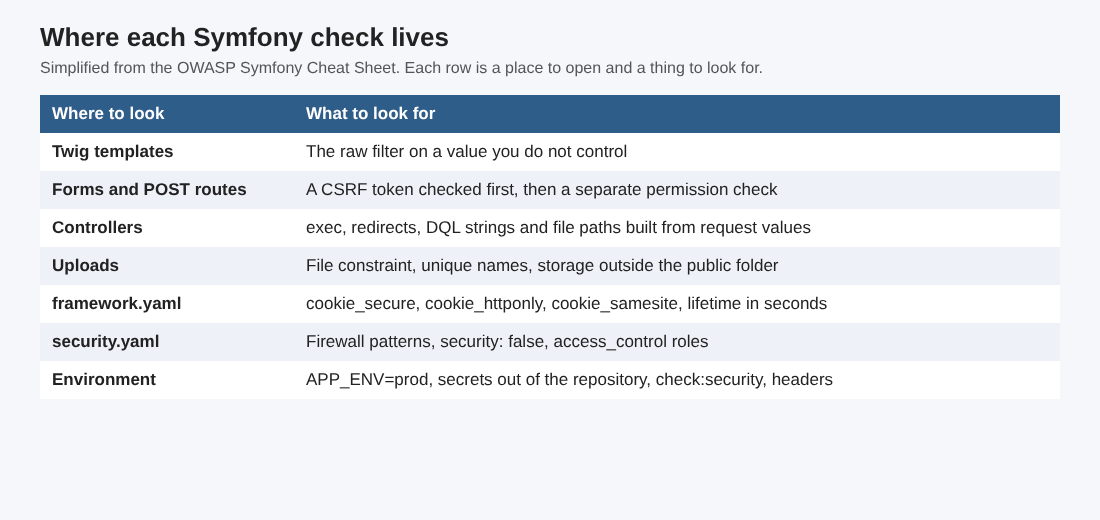
Where each check lives in a Symfony project.
- Templates: search for
rawand trace each value back to where it comes from. - Forms and POST routes: confirm every state-changing request carries a token that the controller checks first, then confirm a separate permission check on the post being deleted.
- Controllers: search for
exec,redirect(with a request value,createQuerywith a joined string, and anyrealpathor file read that takes a filename from the request. - Uploads: check the
Fileconstraint, the unique names and the storage folder. framework.yaml: confirm the three cookie settings, the lifetime unit and CSRF.security.yaml: read each firewall pattern and confirm that anything withsecurity: falsecovers nothing more than the profiler and static assets. Then check that^/adminneedsROLE_ADMIN.- Environment:
APP_ENV=prod, no secret keys in the repository,symfony check:securityclean, headers present on a real response.
Fix the findings, then run the pass again. Each step is a search or a file read. It finds the exceptions the cheat sheet describes; it does not replace a test of how your own features behave.
Frequently asked questions
Is Symfony secure by default?
It has good defaults: Twig escaping, form CSRF tokens, Doctrine parameters and generic error pages in production. The OWASP sheet says developers still need to know the pitfalls, because each protection can be turned off or written around.
What is the first Symfony setting to check before launch?
Debug mode. The sheet says production must not run in debug mode, which means APP_ENV=prod.
Does a CSRF token mean a request is allowed?
No. A valid token shows the request came from your own form. The sheet says to check the caller's permission separately before changing anything.
How do I check my Symfony dependencies for known vulnerabilities?
Keep packages updated with Composer and run symfony check:security with the Symfony CLI. It reads your composer.lock file for known vulnerabilities.
Get started
Run the launch-day pass on your own app this week and write down every exception. whitehatstoic builds web and mobile apps and tests web apps and APIs for weak spots, with a written report and a retest after fixes. Book a meeting with whitehatstoic and tell us about your app, your deadline and your biggest worry; work is scoped after a short call.
Build it right. Test it thoroughly. Keep it safe.
Visit whitehatstoic.com↗


Comments
No comments yet.
Sign in or make an account to comment.