Micro frontend security: what to check across teams
Micro frontend security starts from one fact in the OWASP Micro-Frontend Security Cheat Sheet: separate repositories and separate deployment teams do not create browser security boundaries. The same-origin policy separates origins, not the individual features inside one page. If five teams ship code into one shell page, each of them may be able to run script with the page's full privileges. This guide turns the sheet into a checklist you can walk through with every team.
Building or testing something that has to be safe? Book a meeting with whitehatstoic: it builds web and mobile apps, tests web apps and AI systems for weak spots, and gives independent advice.
Micro frontend security: what the shell page really shares
The OWASP Micro-Frontend Security Cheat Sheet describes micro frontends as independently deployed features combined in a host application, also called a shell. Its four decisions: which features share the host's browser privileges, what they may communicate and share, how the server authorizes every request, and which remote code each host release loads.
None of the four is about team structure: a feature from a careful team and one from a rushed team sit on the same page with the same powers. The checklist below takes the decisions in order and ends with a pass you can do in an afternoon.
Write down each feature, then choose how it is composed
The sheet starts with paperwork: document the origin, the deployment owner and the data access each micro frontend needs before you choose how to compose it. The choice of composition is a security decision, and the sheet gives a different answer for each kind.
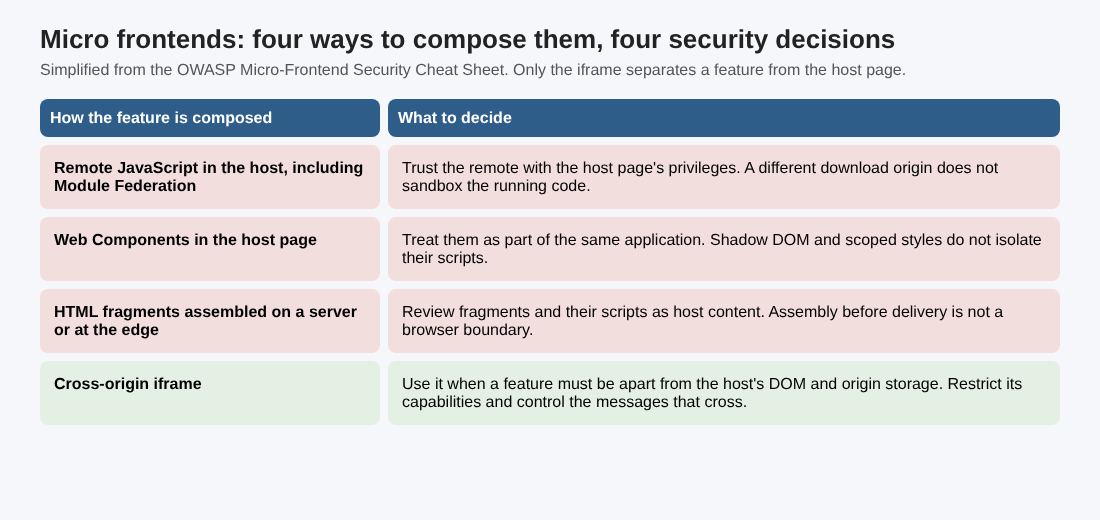
In short: remote JavaScript, including Module Federation, gets the host page's privileges, and a different download origin does not sandbox it. Web Components are part of the same application, and Shadow DOM does not isolate their scripts. HTML fragments assembled on a server or at the edge are host content, scripts included. Only a cross-origin iframe separates a feature from the host's DOM and origin storage, and even then you restrict its capabilities and control the messages that cross.
If your team believes Shadow DOM or a separate CDN host protects one feature from another, correct that first. Our post on third-party JavaScript makes the same point for outside scripts.
Isolate features that have different trust levels
For a feature you trust less, the sheet says to serve it from a dedicated origin in an iframe and apply an iframe sandbox that grants only the capabilities the feature needs. Leave top-level navigation and popup permissions off unless the feature requires them.
Two sandbox details trip teams up:
- Do not combine allow-scripts and allow-same-origin for content on the host's own origin. That combination can let the embedded application remove its own sandbox.
- A sandboxed frame without allow-same-origin has an opaque origin, reported as "null" in messages. Do not treat "null" as a sender identity. If sensitive messaging needs an identifiable origin, use a dedicated cross-origin frame with a sandbox policy that keeps that origin.
An iframe buys less than people assume: origin separation limits direct access to the host's DOM and storage, but it does not authorize backend requests or hide data you send into the frame. Our HTML5 security checklist covers iframes and messaging for the page as a whole.
Control which remote code the shell loads
For remotes that run inside the host page, the sheet treats permission to publish a remote as permission to change the host's running application. Its checks:
- Load only approved HTTPS remote URLs from host-controlled configuration. Do not let query parameters or other untrusted input choose executable code.
- Select immutable, reviewed releases, including entry scripts and their dependent chunks, and keep a known-good release available for rollback.
- Keep deployment credentials separate for the shell and for each remote. This limits direct changes to other deployments but does not contain a remote already trusted to run in the shell. See our CI/CD security post for pipeline controls.
- Use Subresource Integrity where the loader supports it, and check that dynamically loaded chunks are covered, because verifying an entry script alone does not verify everything it loads later. Integrity checks detect changed bytes, not malicious behavior in a release you approved.
- Apply the host's Content Security Policy to remote loading. A permitted script source is still trusted code, and CSP does not isolate one allowed micro frontend from another. Our Content Security Policy post shows how to write one.
Restrict messages between the shell and its features
Features talk to the shell and to each other, often with postMessage. The sheet applies the general web messaging guidance to every host and frame pair: set an exact targetOrigin when sending, match event.origin exactly when receiving, and validate the message data. It adds rules for the micro frontend case:
- Define a small message contract for each pair. Accept only the message types and payload fields the receiving feature needs.
- Check event.source against the expected frame's contentWindow, or the expected parent window, and not only the origin. Several frames can share one origin.
- Pass the minimum data needed for the operation. Do not broadcast credentials or sensitive state to every feature.
These checks say who sent a message, not what the current user may do, so a message asking for a privileged action must still lead to server-side authorization. They do not protect against compromised code inside the expected sender. A shared in-page event bus has no browser-enforced identity boundary, so event names or application identifiers are not proof of authority.
Authorize on the server and keep sensitive state out of shared pages
The sheet is blunt: neither the shell nor a remote can enforce authorization in client-side code. Route guards, hidden controls and role checks in the browser only change what is shown, and they can be bypassed. Enforce permissions for the requested operation, resource and tenant on every backend request, whichever frontend sent it, and do not trust a role, tenant identifier or permission flag supplied by the shell or a remote. A shared server-side policy helps independent teams apply the same checks. Our post on authorization checks goes into deny-by-default design.
On shared state, the sheet says browser storage is separated by origin only. Key prefixes, separate state stores and component boundaries are not security isolation between scripts in the same page, so anything exposed in the page or in origin storage is available to every remote running there. Its rules:
- Keep session identifiers out of localStorage and sessionStorage.
- With a backend-for-frontend, keep upstream access tokens on the server and use a session cookie set up as in the OWASP Session Management Cheat Sheet. Our session management post covers that setup.
- An HttpOnly cookie stops JavaScript from reading the cookie, but compromised code in the host can still make authenticated requests, so add cross-site request forgery protection to cookie-authenticated operations.
- Return only data the authenticated user may see, and clear shared state and cached responses on logout or tenant changes. That cleanup does not replace backend tenant checks or recall what a compromised remote already saw.
A worked example: one afternoon with a shell and three features
Take a made-up shell that loads three features: account, search and checkout. This is an example to practice on, not a real client. The steps below follow from the sheet; the sheet itself does not prescribe a test plan.
- Fill the table. For each feature, write the owner, the origin it loads from, the data it needs and how it is composed. Mark any remote JavaScript in the host page: it has the page's privileges.
- Decide who needs a wall. Say checkout handles the most sensitive data. If you cannot trust every remote on the page, plan to serve it from a dedicated origin in a sandboxed iframe.
- Trace how a release is chosen. Find where the shell gets each remote URL. If a query parameter or an editable config can change it, fix that first, and confirm a known-good release exists.
- Read each message handler. Write down the origin it matches, whether it checks event.source and which message types it accepts. A handler that accepts anything is a finding.
- Call the backend without the UI. Send a checkout request from a lower-privileged account, and one with another tenant's identifier. The server should refuse both.
- Look in storage. After sign-in, look for session identifiers in localStorage or sessionStorage. Then log out and check that shared state and cached responses are cleared.
Write each result in one line: what you checked, what you saw, who owns the fix. A pass like this shows the gaps in your own checks; it does not show the product is secure.
Frequently asked questions
Does Shadow DOM isolate one micro frontend from another?
No. The sheet says Shadow DOM and scoped styles do not isolate the scripts of Web Components from the host. Treat them as part of the same application.
Does a sandboxed iframe make a feature safe?
It limits access to the host's DOM and storage, and it is the sheet's answer for less-trusted features. It does not authorize backend requests, and it does not hide data you send into the frame.
Is checking event.origin enough for postMessage?
The sheet asks for more: match the origin exactly, check event.source against the expected window, validate the message data, and still authorize any privileged action on the server.
Get started
Fill in the table for one shell this week and start with the feature that handles the most sensitive data. whitehatstoic tests web apps and APIs for weak spots, with a written report and a retest after fixes. Book a meeting with whitehatstoic and tell us about your product, your deadline and your biggest worry; work is scoped after a short call.
Build it right. Test it thoroughly. Keep it safe.
Visit whitehatstoic.com↗


Comments
No comments yet.
Sign in or make an account to comment.