Rails security checklist for production apps
This Rails security checklist follows the OWASP Ruby on Rails Cheat Sheet, which gives quick, basic security tips for Rails developers and complements the Rails core security guide. Rails does a lot for you out of the box, but the sheet's point is that several defaults still need a decision from you before production: how you query, what you mark as safe, where sessions live, who can reach which record.
Building or testing something that has to be safe? Book a meeting with whitehatstoic: it builds web and mobile apps, tests web apps and AI systems for weak spots, and gives independent advice.
Rails security checklist: commands and SQL
Start with the two places where your code hands text to something that runs it. The OWASP sheet lists Ruby's ways of running code or system commands: eval, system, backticks, exec, spawn, and open or IO methods that start with a pipe. Its advice is that extreme care is needed and that it is usually a bad idea. If you must, use an allow-list of values and validate input as thoroughly as you can. Our command injection post goes deeper.
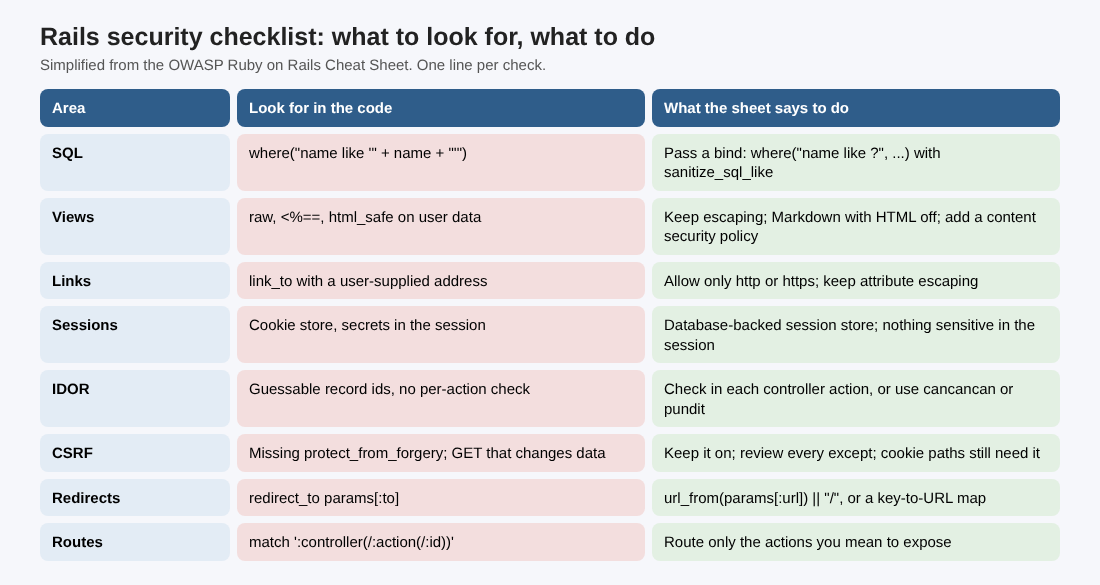
For SQL, the sheet says many Rails use cases are protected out of the box, but it is still possible to write injectable code. Its example is Project.where("name like '" + name + "'"), which is injectable because the parameter is not escaped. The idiom it gives instead is to pass the value as a bind: Project.where("name like ?", "%#{ActiveRecord::Base.sanitize_sql_like(params[:name])}%"). The rule behind it: never build SQL from user-controlled input. See also SQL injection testing.
Views: raw, html_safe and link_to
Rails escapes strings in views by default. The sheet warns about the three common ways developers turn that off, usually to allow rich text: raw, the <%== tag, and html_safe. Any field that uses them is a potential XSS target. The name html_safe is confusing: it means you already know the content is safe, and the method itself is unsafe.
If users need rich text, the sheet suggests a markup language such as Markdown or textile, with HTML tags disallowed. If you cannot stop users entering HTML, add a content security policy that disallows script execution, and consider sanitize with a list of allowed tags. The sheet is blunt that sanitize has been flawed many times and is never a complete solution.
One more trap: link_to "Personal Website", @user.website does not enforce a URL-scheme allowlist, so a javascript: address saved in that field can run script when clicked. Validate such links to allow only https or http, and keep attribute escaping. A restrictive content security policy can also block javascript: navigation, but the sheet says it does not replace URL validation. Our XSS prevention post covers output encoding.
Sessions and sign-in
By default Rails uses a cookie-based session store. The sheet's consequence: the session does not expire on the server, so some default apps can be open to replay attacks, and sensitive information should never go in the session. Its best practice is a database-based session, set with config.session_store :active_record_store. For the cookie flags themselves, see session cookie security.
For sign-in, turn on TLS first: config.force_ssl = true in config/environments/production.rb forces SSL, sends Strict-Transport-Security and marks cookies secure. Rails 8.0 added a built-in authentication generator for basic sign-in and password reset. The sheet calls it a starting point that you must adapt, including the sign-up flow. Devise is another option; the sheet shows it with the zxcvbn gem and config.min_password_score = 4 to enforce password strength, and notes that Devise hashes passwords with bcrypt by default, with 10 stretches in production.
Who can reach what: IDOR, CSRF and routes
Rails paths are RESTful and easy to guess. The sheet says a vanilla Rails app has no built-in protection against one user reading or changing another user's data, so you control that per action in the controller. It recommends considering resource-based libraries such as cancancan or pundit, so every operation on a record is authorized. Test it the way our IDOR prevention post describes.
For CSRF, check that ApplicationController calls protect_from_forgery. Any exception, such as protect_from_forgery except: :show, should be reviewed and chosen on purpose. By default Rails gives no CSRF protection for GET requests, so a GET must never change data. If you use token authentication only, you do not need CSRF protection in controllers, but any path that uses cookies for authentication still does.
Finally, read config/routes.rb: the sheet calls it the place to see your attack surface. Its example of what not to do is a wildcard route, match ':controller(/:action(/:id(.:format)))', which lets any public method on any controller be called as an action.
Redirects, render paths, CORS and headers
For redirects that must stay inside the app, the sheet uses redirect_to url_from(params[:url]) || "/", which checks the destination against the request host and gives a fixed fallback. It warns against treating URI.parse(value).path as validation: for https://trusted.example//evil.example/path the path is //evil.example/path, an external destination. Another option is a map of keys to approved URLs, so users send a key, never an address. Passing params[:to] straight to redirect_to can even lead to XSS. See open redirect testing.
Related: do not let user input pick the view that renders. The sheet says an attacker could make the app render an arbitrary view, such as an admin page.
For cross-origin access, list the allowed origins with the rack-cors gem. For headers, ActionDispatch::Response.default_headers can set X-Frame-Options: SAMEORIGIN, X-Content-Type-Options: nosniff and X-XSS-Protection: 0 for every response. The secure_headers gem adds content security policy handling. Our posts on security headers explain what each header does.
Sensitive files, gems and tools
The sheet lists four files to exclude or manage carefully in source control: config/database.yml (may hold production credentials), config/initializers/secret_token.rb (a secret used to hash session cookies), db/seeds.rb (may hold a bootstrap admin user) and db/development.sqlite3 (may hold real data).
On dependencies, it recalls that critical Rails vulnerabilities in early 2013 were harder to handle for teams that had fallen behind. Most gems are not signed by their authors, so audit the ones you use. A sample update process has three triggers: general updates monthly or quarterly, a weekly look at important security vulnerabilities, and emergency updates in exceptional conditions. For tools, the sheet names Brakeman, an open source static analyzer for Rails, and Bearer, which scans Ruby and JavaScript or TypeScript code, plus the dependency scanning built into GitHub and GitLab. Brakeman does not find everything. The sheet adds that business logic bugs are hard to impossible for automated tools to find, so keep code review, pair programming and unit tests. More on dependency updates.
A worked example: one afternoon on a small Rails app
Take a made-up Rails app with user accounts, a profile page that has a website field, a search box and a login redirect. This is an example to practice on, not a real client, and the order is ours; the sheet supplies the checks.
- Hour 1, grep. Search for
raw,html_safe,<%==,system,evaland string-builtwherecalls. For each hit, write down whether user input can reach it. - Hour 2, links and redirects. Save
javascript:alert(1)as your own website value and view the profile page. Then try an external address in the login redirect parameter. - Hour 3, access. Sign in as user A, copy a record address, sign in as user B and open it. Then check
routes.rbfor wildcard routes andApplicationControllerforprotect_from_forgery. - Hour 4, config and files. Confirm
force_sslis on in production, the session store choice is deliberate, and the four sensitive files are not in the repository. Run Brakeman and list the gems you have not updated.
Write each result as one line: what you checked, what you saw, who fixes it. This is a start, not a full test.
Frequently asked questions
Is Rails secure by default?
Partly. The OWASP sheet says many cases are protected out of the box, such as view escaping and many queries, but you can still write injectable code, and a vanilla app has no built-in protection against one user reaching another's data.
Do I need CSRF protection if I use tokens?
Not for token-only authentication, according to the sheet. Any path that uses cookies for authentication still needs protect_from_forgery.
Is html_safe ever fine?
The sheet treats it as unsafe: it tells Rails you already know the content is safe. Prefer Markdown with HTML disallowed, or a restrictive content security policy, and never use it to bypass escaping on user input.
Get started
Run the four-hour review on one Rails app this week. whitehatstoic tests web apps and APIs for weak spots, with a written report and a retest after fixes, and gives independent codebase and vendor reviews. Book a meeting with whitehatstoic and tell us about your product, your deadline and your biggest worry; work is scoped after a short call.
Build it right. Test it thoroughly. Keep it safe.
Visit whitehatstoic.com↗


Comments
No comments yet.
Sign in or make an account to comment.